
All help topics
Help topics
- Getting Started
- Sales & POS
- Products & Inventory
- Purchases & Suppliers
- Customers
- Staff & Permissions
- Reports
- Branches
- Hardware
- Payments
- Settings
- Troubleshooting
- Billing & Subscription
- Workshop
- Training
- Sales Agents
- Laundry
- Accounting
- HR & Payroll
- Hotel
- Services
- Communication Center
- Online Store
- CRM
- Restaurant
- F&B Manager
- Production
- Projects
- Asset Management
- All topics
On this page
Running Your Laundry Day in SellarPro
Start the day on Laundry → Board, take clothes in with New drop-off, move tickets through Washing, Ironing and Ready as the work is done, hand clothes back with a piece count, chase anything waiting under Uncollected, and check Laundry → Reports at the end of the day.
This is the whole Laundry module in the order you use it through a working day. Each step links to a detailed guide.
Before your first day
- Switch Laundry on and choose your settings: How to Set Up the Laundry Module.
- Set your prices: How to Set Up Your Laundry Price List.
- Give your staff the right access: How to Set Up Roles for Laundry Staff.
Morning: open the board
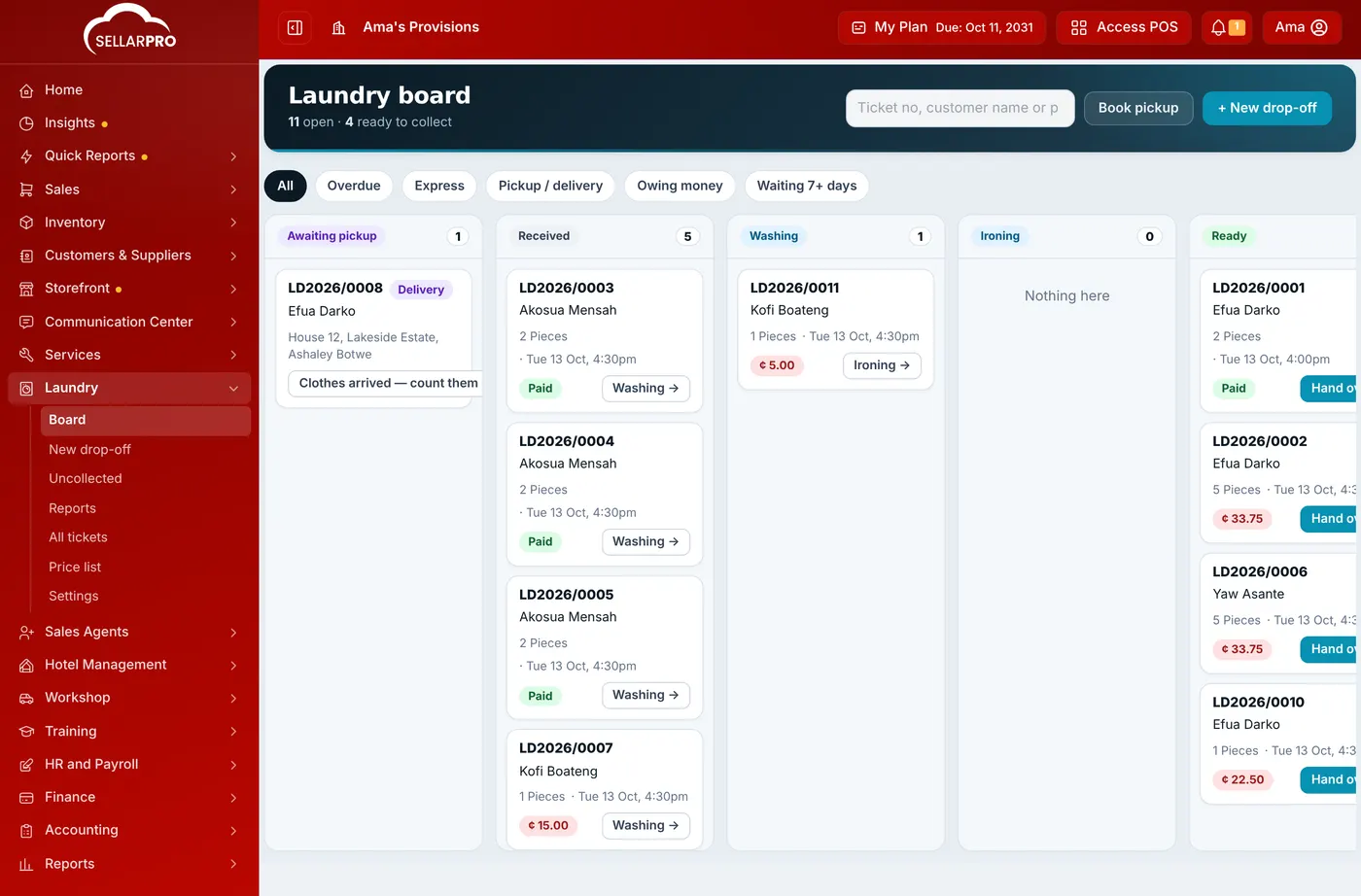
Open Laundry → Board. Every open ticket is in the column for its stage, soonest promised first. Click the Overdue filter to see what should already be done, and check the Awaiting pickup column for collections booked for today. See How to Track Laundry Tickets on the Board.
All day: take clothes in
For each customer, open Laundry → New drop-off, tap the prices, describe each item, take the deposit and click Save & print ticket. Give the customer their copy and keep the shop copy with the clothes. See How to Take In Laundry and Print a Ticket.
For collections from home, use Book pickup, then Clothes arrived — count them in when the rider returns. See How to Book a Laundry Pickup.
As the work is done: move tickets
When a load goes in, click Washing → on its ticket; then Ironing →; then Ready →. Moving a ticket to Ready texts the customer that their clothes are ready.
When customers come back: hand over
Open the ticket, count the pieces out, take the balance and click Complete handover. See How to Hand Back Laundry and Collect Payment.
Once a day: chase uncollected clothes
Open Laundry → Uncollected to see everything ready but not collected, oldest first, with what is owed. Click Send reminder, or let automatic reminders go out. See Customer Texts and Uncollected Clothes.
End of the day: check the numbers
Open Laundry → Reports with the period set to Today: tickets and pieces taken in, laundry sales, money collected and who owes money. If you use the daily sales summary, laundry takings are included in it. See How to Read Your Laundry Reports.
Common questions
Do I still use the POS for a laundry?
Where do I find an old ticket?
Was this article helpful?
Thanks — your answer helps us improve this article.
Still need help?
Can’t find the answer you’re looking for? Our support team in Accra can help.