
All help topics
Help topics
- Getting Started
- Sales & POS
- Products & Inventory
- Purchases & Suppliers
- Customers
- Staff & Permissions
- Reports
- Branches
- Hardware
- Payments
- Settings
- Troubleshooting
- Billing & Subscription
- Workshop
- Training
- Sales Agents
- Laundry
- Accounting
- HR & Payroll
- Hotel
- Services
- Communication Center
- Online Store
- CRM
- Restaurant
- F&B Manager
- Production
- Projects
- Asset Management
- All topics
On this page
How to Track Laundry Tickets on the Board
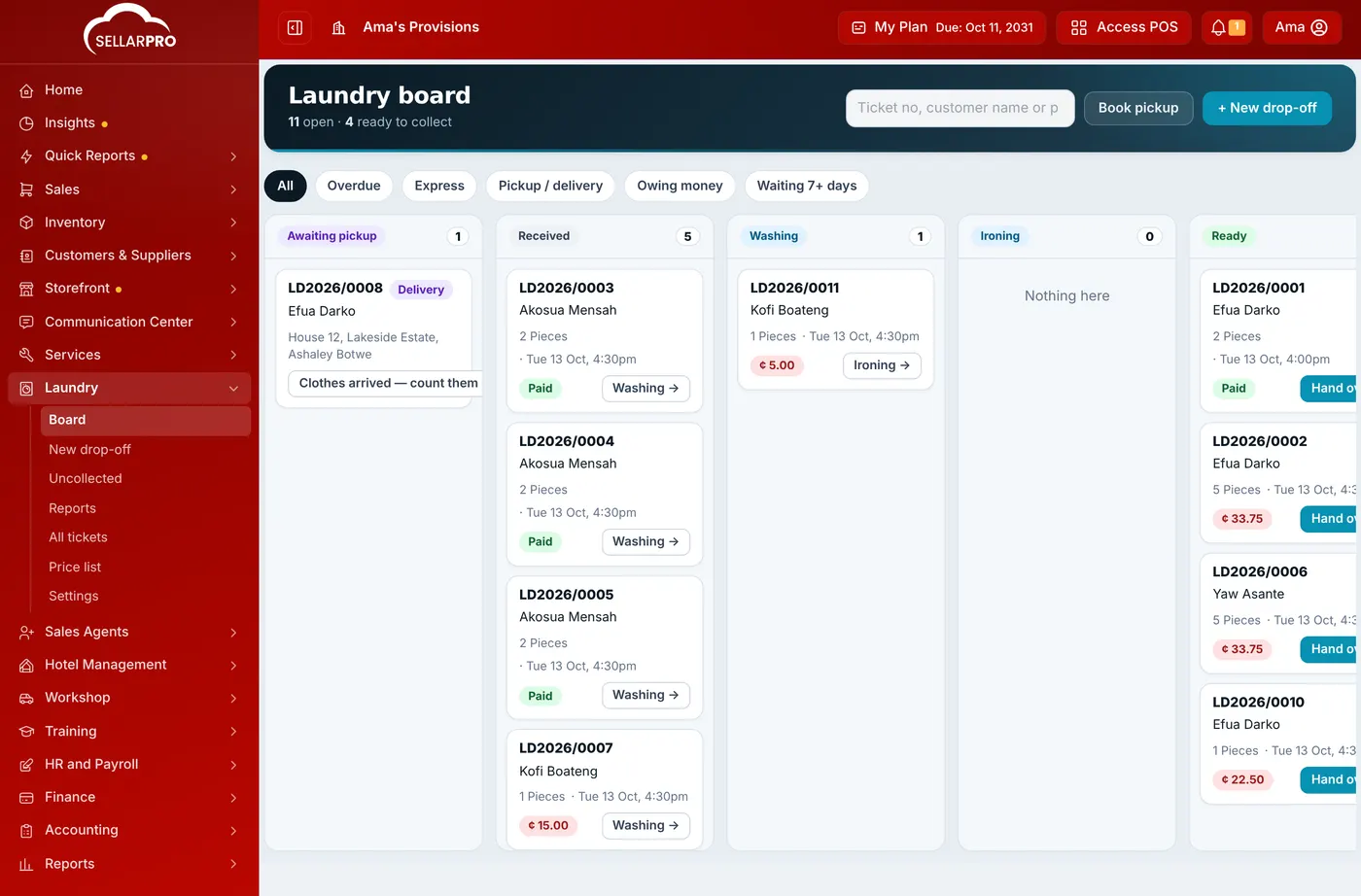
Laundry → Board shows every open ticket in its stage: Awaiting pickup, Received, Washing, Ironing, Ready and Out for delivery. Click the button on a ticket to move it to the next stage, use the filters to find overdue or unpaid tickets, and search by ticket number, name or phone.
The board is where staff see what to work on next. Each column is a stage; each card is a ticket, soonest promised first.
The stages
- Awaiting pickup: booked, not yet collected from the customer.
- Received: counted in at the counter.
- Washing and Ironing: in progress.
- Ready: done and waiting for the customer.
- Out for delivery: on the way to the customer.
A ticket leaves the board when it is handed over (Collected or Delivered).
Move a ticket
- On the board, click the button on a card, such as Washing → or Ready →.
- Or open the ticket and choose a stage under Move to. A ticket can go back a step, for example from Ironing to Washing if a stain is still there.
Moving a ticket to Ready texts the customer, if texts are on.
Clothes are never marked Collected from the board. That happens only at handover, where the pieces are counted and the balance is taken, so nothing leaves the shop unchecked.
Find tickets quickly
- Use the filters at the top: Overdue, Express, Pickup / delivery, Owing money and Waiting 7+ days.
- Search by ticket number, customer name or phone.
- Each column shows its exact count. A busy column shows its most urgent tickets first, with a link to the full list for the rest.
A ticket is overdue when it is still being washed or ironed after its promised time; it is shown with a red edge. A ticket that is ready but not collected is not overdue, it is uncollected.
For every ticket, open or closed, use Laundry → All tickets.
Common questions
Who can move tickets?
Two people moved the same ticket at once. What happens?
Was this article helpful?
Thanks — your answer helps us improve this article.
Still need help?
Can’t find the answer you’re looking for? Our support team in Accra can help.