
All help topics
Help topics
- Getting Started
- Sales & POS
- Products & Inventory
- Purchases & Suppliers
- Customers
- Staff & Permissions
- Reports
- Branches
- Hardware
- Payments
- Settings
- Troubleshooting
- Billing & Subscription
- Workshop
- Training
- Sales Agents
- Laundry
- Accounting
- HR & Payroll
- Hotel
- Services
- Communication Center
- Online Store
- CRM
- Restaurant
- F&B Manager
- Production
- Projects
- Asset Management
- All topics
On this page
How to Read Your Laundry Reports
Short answer
Open Laundry → Reports and choose a period. You see tickets and pieces taken in, laundry sales and money collected, average turnaround, the share ready on time, how long customers take to collect, express share, overdue tickets, who owes money, what was brought in, condition at drop-off and each staff member's work.
Open Laundry → Reports. Choose the Period (Today, This week, This month, Last 30 days…, or Custom range) and, if you have several branches, a branch.
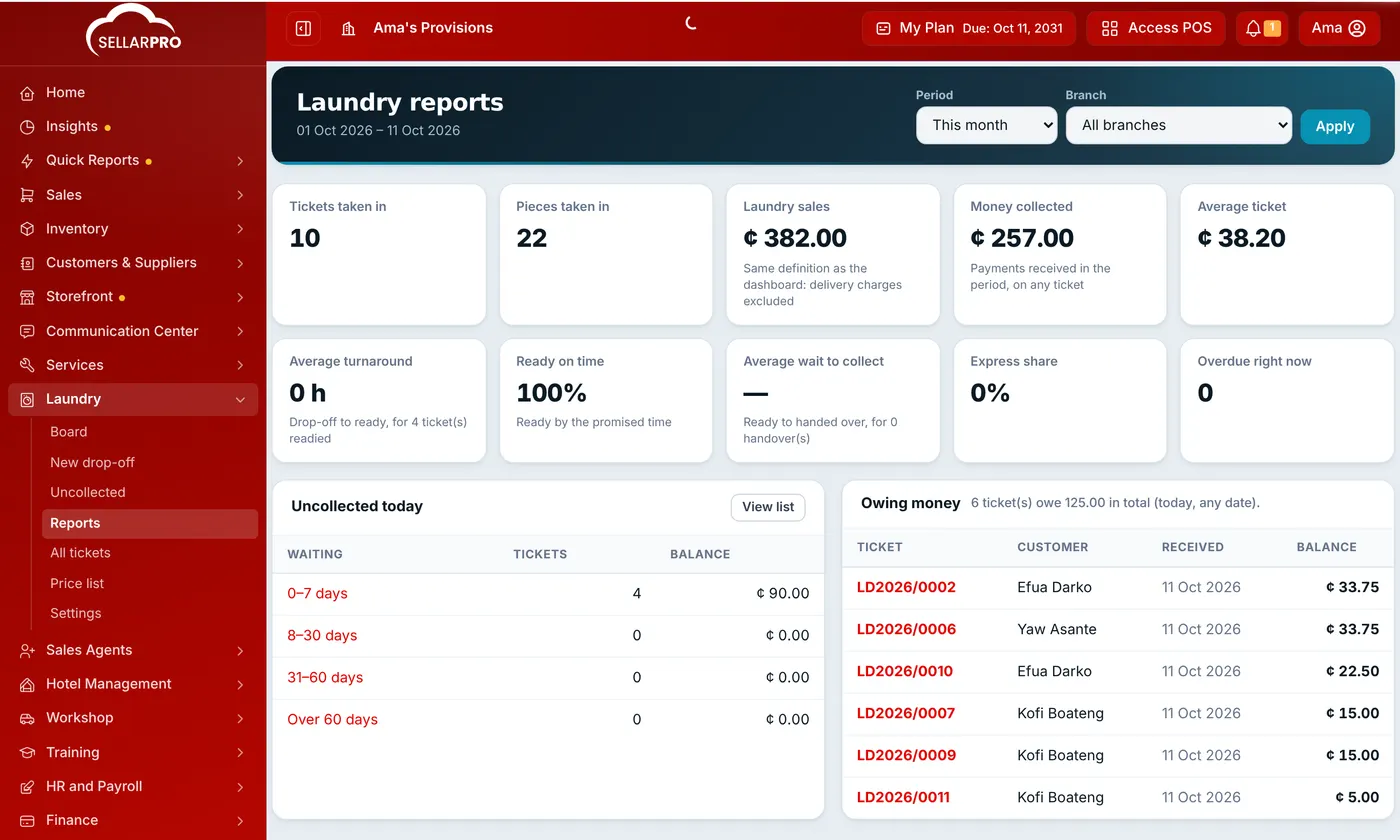
The headline figures
- Tickets taken in and Pieces taken in in the period.
- Laundry sales: the value of laundry tickets, counted the same way as your dashboard (delivery charges left out).
- Money collected: payments received in the period, on any ticket.
- Average turnaround: from drop-off to ready.
- Ready on time: the share of tickets ready by the promised time.
- Average wait to collect: from ready to handed over.
- Express share and Overdue right now.
The tables
- Uncollected today: ready tickets by how long they have waited, and what they owe.
- Owing money: tickets with a balance, largest first.
- By day: tickets, pieces and sales for each day.
- What was brought in: each garment and service, by quantity and value.
- Condition at drop-off: how often each condition tag was recorded.
- Staff: tickets each person took in, stages moved and handovers.
Laundry sales also appear in your ordinary sales, profit and loss and product sales reports, and in the daily sales summary.
Common questions
Why do Laundry sales and Money collected differ?
Sales count tickets raised in the period; money collected counts payments received, including balances on older tickets. A ticket paid partly now and partly later appears in sales once and in collections twice.
Who can see Laundry reports?
Staff with View Laundry reports. Business owners can always see them.
Was this article helpful?
Thanks — your answer helps us improve this article.
Still need help?
Can’t find the answer you’re looking for? Our support team in Accra can help.