
All help topics
Help topics
- Getting Started
- Sales & POS
- Products & Inventory
- Purchases & Suppliers
- Customers
- Staff & Permissions
- Reports
- Branches
- Hardware
- Payments
- Settings
- Troubleshooting
- Billing & Subscription
- Workshop
- Training
- Sales Agents
- Laundry
- Accounting
- HR & Payroll
- Hotel
- Services
- Communication Center
- Online Store
- CRM
- Restaurant
- F&B Manager
- Production
- Projects
- Asset Management
- All topics
On this page
Laundry Payments: Deposits, Split Payments, Discounts and Customer Advance
A deposit is required on every laundry ticket; set the minimum percentage in Laundry → Settings. A customer can pay with several methods at once, a discount is a fixed amount, any overpayment is kept as the customer's advance, and that advance can pay for later tickets.
Deposits
Your business decides how much a customer pays when they bring clothes in. Set the share under Laundry → Settings → Deposit → Minimum deposit at drop-off (%): set 0 to take tickets with nothing paid, or 100 to require payment in full. The minimum is filled in on the drop-off screen and works out from the total after any discount. Clothes added later with Add items need the same share as a deposit of their own.
Paying with several methods
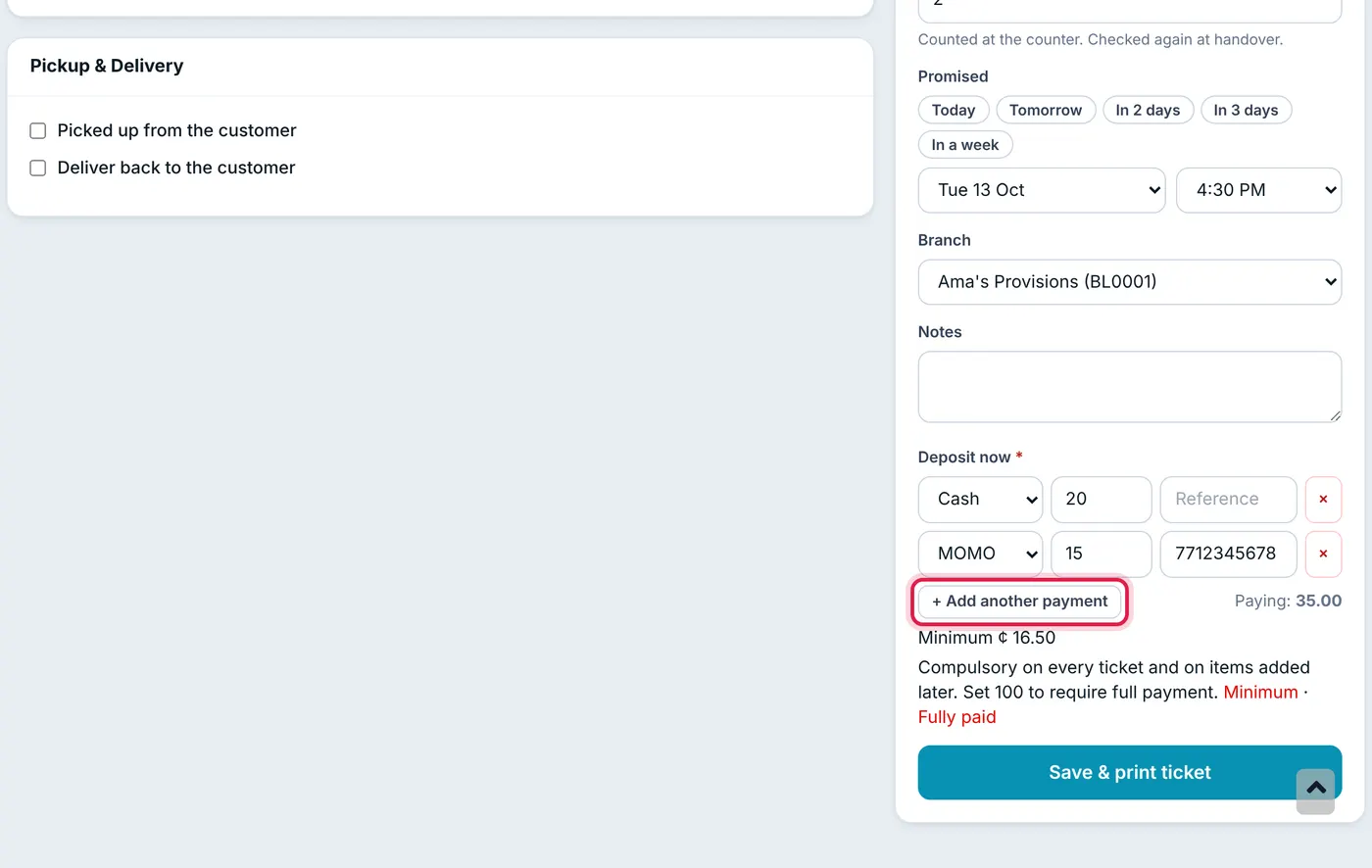
Wherever money is taken (drop-off, Add items, Record payment on the ticket, and handover), click Add another payment to split it, for example GHS 20 cash and GHS 30 MoMo. Each method is recorded as its own payment, so your cash count and MoMo statement both match. Put the MoMo transaction ID, transfer or cheque number in Reference.
Discounts
Staff with Change prices and give discounts on a ticket see a Discount box above the total. Enter an amount, not a percentage. It cannot be more than the ticket is worth, and it shows on the ticket and both printed copies. Change it later from Edit.
Customer advance
- Overpayments are kept: if a customer pays more than the ticket (at drop-off, Add items, Record payment or handover), the extra is kept as their advance. At drop-off, it first pays anything they still owe on older tickets.
- Paying with advance: choose Advance as the payment method. The amount the customer holds is shown, and you cannot use more than that.
- The walk-in customer cannot hold an advance. Choose the customer's own name if they overpay.
- Deleting a ticket takes back any advance it created.
A customer's advance is the same balance used at the POS and shown on their customer page.
Paying between drop-off and collection
A customer can pay part of the balance at any time, before the clothes are ready or after they have collected them. Open the ticket and click Record payment. See How to Record a Payment on a Laundry Ticket.
Common questions
Why can't I save a ticket with no payment?
Where do I see what a customer owes or holds in advance?
Was this article helpful?
Thanks — your answer helps us improve this article.
Still need help?
Can’t find the answer you’re looking for? Our support team in Accra can help.