
All help topics
Help topics
- Getting Started
- Sales & POS
- Products & Inventory
- Purchases & Suppliers
- Customers
- Staff & Permissions
- Reports
- Branches
- Hardware
- Payments
- Settings
- Troubleshooting
- Billing & Subscription
- Workshop
- Training
- Sales Agents
- Laundry
- Accounting
- HR & Payroll
- Hotel
- Services
- Communication Center
- Online Store
- CRM
- Restaurant
- F&B Manager
- Production
- Projects
- Asset Management
- Device Repair
- Bookings & appointments
- Set up for your industry
- All topics
How to Set Up the Device Repair Module
Device Repair runs a phone, tablet or laptop repair shop: book devices in, quote and get approval, track every job on a board, test, hand back and take payment. Set your job numbers, deposit, warranty, texts and check lists under Device Repair → Settings.
The Device Repair module runs a repair counter for phones, tablets and laptops. Every device gets a job: booked in with its IMEI, condition and accessories, priced with an estimate the customer approves, worked on, tested, and handed back with an invoice and a warranty. The invoice is an ordinary sale, so repair takings appear in your dashboard, sales reports, profit and customer balances like any other sale, and the parts you fit leave your stock when the device is handed back.
Step 1: get the module
Device Repair comes with selected plans. If you do not see Device Repair in your sidebar, contact SellarPro to add it to your plan. The menu has Repair board, Book in a device, Repair jobs, Uncollected, Parts needed, Devices, Between branches, Loaners, Trade-ins, Repair accounts, Reports and Settings.
Step 2: choose your settings
Open Device Repair → Settings. Everything has a default, so change only what you need:
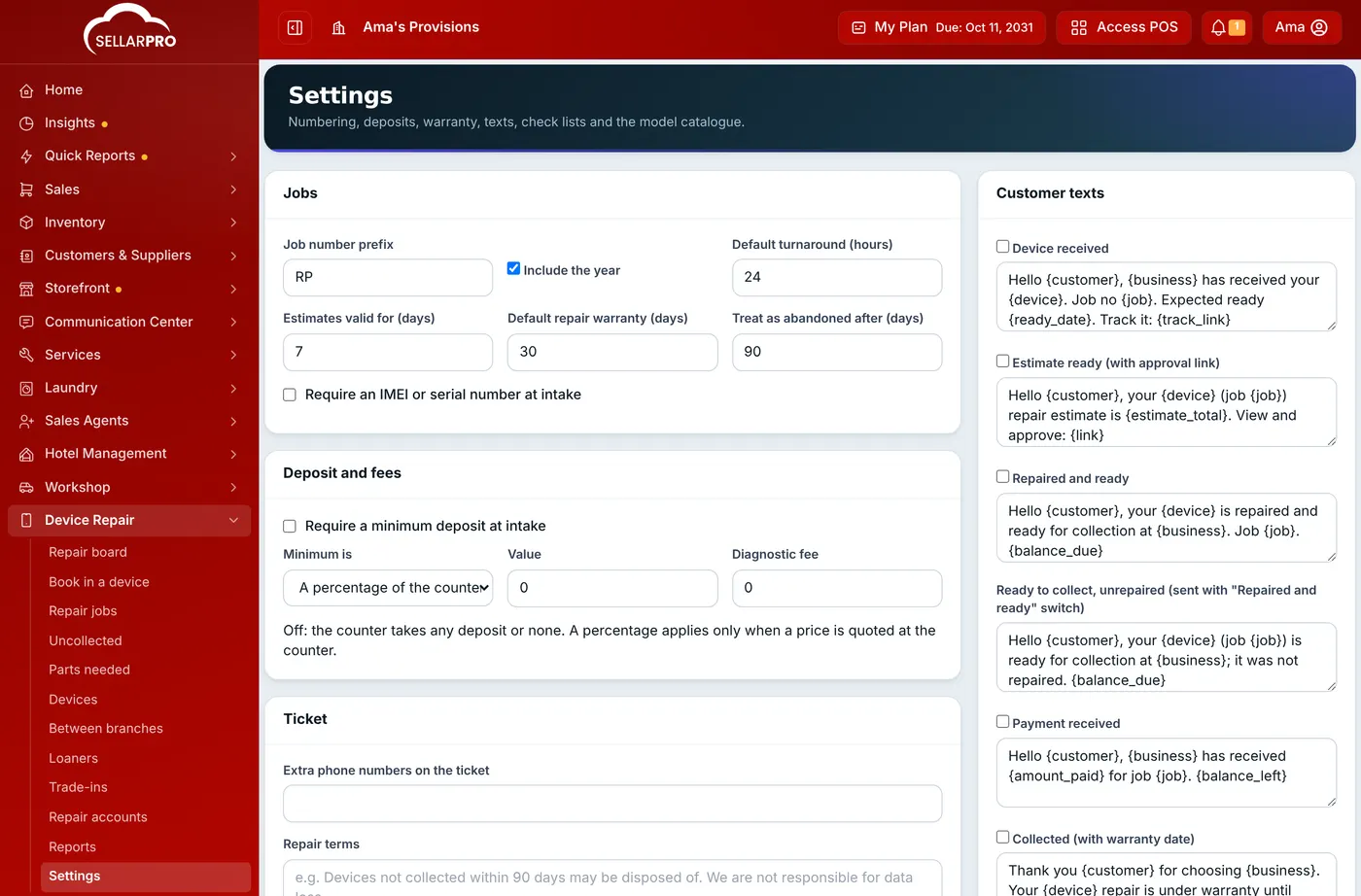
- Jobs: the Job number prefix (RP by default, so jobs read RP2026/0001), the Default turnaround (hours), how long estimates stay valid, the Default repair warranty (days), and after how many days an uncollected device may be closed as abandoned. Tick Require an IMEI or serial number at intake if every device must be identified.
- Deposit and fees: a deposit is optional unless you tick Require a minimum deposit at intake, either a percentage of the price quoted at the counter or a fixed amount. Set a Diagnostic fee if you charge for looking at a device that goes back unrepaired.
- Ticket: extra phone numbers and your Repair terms, printed on every ticket (for example data loss, and how long you keep uncollected devices).
- Fault tags and accessories: the faults and accessories staff tap at the counter, one per line, for phones, tablets, laptops and other devices.
- Customer texts and Uncollected reminders: see How to Chase Uncollected Devices.
- Check lists: the condition and function tests run at intake and again at quality check, one per line as "Section | Check".
- Model catalogue: the brands and models offered at intake. It starts with common phones, tablets and laptops, and learns any new model typed at the counter.
Step 3: give your staff access
Business owners can do everything. For staff, open Access Controls → Roles, edit the role and tick what they need under Device Repair:
- Counter staff: Open Device Repair, Book devices in, Take and refund deposits, Hand devices back and raise the invoice. Handing back raises a sale, so the role also needs Add POS sell.
- Technicians: Open Device Repair and Bench work: diagnose, move jobs, quality check.
- Supervisors: Price repairs and send estimates, Record a customer's approval or refusal, Change prices, give discounts, waive the diagnostic fee, See device passcodes, Assign technicians.
- Owners and managers: Delete repair jobs, View repair reports, Change Device Repair settings, Open repair accounts and read their statements, Buy devices from customers (trade-ins).
- Shops with loaners or more than one branch: Lend loaner devices and take them back, Send jobs to another branch and receive them.
Give See device passcodes only to the people who test devices. Every time a passcode is shown, it is logged.
Common questions
Does a repair count as a sale?
Do repairs go through the cash register?
Can I repair laptops and tablets too?
Was this article helpful?
Thanks — your answer helps us improve this article.
Still need help?
Can’t find the answer you’re looking for? Our support team in Accra can help.