
All help topics
Help topics
- Getting Started
- Sales & POS
- Products & Inventory
- Purchases & Suppliers
- Customers
- Staff & Permissions
- Reports
- Branches
- Hardware
- Payments
- Settings
- Troubleshooting
- Billing & Subscription
- Workshop
- Training
- Sales Agents
- Laundry
- Accounting
- HR & Payroll
- Hotel
- Services
- Communication Center
- Online Store
- CRM
- Restaurant
- F&B Manager
- Production
- Projects
- Asset Management
- Device Repair
- Bookings & appointments
- Set up for your industry
- All topics
On this page
How to Text Customers and Chase Uncollected Devices
Customers get texts when the device is received, the estimate is ready, it is ready to collect, a payment is made and it is collected. Device Repair → Uncollected lists ready devices by age, sends reminders and closes long-abandoned jobs.
Customer texts
Under Device Repair → Settings → Customer texts, each text has an on/off switch and wording you can change: Device received (with the tracking link), Estimate ready (with the approval link), Repaired and ready, the unrepaired version, Payment received, Collected (with the warranty date) and the uncollected reminder. Texts use your SMS balance. Placeholders such as {customer}, {device}, {job} and {track_link} are listed under the boxes.
Tracking link
The customer's ticket has a QR code, and the received text a link, to a page showing the repair's stage, the promised time, any balance and the estimate to approve. It never shows the passcode or their phone number. Open it from the job with Customer link.
Uncollected devices
Open Device Repair → Uncollected: every ready device, oldest first, with days waiting, the balance and reminders sent. Click Send reminder to text one now. With Uncollected reminders switched on, reminders also go automatically each morning: the first after the days you set, then every few days, up to the most you allow.
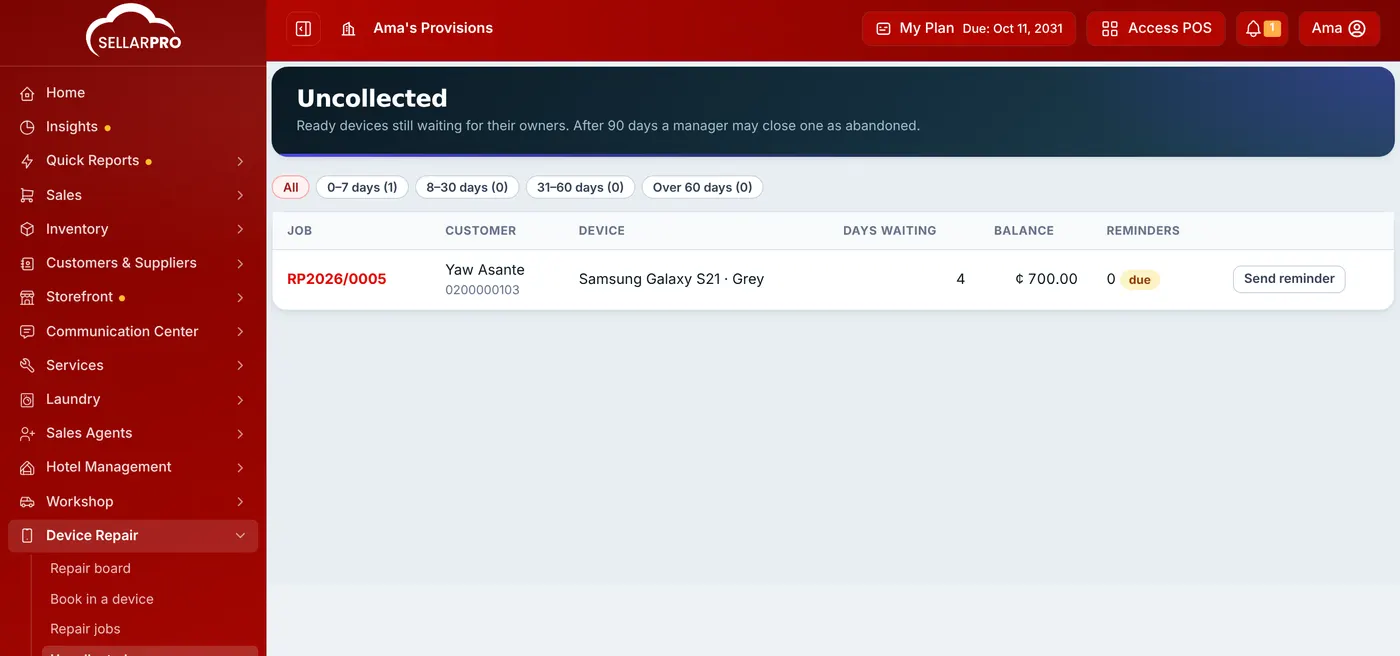
After the period set in Treat as abandoned after (days), someone with Delete repair jobs can click Close as abandoned and note what happens to the device. Any deposit stays with the customer as advance. State your period in your Repair terms so customers know.
Was this article helpful?
Thanks — your answer helps us improve this article.
Still need help?
Can’t find the answer you’re looking for? Our support team in Accra can help.