
All help topics
Help topics
- Getting Started
- Sales & POS
- Products & Inventory
- Purchases & Suppliers
- Customers
- Staff & Permissions
- Reports
- Branches
- Hardware
- Payments
- Settings
- Troubleshooting
- Billing & Subscription
- Workshop
- Training
- Sales Agents
- Laundry
- Accounting
- HR & Payroll
- Hotel
- Services
- Communication Center
- Online Store
- CRM
- Restaurant
- F&B Manager
- Production
- Projects
- Asset Management
- Device Repair
- Bookings & appointments
- Set up for your industry
- All topics
On this page
How to Manage Parts for Repairs
Repair parts are ordinary stocked products. Approved repairs reserve them, Device Repair → Parts needed shows what is short, and parts leave stock only when the device is handed back.
Add your parts (screens, batteries, charging ports…) as normal products with stock, and your labour as services. Put the model in the part's name, for example "iPhone 12 Screen OLED", and link it to the models it fits: the estimate search lists the parts that fit the device first.
Reserved and short
A part on an approved estimate of an open job is reserved. Nothing leaves stock yet. Open Device Repair → Parts needed to see each part's On hand, Reserved and Short, with the jobs waiting on it. Click New purchase to order.
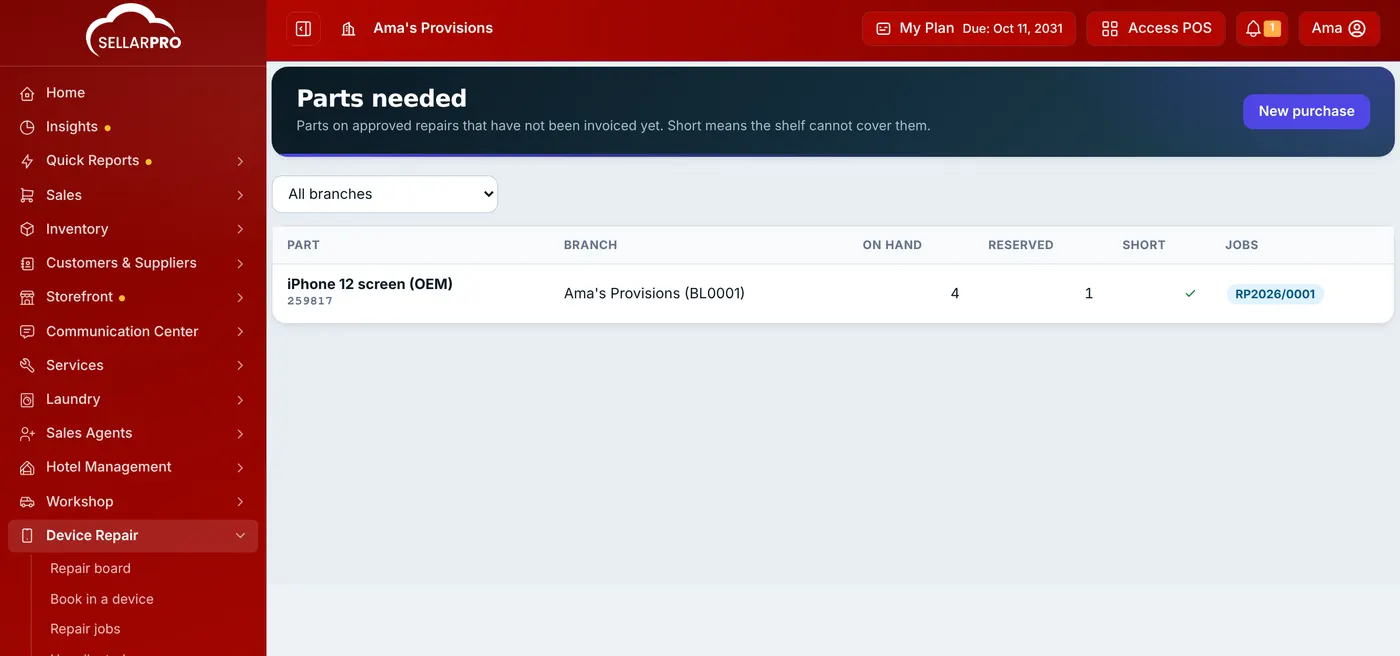
When a customer approves a repair and the shelf cannot cover the parts (after older jobs take theirs), the job goes to Awaiting parts instead of In repair. When the parts arrive, move it to In repair.
When stock moves
Parts leave stock once, when the device is handed back and the invoice is raised. Their cost comes from the stock lots used, so repair profit is real.
Was this article helpful?
Thanks — your answer helps us improve this article.
Still need help?
Can’t find the answer you’re looking for? Our support team in Accra can help.