
All help topics
Help topics
- Getting Started
- Sales & POS
- Products & Inventory
- Purchases & Suppliers
- Customers
- Staff & Permissions
- Reports
- Branches
- Hardware
- Payments
- Settings
- Troubleshooting
- Billing & Subscription
- Workshop
- Training
- Sales Agents
- Laundry
- Accounting
- HR & Payroll
- Hotel
- Services
- Communication Center
- Online Store
- CRM
- Restaurant
- F&B Manager
- Production
- Projects
- Asset Management
- Device Repair
- Bookings & appointments
- Set up for your industry
- All topics
How to Hand Back a Repaired Device and Take Payment
Click Hand over on a ready job. SellarPro bills the approved work, uses the deposit, takes the rest in any payment method, sets the warranty, erases the passcode and texts the customer.
- Open the job (it must be Ready) and click Hand over.
- Give back every accessory listed and tick Every accessory listed has been given back.
- If someone other than the owner is collecting, write their name under Collected by.
- Check the Warranty (days); the default comes from Settings. Use 0 for no warranty.
- The payment box shows the Invoice total, the Deposit applied and what is To pay now. Take it in one or more methods (cash, MoMo with its reference…).
- If the deposit was more than the bill, choose to keep the rest as the customer's advance or refund it now.
- Click Hand over device.
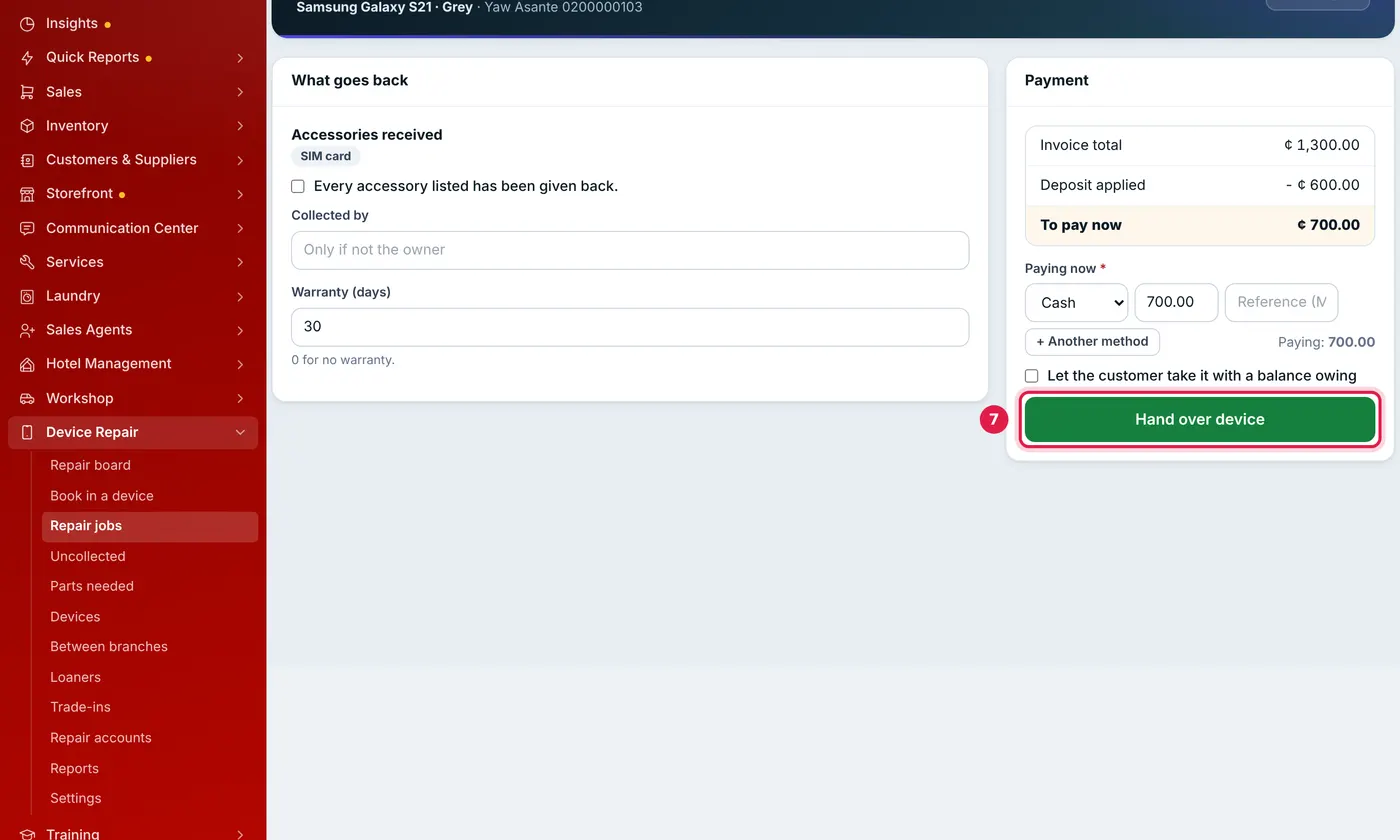
The deposit is taken off before you collect the rest.
SellarPro raises the invoice for the approved work only, takes the parts out of stock, records the payments, sets the warranty date, erases the stored passcode and sends the "Collected" text with the warranty date.
The balance must be paid in full. Someone with Change prices, give discounts, waive the diagnostic fee can tick Let the customer take it with a balance owing; the balance is then owed on the invoice like any credit sale. A customer with a repair account takes the device on account without it, within their credit limit.
If you have a cash register open, the money taken goes on it, so it is counted when you close the register. A device cannot be handed back while the customer still has one of your loaner phones, or while it is on its way between branches.
If an invoice was raised by mistake, delete the sale from the Sales list. The parts go back to stock and the deposit is held on the job again.
Common questions
Why can my cashier not hand a device over?
Was this article helpful?
Thanks — your answer helps us improve this article.
Still need help?
Can’t find the answer you’re looking for? Our support team in Accra can help.