
All help topics
Help topics
- Getting Started
- Sales & POS
- Products & Inventory
- Purchases & Suppliers
- Customers
- Staff & Permissions
- Reports
- Branches
- Hardware
- Payments
- Settings
- Troubleshooting
- Billing & Subscription
- Workshop
- Training
- Sales Agents
- Laundry
- Accounting
- HR & Payroll
- Hotel
- Services
- Communication Center
- Online Store
- CRM
- Restaurant
- F&B Manager
- Production
- Projects
- Asset Management
- Device Repair
- Bookings & appointments
- Set up for your industry
- All topics
How to Book In a Warranty Repair
Short answer
When a repaired device comes back inside its warranty, book it in as a warranty claim from the old job. It goes to the bench without a new estimate and is linked to the original repair.
- Find the original job: type the IMEI at intake (its jobs and warranty appear), or open the job from Devices or Repair jobs.
- Click Book in as warranty claim. This appears only on a repaired, collected job whose warranty has not ended.
- The customer and device are filled in. Record the new fault, tests and accessories, and book it in.
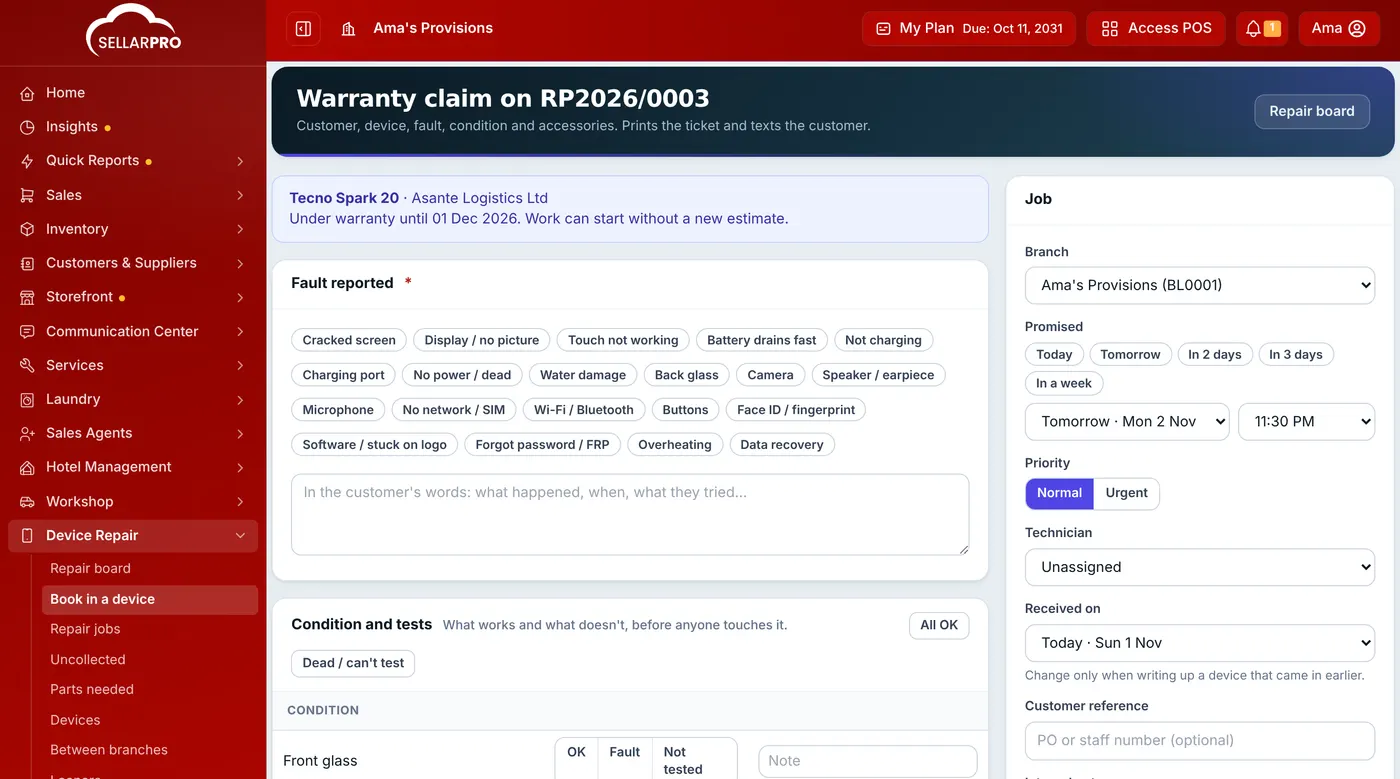
A claim is booked against the original job.
The claim is marked Warranty claim, can go to In repair without an estimate, and is linked to the original job. If the fault is not covered, price it with an estimate as usual. A claim keeps the original warranty date.
Claims are counted as comebacks for the technician who did the original repair in Repair reports.
Common questions
The warranty has ended. What now?
Book the device in as a new job and quote as usual.
Was this article helpful?
Thanks — your answer helps us improve this article.
Still need help?
Can’t find the answer you’re looking for? Our support team in Accra can help.