
All help topics
Help topics
- Getting Started
- Sales & POS
- Products & Inventory
- Purchases & Suppliers
- Customers
- Staff & Permissions
- Reports
- Branches
- Hardware
- Payments
- Settings
- Troubleshooting
- Billing & Subscription
- Workshop
- Training
- Sales Agents
- Laundry
- Accounting
- HR & Payroll
- Hotel
- Services
- Communication Center
- Online Store
- CRM
- Restaurant
- F&B Manager
- Production
- Projects
- Asset Management
- All topics
How to Set Up Payroll Settings and Components
Payroll Settings holds the SSNIT, Tier 2 and NHiL rates, overtime and your pay period. Payroll Components are the allowances and deductions; Payroll Templates decide who gets which, for the whole business, a department or a role.
Most of payroll is set once: the statutory rates, the allowances you pay, and who gets them.
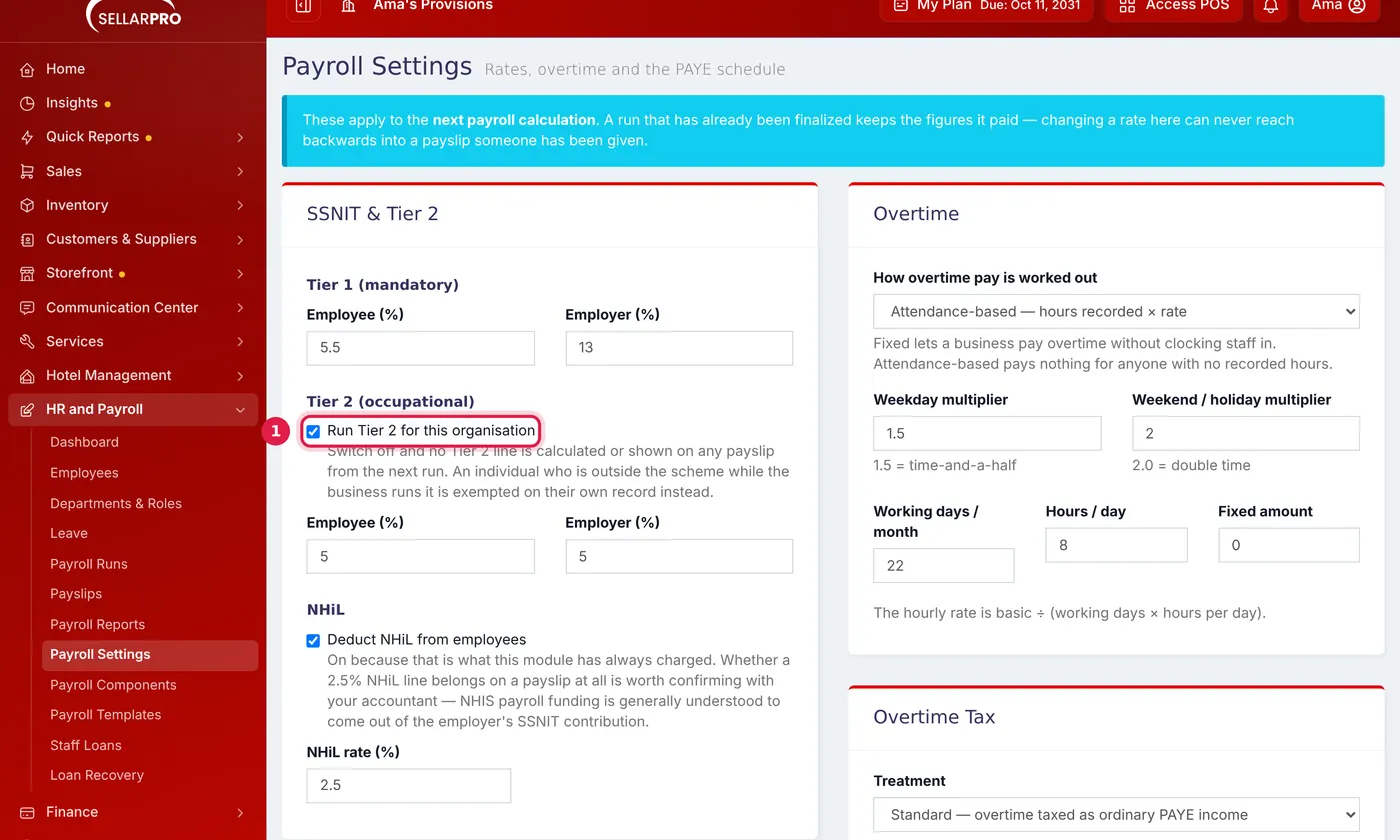
Payroll Settings
Open HR and Payroll → Payroll Settings.
- SSNIT & Tier 2: the employee and employer percentages. Untick Run Tier 2 for this organisation if your business does not run Tier 2. Choose whether to Deduct NHiL from employees and at what rate.
- Overtime: How overtime pay is worked out, the weekday and weekend multipliers, working days per month and hours per day.
- Overtime Tax, your Pay Period (Frequency and Usual pay day), and Trade Union dues, if your staff belong to one.
- PAYE Schedule: the monthly tax bands. Unless you have set your own, PAYE follows the GRA bands in force for each pay period. See How to Keep PAYE on the Current GRA Bands.
Payroll Components
Components are the lines on a payslip. Basic Salary, Housing, Transport, Overtime, Bonus and the statutory deductions are there already. To add your own:
- Open HR and Payroll → Payroll Components.
- Fill in the Name and Code, choose the Type (an earning or a deduction) and the Calculation Type, and enter the Default Amount or Default Percentage.
- Tick Taxable for taxable earnings, and Comes off before tax for a pre-tax deduction. Click Save Component.
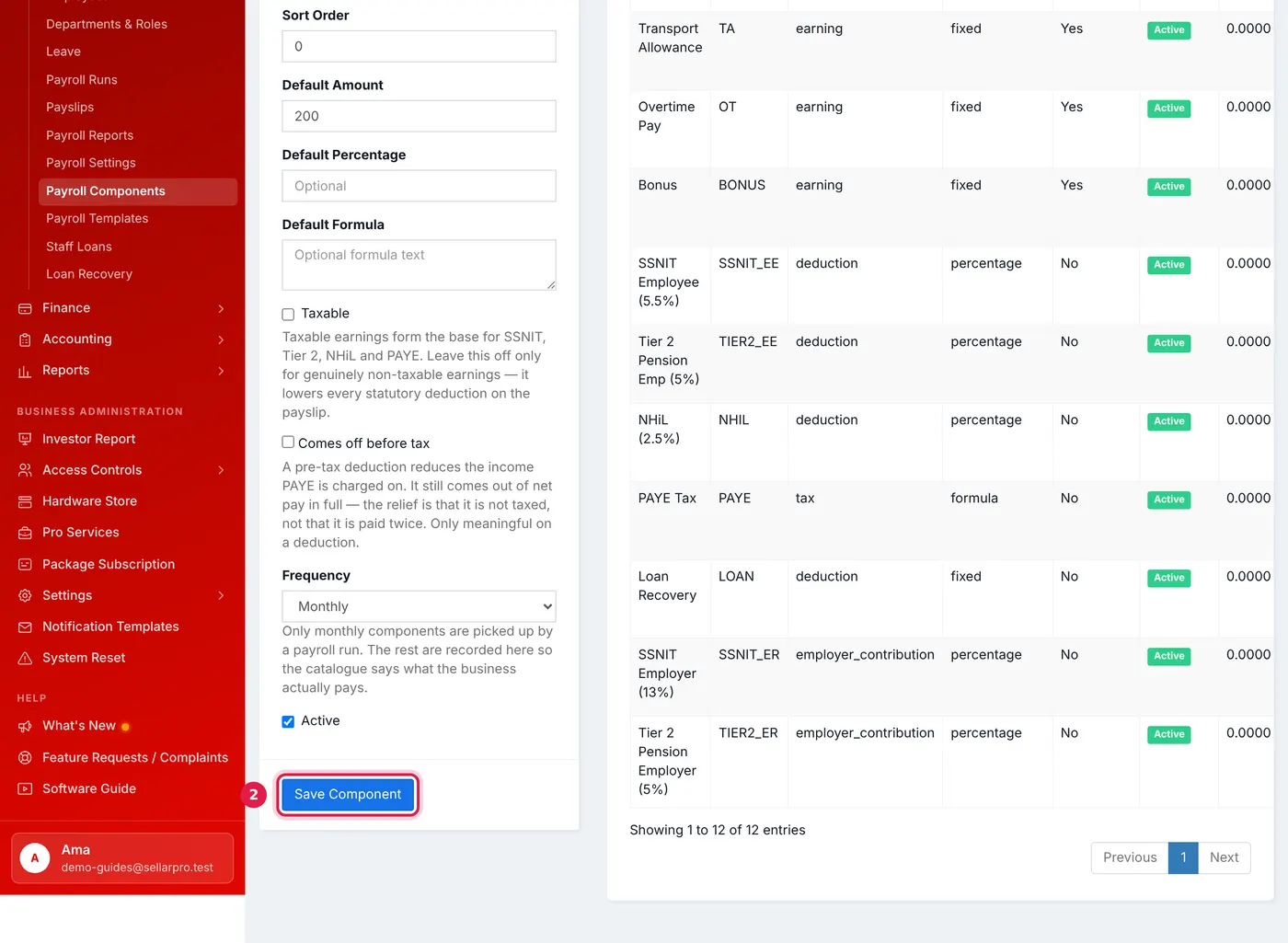
A fixed allowance of 200. Taxable earnings count towards SSNIT, Tier 2, NHiL and PAYE.
Payroll Templates: who gets what
A component is only paid to employees whose template includes it. Open HR and Payroll → Payroll Templates, create a template with its Scope (the whole business, a department or a role) and click Add Items to choose its components and amounts. Every template that matches an employee applies, from the broadest to the narrowest. For something only one person gets, use Pay Setup on their employee record instead.
Common questions
Payroll paid only the basic salary.
Was this article helpful?
Thanks — your answer helps us improve this article.
Still need help?
Can’t find the answer you’re looking for? Our support team in Accra can help.