
All help topics
Help topics
- Getting Started
- Sales & POS
- Products & Inventory
- Purchases & Suppliers
- Customers
- Staff & Permissions
- Reports
- Branches
- Hardware
- Payments
- Settings
- Troubleshooting
- Billing & Subscription
- Workshop
- Training
- Sales Agents
- Laundry
- Accounting
- HR & Payroll
- Hotel
- Services
- Communication Center
- Online Store
- CRM
- Restaurant
- F&B Manager
- Production
- Projects
- Asset Management
- All topics
On this page
How to Add Employees
Set up your departments and roles under HR and Payroll → Departments & Roles. Then open Employees, fill in the employee's details, Ghana Card, SSNIT number, department, role and Basic Salary, and click Add Employee.
HR & Payroll keeps a record for each employee and pays them through payroll runs, with SSNIT, Tier 2 and PAYE worked out for you.
HR & Payroll comes with selected plans. If you do not see HR and Payroll in your menu, contact SellarPro to add it.
Step 1: departments and roles (once)
Open HR and Payroll → Departments & Roles. Add each department with Add Department (a Department Name and optional Code), then each job with Add Role (a Role Name and its Department).
Step 2: add the employee
- Open HR and Payroll → Employees.
- Under Personal Details, fill in the First Name, Last Name, Phone and the rest.
- Under Ghana Compliance IDs, enter the Ghana Card Number, TIN (Tax ID) and SSNIT Number. They print on the payslip.
- Under Employment, choose the Status, Department and Designation, and enter the Basic Salary (GHS).
- Add the Bank Details the salary is paid into, and the Tier 2 Pension provider if there is one.
- Click Add Employee.
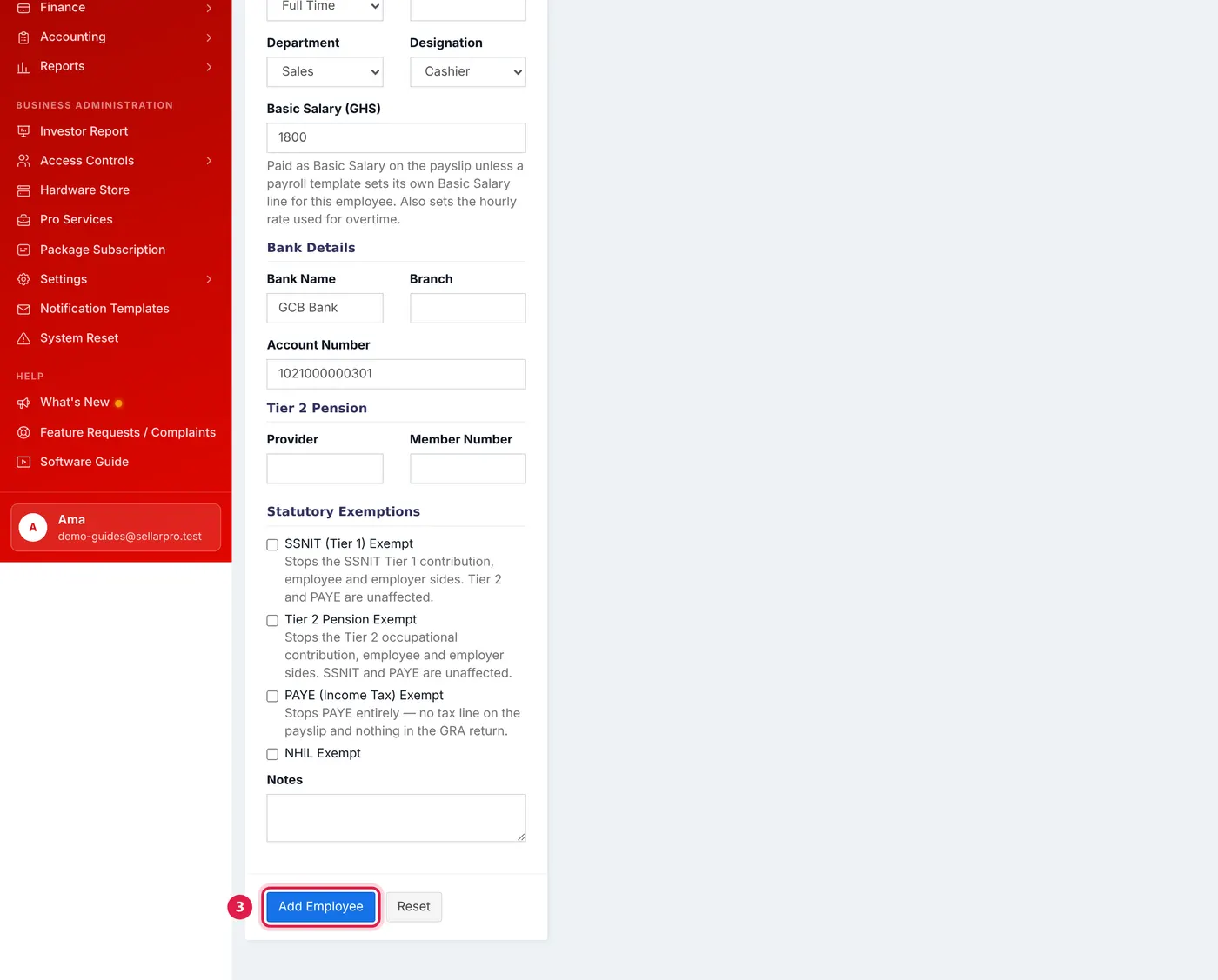
Department, role and basic salary, then bank details and any statutory exemptions.
Exemptions
Tick an exemption only for someone it genuinely applies to: SSNIT (Tier 1) Exempt, Tier 2 Pension Exempt, PAYE (Income Tax) Exempt or NHiL Exempt. Each stops only that line on their payslip.
Pay that differs from the rest
An allowance only this employee gets goes on their own record: open their Pay Setup from the employee list. Pay that a whole department or the whole business shares goes in a payroll template; see How to Set Up Payroll Settings and Components.
Common questions
Can I delete an employee who has been paid?
Was this article helpful?
Thanks — your answer helps us improve this article.
Still need help?
Can’t find the answer you’re looking for? Our support team in Accra can help.