
All help topics
Help topics
- Getting Started
- Sales & POS
- Products & Inventory
- Purchases & Suppliers
- Customers
- Staff & Permissions
- Reports
- Branches
- Hardware
- Payments
- Settings
- Troubleshooting
- Billing & Subscription
- Workshop
- Training
- Sales Agents
- Laundry
- Accounting
- HR & Payroll
- Hotel
- Services
- Communication Center
- Online Store
- CRM
- Restaurant
- F&B Manager
- Production
- Projects
- Asset Management
- All topics
How to Set Up Invoice Numbering and Layouts
Open Settings → Invoice Settings. On Invoice Schemes, set how invoice numbers look: a prefix, the starting number and the number of digits. On Invoice Layouts, choose the design, logo, header and footer of your receipts and invoices. Each branch picks its scheme and layouts.
Two things decide what your invoices look like: the invoice scheme (the number, such as INV-0042) and the invoice layout (the design, logo and wording).
Invoice numbering
- Open Settings → Invoice Settings. The Invoice Schemes tab opens.
- Click Add, or Edit on the scheme you use.
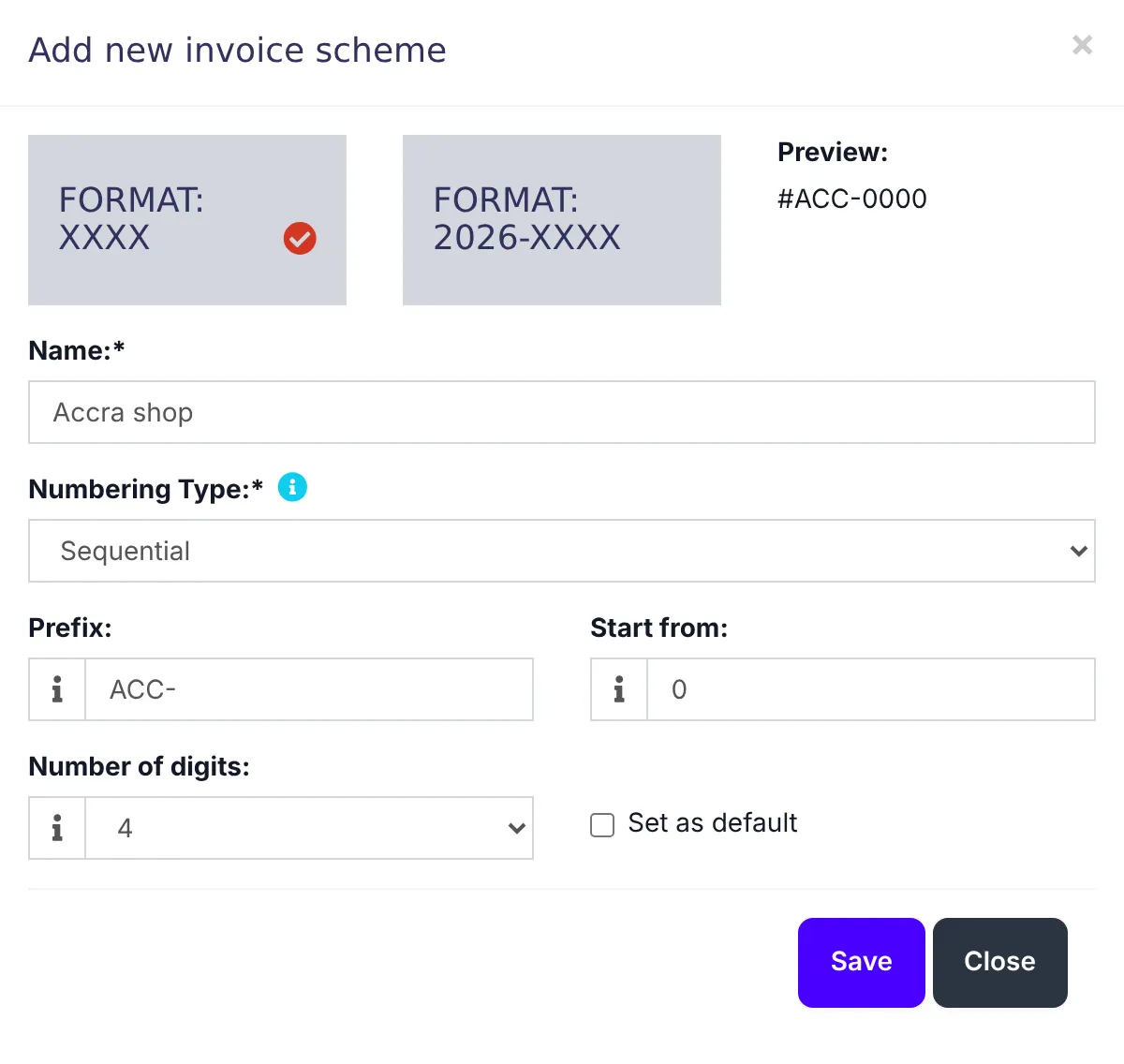
- Click a format: plain numbers (XXXX) or numbers with the year (2026-XXXX).
- Give it a Name, a Prefix such as INV-, the number to Start from and the Number of digits (4 gives 0001). The Preview shows what the next invoice number will look like.
- Save. Click Default on the scheme new branches should use.
Invoice and receipt layouts
- Open the Invoice Layouts tab and click Edit on a layout, or Add one.
- Choose the Design: Classic or Detailed for A4 printers, Slim or Slim 2 for receipt printers.
- Upload an Invoice Logo and tick Show invoice Logo.
- Write the Header text and Footer text, such as your returns policy or bank details.
- Tick what to show: the business name, the customer's details, payment information, the total due on all sales.
- Save.
Which branch uses what
Each branch chooses its scheme and layouts. Open Settings → Business Locations, edit the branch and set the Invoice scheme, Invoice layout for POS and Invoice layout for sale.
Use a different prefix per branch, such as ACC- and KSI-, and you can tell from an invoice number which shop made the sale.
Common questions
Can I restart invoice numbers at 1?
My logo does not print.
Was this article helpful?
Thanks — your answer helps us improve this article.
Still need help?
Can’t find the answer you’re looking for? Our support team in Accra can help.