
All help topics
Help topics
- Getting Started
- Sales & POS
- Products & Inventory
- Purchases & Suppliers
- Customers
- Staff & Permissions
- Reports
- Branches
- Hardware
- Payments
- Settings
- Troubleshooting
- Billing & Subscription
- Workshop
- Training
- Sales Agents
- Laundry
- Accounting
- HR & Payroll
- Hotel
- Services
- Communication Center
- Online Store
- CRM
- Restaurant
- F&B Manager
- Production
- Projects
- Asset Management
- All topics
How to Sell on Credit and Collect What Customers Owe
Select the customer and click Credit Sale to put the whole sale on their account, or take part payment. When the customer comes back, use Pay due next to their name at the POS, or tick Collect due with this order to clear old debt with a new sale.
Selling on credit means the customer takes the goods now and pays later. SellarPro keeps the debt on the customer's account and shows it every time you serve them.
Make a credit sale
- Select the customer. Credit cannot go on the walk-in customer, so add the customer first if they are new.
- Add the items as usual.
- Click Credit Sale. The sale is saved with nothing paid, and the full amount is owed.
For a part payment, take the payment as usual but enter only what the customer paid. The rest is owed.
Collect the debt at the POS
When you select a customer who owes money, their Customer Due shows next to their name.
- Click Pay due to take a payment towards it without making a sale.
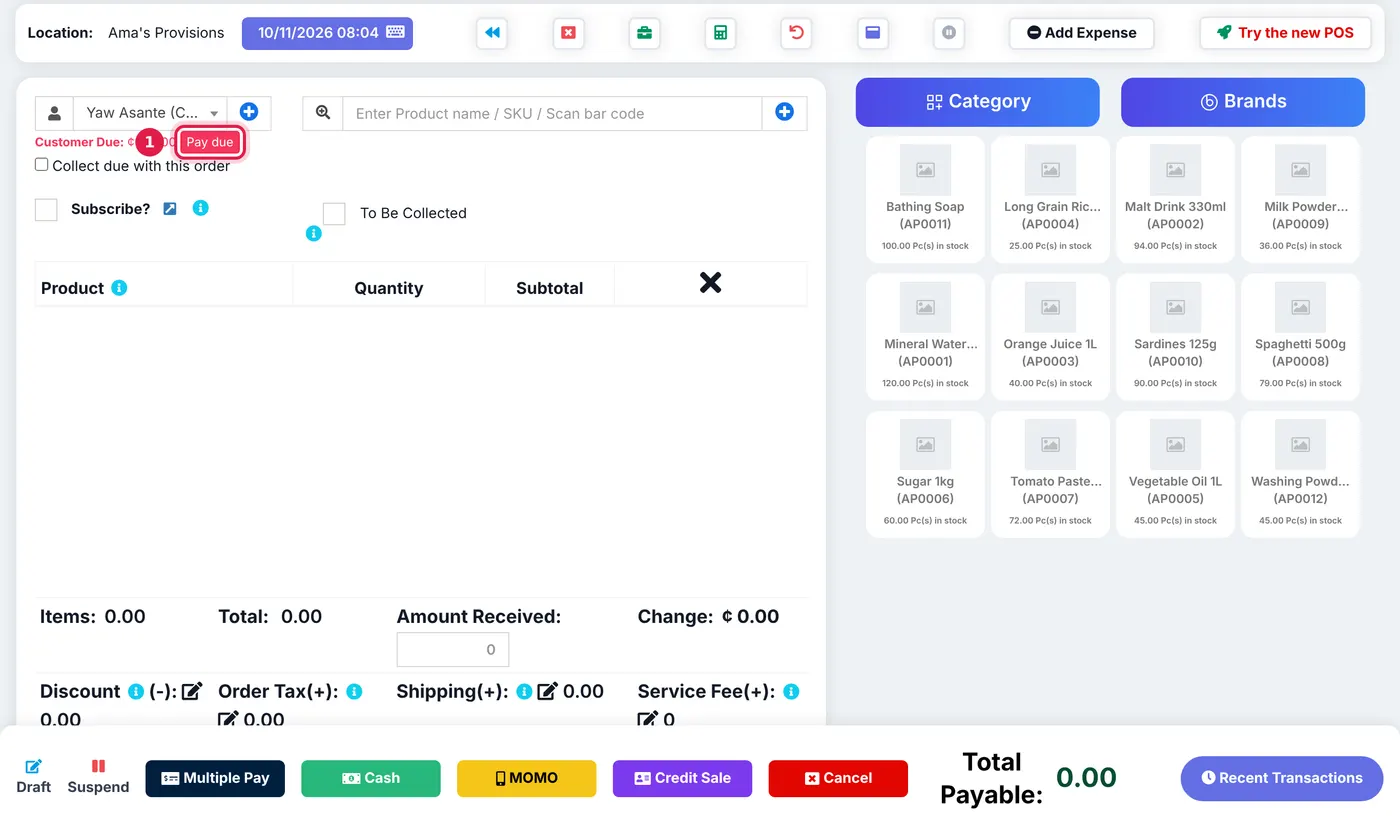
A customer who owes money: their due, Pay due, and Collect due with this order. - Or tick Collect due with this order while selling to them. The old debt is added to Total Payable, and the money pays this sale first, then the old debt.
Due payments taken at the POS are recorded on the open register as debt payments, so the cash count includes them.
Set a credit limit
Edit the customer and fill in Credit Limit to cap what they can owe. Leave it blank for no limit. You can also set a Pay term (in days or months) so overdue debts stand out on the dashboard.
To see everyone who owes you, open Quick Reports → Debtors List. To control which cashiers can sell on credit at all, see How to Approve a Cashier's Discount or Credit Sale.
Common questions
Can I take a debt payment away from the POS?
Which old sales does a due payment clear?
Why is the Credit Sale button missing?
Was this article helpful?
Thanks — your answer helps us improve this article.
Still need help?
Can’t find the answer you’re looking for? Our support team in Accra can help.