
All help topics
Help topics
- Getting Started
- Sales & POS
- Products & Inventory
- Purchases & Suppliers
- Customers
- Staff & Permissions
- Reports
- Branches
- Hardware
- Payments
- Settings
- Troubleshooting
- Billing & Subscription
- Workshop
- Training
- Sales Agents
- Laundry
- Accounting
- HR & Payroll
- Hotel
- Services
- Communication Center
- Online Store
- CRM
- Restaurant
- F&B Manager
- Production
- Projects
- Asset Management
- All topics
On this page
How to Sell in Cartons and Pieces
Give the product its smallest unit, such as Pieces. Then, under Alternative Units of Measurement on the product form, click Add Unit and add Carton with how many pieces it holds and its own buy and sell price. Sell and buy in either unit; stock is always counted in pieces.
Many shops buy by the carton and sell by the piece, or sell both ways. SellarPro counts the stock in the smallest unit and lets you buy and sell in bigger ones.
Step 1: check your units
Open Inventory → Units. Click Add for any unit you need, such as "Carton", with a Name and Short name. Set Allow decimal to Yes for units you sell in parts, such as kilograms.
Step 2: add the bigger units to the product
- Open the product (or add it). Its Unit is the smallest one you sell, such as Pieces.
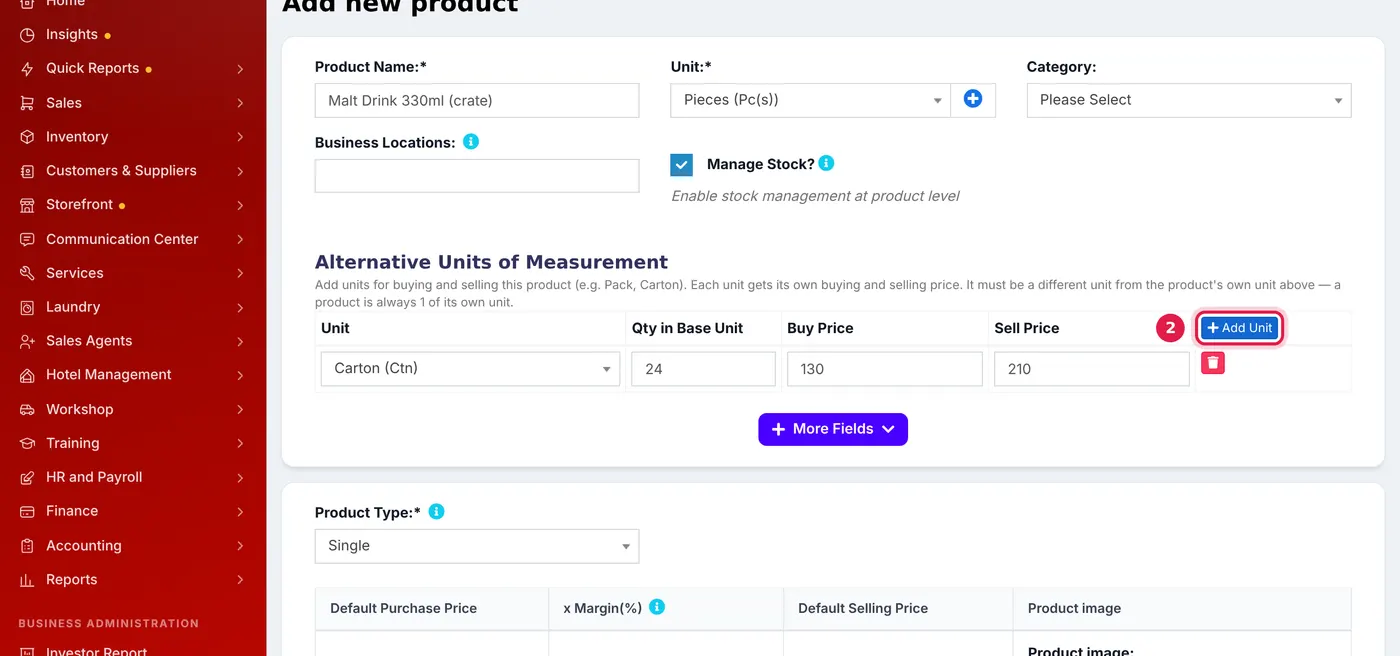
- Under Alternative Units of Measurement, click Add Unit.
- Choose the Unit (Carton), the Qty in Base Unit (24, if a carton holds 24 pieces), and its own Buy Price and Sell Price.
- Add more rows for other packs, such as a half-carton. Save.
Step 3: buy and sell in either unit
- On the POS and Add Sale, each line has a unit list. Choose Carton and the carton price is used; one carton takes 24 pieces off the stock.
- On a purchase, choose the unit you bought in. Ten cartons add 240 pieces.
A product is always 1 of its own unit, so the carton must be a different unit from the product's own. Stock reports show pieces.
Common questions
Why is the carton price not just 24 times the piece price?
Was this article helpful?
Thanks — your answer helps us improve this article.
Still need help?
Can’t find the answer you’re looking for? Our support team in Accra can help.