
All help topics
Help topics
- Getting Started
- Sales & POS
- Products & Inventory
- Purchases & Suppliers
- Customers
- Staff & Permissions
- Reports
- Branches
- Hardware
- Payments
- Settings
- Troubleshooting
- Billing & Subscription
- Workshop
- Training
- Sales Agents
- Laundry
- Accounting
- HR & Payroll
- Hotel
- Services
- Communication Center
- Online Store
- CRM
- Restaurant
- F&B Manager
- Production
- Projects
- Asset Management
- All topics
On this page
How to Record Damage at Drop-Off and Handle Laundry Claims
At drop-off, describe each item and tap its condition tags (Stained, Torn, Missing button…), add photos of any damage on the ticket page, and print the ticket. The customer copy, the shop copy, the photos and the ticket history then show exactly how the clothes came in if a customer later makes a claim.
"You damaged my dress" is the hardest conversation a laundry has. The answer is a record, made at the counter with the customer present, of how each item came in.
Step 1: describe and tag every item at drop-off
- On Laundry → New drop-off, describe each item so it can be told apart: colour, brand, pattern.
- Tap every condition tag that applies, such as Stained, Torn, Missing button, Faded, Colour may run or Delicate.
- Point the marks out to the customer before you save.
Your list of tags is set under Laundry → Settings → Condition.
Step 2: add photos of any damage
- After saving, on the ticket page, go to Photos.
- Choose the pictures (on a phone, this opens the camera) and click Add photos. Add as many as you need.
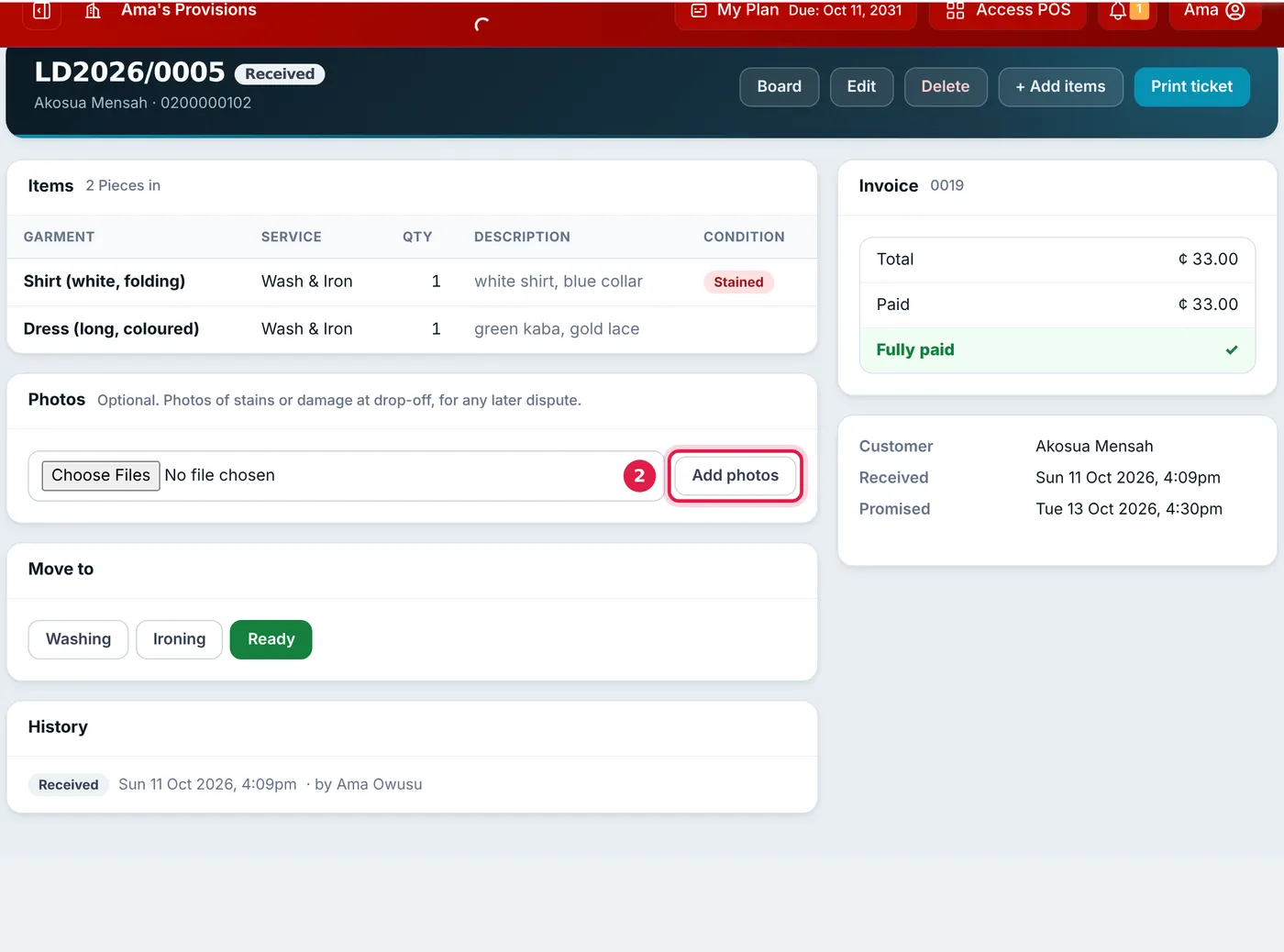
The condition tags show on the ticket; photos go under Photos.
Step 3: print and hand over the customer copy
The ticket prints each item's description and condition on both the CUSTOMER COPY and the SHOP COPY. Put your policy in Terms printed on the ticket under Laundry → Settings, for example "We are not liable for colour run or shrinkage on unlabelled items", so the customer receives it with every ticket.
When a customer makes a claim
- Find the ticket on Laundry → All tickets by ticket number, name or phone.
- Show the item's description and condition tags, and the photos.
- Check the History on the ticket: every stage, edit and handover, with who did it and when.
- Check the handover: the pieces counted out and the name in Collected by.
Watch Condition at drop-off in Laundry → Reports. If "Colour may run" or "Delicate" tags are common, it may be worth adding a line about them to your ticket terms.
Common questions
Can I add photos after the ticket is saved?
Can I change the condition tags later?
Was this article helpful?
Thanks — your answer helps us improve this article.
Still need help?
Can’t find the answer you’re looking for? Our support team in Accra can help.