
All help topics
Help topics
- Getting Started
- Sales & POS
- Products & Inventory
- Purchases & Suppliers
- Customers
- Staff & Permissions
- Reports
- Branches
- Hardware
- Payments
- Settings
- Troubleshooting
- Billing & Subscription
- Workshop
- Training
- Sales Agents
- Laundry
- Accounting
- HR & Payroll
- Hotel
- Services
- Communication Center
- Online Store
- CRM
- Restaurant
- F&B Manager
- Production
- Projects
- Asset Management
- All topics
On this page
How to Read Your Financial Statements
Open Accounting → Profit & Loss, choose From and To and click Generate to see revenue, cost of goods sold, expenses and net income. The Balance Sheet, Cash Flow and Trial Balance work the same way, and each can be downloaded.
Your financial statements are built from the journal entries in your books. They are the documents banks, investors and the tax office ask for.
Profit & Loss
- Open Accounting → Profit & Loss.
- Choose From and To and click Generate.
- Click PDF to download it.
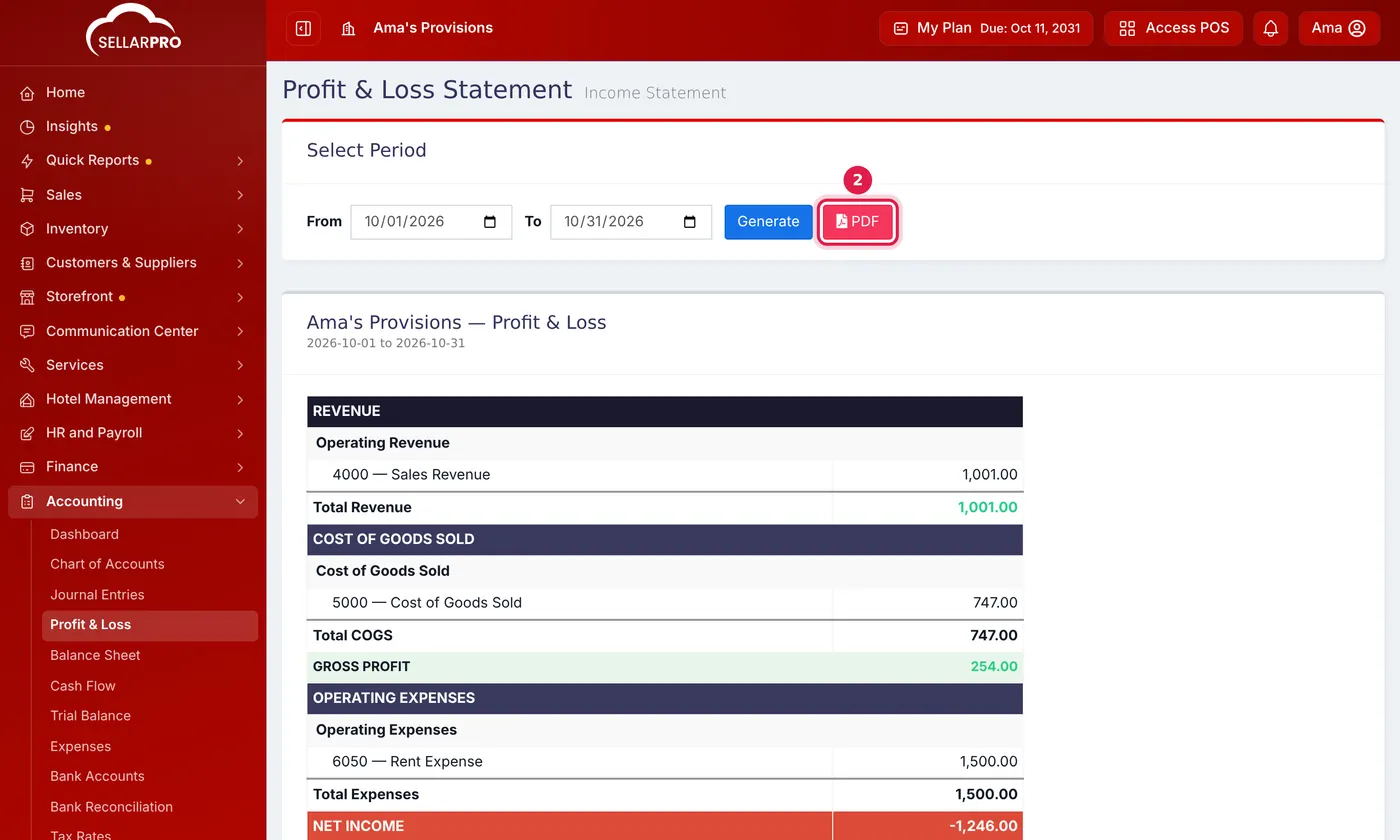
Revenue less cost of goods sold gives gross profit; less expenses gives net income.
It shows REVENUE, COST OF GOODS SOLD, GROSS PROFIT, OPERATING EXPENSES and NET INCOME for the period.
The other statements
- Balance Sheet: what the business owns (ASSETS), owes (LIABILITIES) and is worth (EQUITY) on a date. Choose the date and click Generate; it tells you if it does not balance.
- Cash Flow: where cash came from and went in a period.
- Trial Balance: every account's debits and credits for a period, with a check that they balance. Download it as CSV for your accountant.
More reports
Accounting → All Reports has the Account Ledger (every entry on one account), Aged Receivables and Aged Payables, Budget vs Actual, a Comparison Report of two periods, and an Executive Summary.
Common questions
Why does this profit differ from the profit report under Reports?
My statements are empty.
Was this article helpful?
Thanks — your answer helps us improve this article.
Still need help?
Can’t find the answer you’re looking for? Our support team in Accra can help.