
All help topics
Help topics
- Getting Started
- Sales & POS
- Products & Inventory
- Purchases & Suppliers
- Customers
- Staff & Permissions
- Reports
- Branches
- Hardware
- Payments
- Settings
- Troubleshooting
- Billing & Subscription
- Workshop
- Training
- Sales Agents
- Laundry
- Accounting
- HR & Payroll
- Hotel
- Services
- Communication Center
- Online Store
- CRM
- Restaurant
- F&B Manager
- Production
- Projects
- Asset Management
- All topics
On this page
How to Print, Download or Share an Invoice
Short answer
Open Sales → All Sales, click Actions on the sale and choose Print Invoice to reprint, Download pdf to save it, or Invoice URL to get a link the customer can open. Packing Slip and Delivery Note are there too.
Every sale can be reprinted, saved as a PDF or shared as a link, at any time after the sale.
Find the sale
Open Sales → All Sales and search by invoice number or customer, or narrow the dates. At the POS, Recent Transactions shows the latest sales too.
Choose what you need from Actions
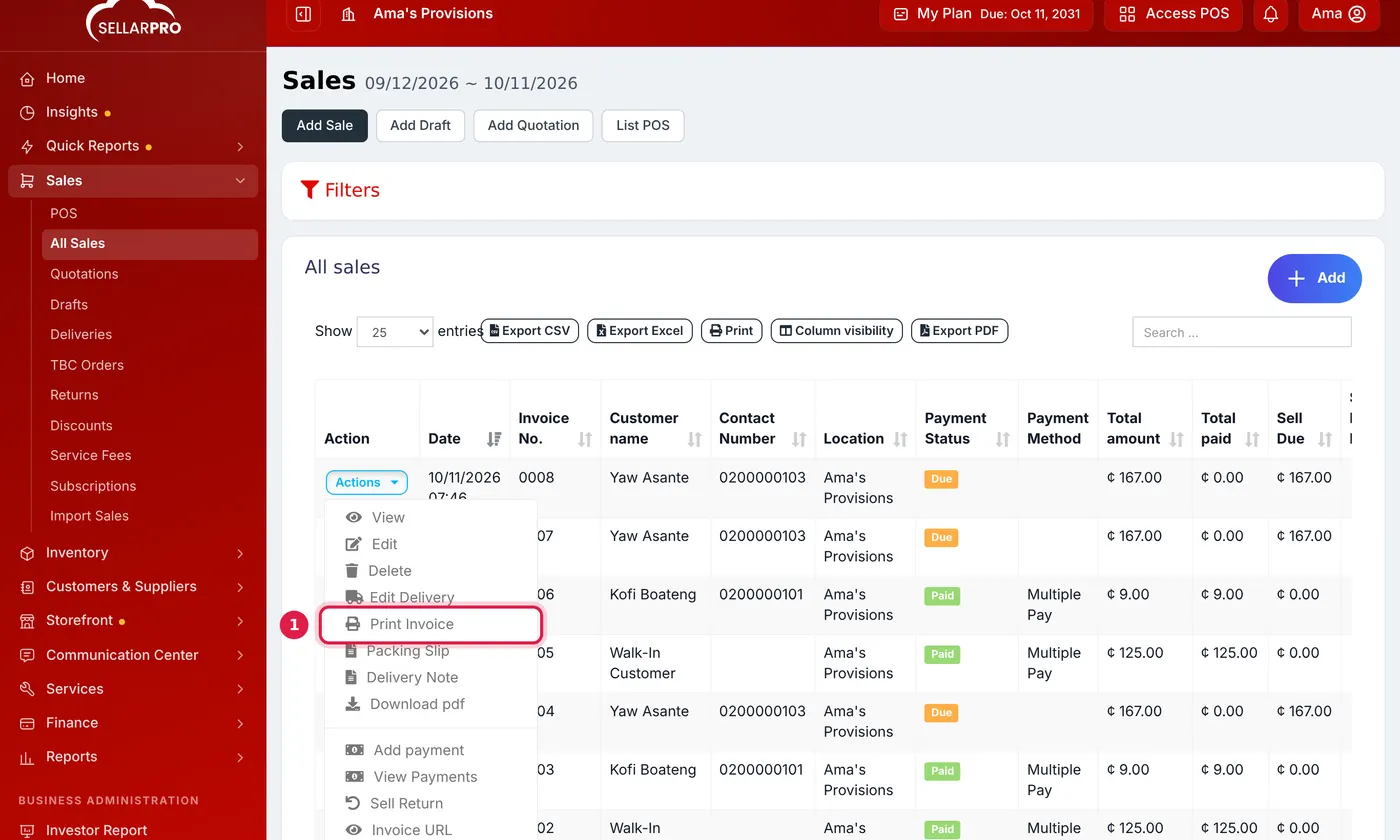
- Print Invoice reprints the receipt on your receipt printer.
- Download pdf saves the invoice as a PDF file to email or WhatsApp.
- Invoice URL gives you a link to the invoice that the customer can open on their phone.
- Packing Slip and Delivery Note print the list of goods without prices, for the person packing or delivering.
- New Sale Notification sends the invoice to the customer by email or SMS, using your notification template.
The receipt's layout (logo, header, footer, QR code) comes from Settings → Invoice Settings. See How to Add a QR Code to Your Receipt.
Common questions
I cannot see Print Invoice.
Your role needs the permission to print invoices. Ask your business owner to tick it under Access Controls → Roles.
Was this article helpful?
Thanks — your answer helps us improve this article.
Still need help?
Can’t find the answer you’re looking for? Our support team in Accra can help.