
All help topics
Help topics
- Getting Started
- Sales & POS
- Products & Inventory
- Purchases & Suppliers
- Customers
- Staff & Permissions
- Reports
- Branches
- Hardware
- Payments
- Settings
- Troubleshooting
- Billing & Subscription
- Workshop
- Training
- Sales Agents
- Laundry
- Accounting
- HR & Payroll
- Hotel
- Services
- Communication Center
- Online Store
- CRM
- Restaurant
- F&B Manager
- Production
- Projects
- Asset Management
- All topics
On this page
How to Edit or Delete a Sale
Open Sales → All Sales, click Actions on the sale and choose Edit to change items, prices or the customer, or View Payments to correct a payment. Delete removes the sale for good and asks for a reason, which is kept in the Deletion Log.
Mistakes happen at the counter. You can correct a sale after it is saved, or delete it if it should never have happened.
Edit a sale
- Open Sales → All Sales, click Actions on the sale and choose Edit.
- Change the items, quantities, prices or customer, and save. Stock moves by the difference.
Correct only the payment
Choose View Payments from Actions to edit or delete a payment, for example a sale recorded as cash that was really MoMo. Use Add payment to record money paid later.
Delete a sale
- Choose Delete from Actions.
- Type why you are deleting it. A reason is required.
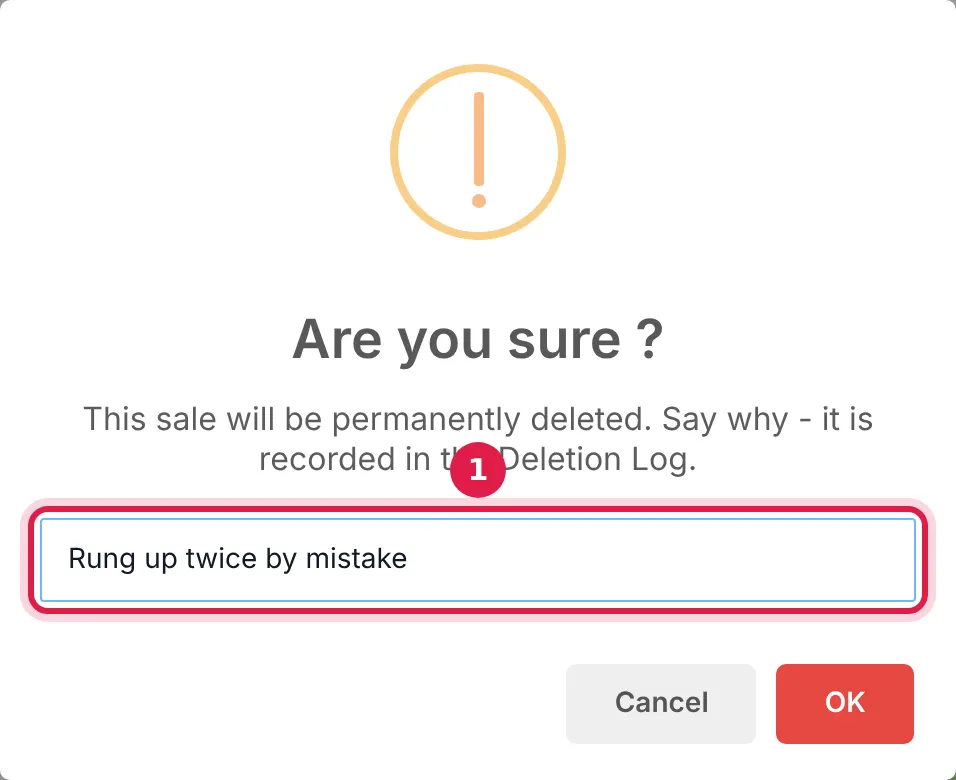
The reason you type is kept in the Deletion Log. - Confirm. The stock comes back and the sale disappears from your reports.
Every deleted sale is kept in Reports → Activity Log → Deletion Log, with what it was worth, who deleted it and why.
Who can do this
Under Access Controls → Roles, the permissions are Edit POS sell and Delete POS sell, and Add/Edit/Delete Payments for payments. Your business can also limit how many days after the sale it can still be edited, with Transaction Edit Days under Settings → Business Settings → Business.
If the customer brought goods back, record a return instead of editing the sale. See How to Handle a Customer Return and Refund.
Common questions
Why can I not edit an old sale?
Can a deleted sale be brought back?
Was this article helpful?
Thanks — your answer helps us improve this article.
Still need help?
Can’t find the answer you’re looking for? Our support team in Accra can help.