
All help topics
Help topics
- Getting Started
- Sales & POS
- Products & Inventory
- Purchases & Suppliers
- Customers
- Staff & Permissions
- Reports
- Branches
- Hardware
- Payments
- Settings
- Troubleshooting
- Billing & Subscription
- Workshop
- Training
- Sales Agents
- Laundry
- Accounting
- HR & Payroll
- Hotel
- Services
- Communication Center
- Online Store
- CRM
- Restaurant
- F&B Manager
- Production
- Projects
- Asset Management
- All topics
On this page
How to Handle a Customer Return and Refund
Short answer
Open Sales → All Sales, click Actions on the sale and choose Sell Return. Enter the Return Quantity for each item. Switch on Refund the customer now to pay them back on the spot, or leave it off to keep the return as credit on their account.
A sell return puts the goods back into stock and reduces what the customer was charged. You choose whether to give the money back now or keep it as credit on their account.
Step 1: open the return
- From Sales → All Sales, click Actions on the sale and choose Sell Return.
- Or on the POS, click Sell Return in the top bar, type the Invoice No. and click Send.
Step 2: enter what came back
- For each item, type the Return Quantity. Leave the others at 0.
- Add a discount on the return if you are keeping part of the price. The Return Total updates as you go.
Step 3: refund now, or keep it as credit
- Switch on Refund the customer now to pay them back. SellarPro suggests the Refund amount: what the customer paid for this sale, less the value of the goods they keep. Change it if you agreed something else, pick the Payment Method and save. It will not let you refund more than the return allows.
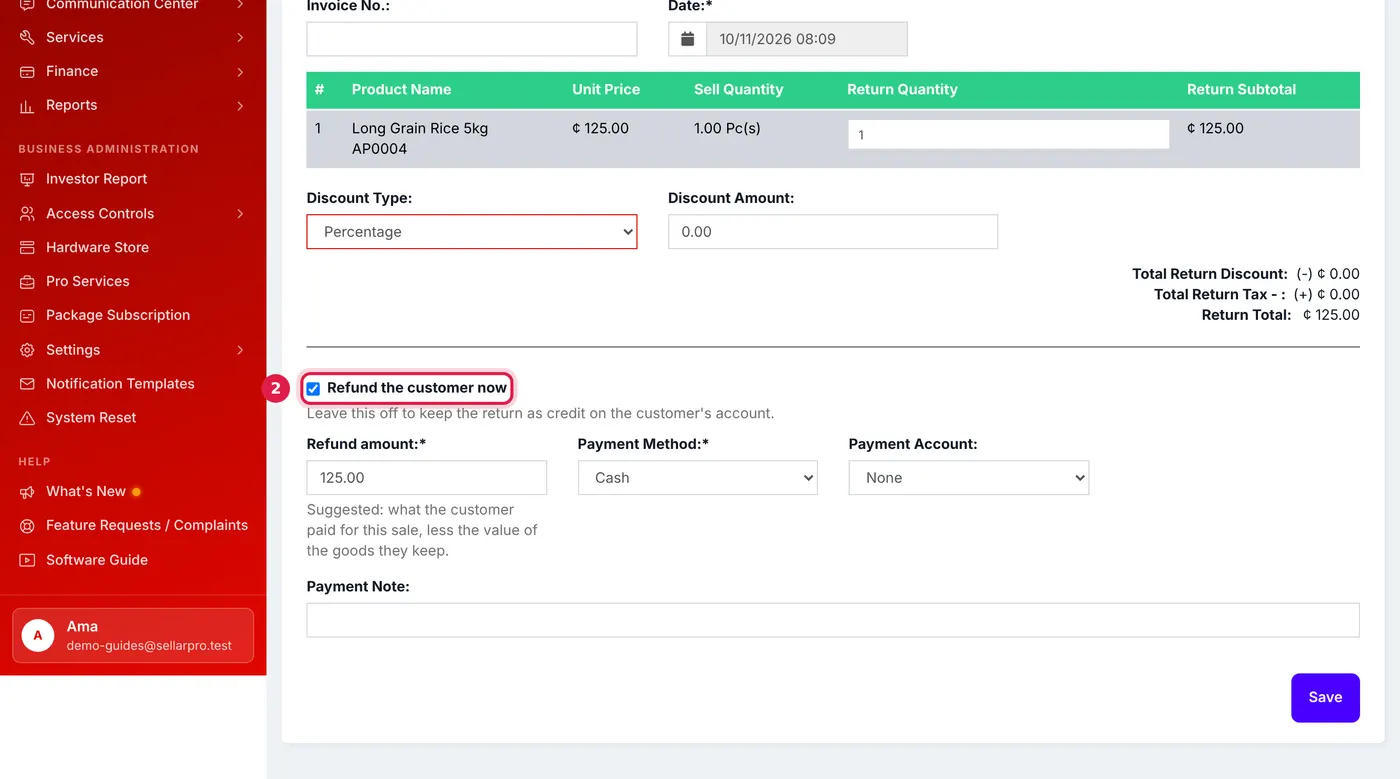
One rice bag returned and refunded in cash. The refund amount is suggested for you. - Leave it off to keep the return as credit on the customer's account. You can pay it out later from Sales → Returns.
What happens next
The returned goods go back into stock, the sale's figures in your reports drop by the return, and a cash refund comes out of the open register as a cash refund.
Common questions
Can I return part of a sale?
Yes. Enter a return quantity only for the items that came back.
Where do I see all returns?
Sales → Returns lists every sell return, with what is still owed to the customer.
The customer wants a different item instead of money.
Record the return without a refund, then make a new sale for the replacement and pay it with the credit from the return.
Was this article helpful?
Thanks — your answer helps us improve this article.
Still need help?
Can’t find the answer you’re looking for? Our support team in Accra can help.