
All help topics
Help topics
- Getting Started
- Sales & POS
- Products & Inventory
- Purchases & Suppliers
- Customers
- Staff & Permissions
- Reports
- Branches
- Hardware
- Payments
- Settings
- Troubleshooting
- Billing & Subscription
- Workshop
- Training
- Sales Agents
- Laundry
- Accounting
- HR & Payroll
- Hotel
- Services
- Communication Center
- Online Store
- CRM
- Restaurant
- F&B Manager
- Production
- Projects
- Asset Management
- All topics
On this page
How to Choose Your Menu and Modules
Open Settings → Menu & Modules. Untick menu items your team does not use to tidy the sidebar, and tick optional modules such as Purchases, Restaurant POS, Services, Production, CRM or Laundry to switch them on for the whole business.
SellarPro does a lot, and most businesses use only part of it. Menu & Modules lets you show only what you need.
Steps
- Open Settings → Menu & Modules.
- Under Main menu, untick anything your team never uses. It disappears from the sidebar for everyone.
- Under Optional modules, tick each feature your business uses, and untick the ones it does not.
- Save.
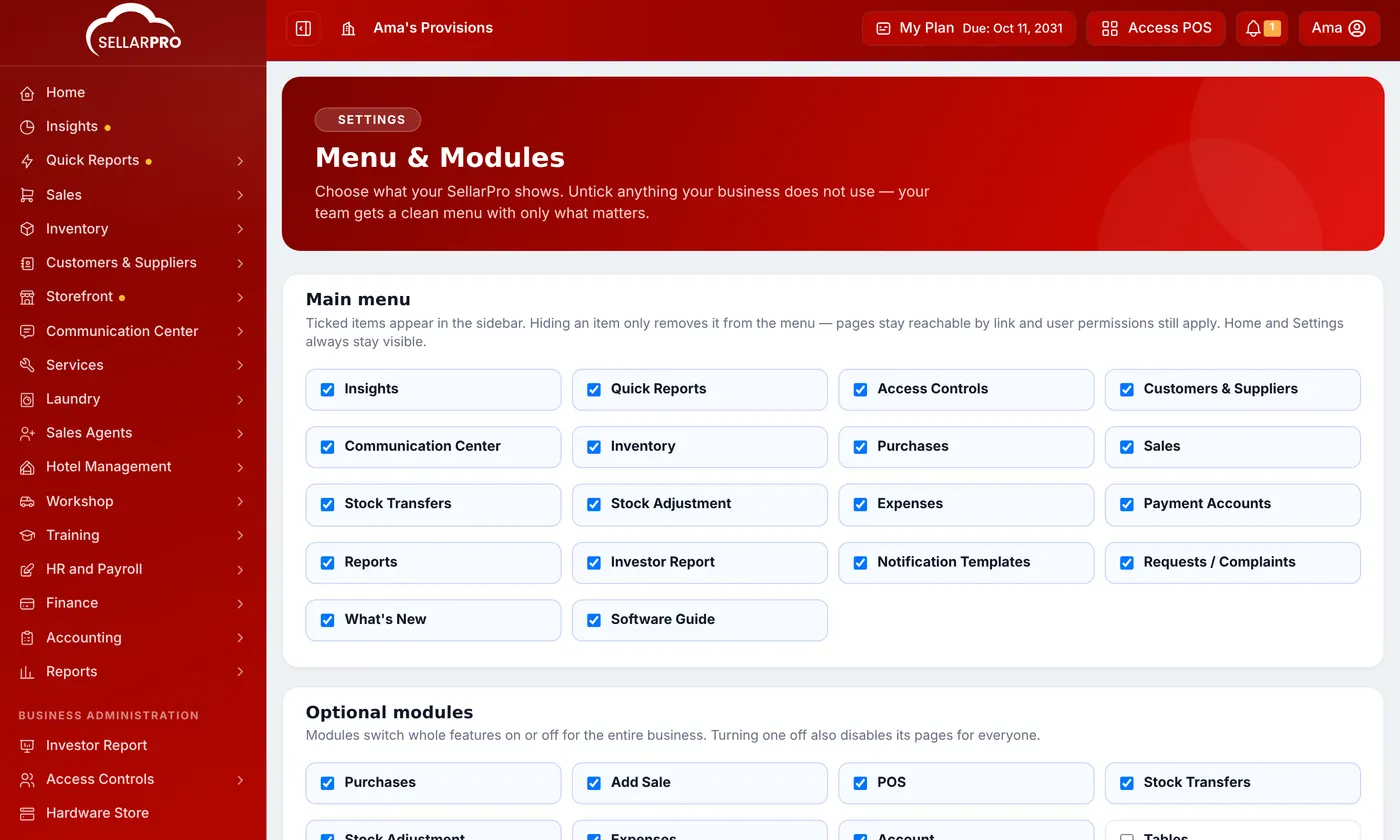
Hiding a menu item is not the same as switching a module off
- Hiding a menu item only removes it from the sidebar. The page still works from a link, and staff permissions still apply.
- Switching a module off turns the whole feature off, for everyone, including its pages.
The optional modules
Among them: Purchases, Add Sale, POS, Stock Transfers, Stock Adjustment, Expenses, Account, the restaurant features (Tables, Modifiers, Kitchen, Restaurant POS, Enable Bookings), Types of service, Enable Subscription, Project Management, Services, To Be Collected (TBC), Service Fee, Production, CRM, Smart Import, F&B Manager, Sale Approvals and Laundry.
Some modules come only with certain plans: Accounting, HR & Payroll, Asset Management, Hotel, Workshop, Training and Sales Agents. They appear in the menu once your plan includes them. See How to Renew or Upgrade Your Plan.
Common questions
Does switching a module off delete its data?
A staff member still cannot see a module I switched on.
Was this article helpful?
Thanks — your answer helps us improve this article.
Still need help?
Can’t find the answer you’re looking for? Our support team in Accra can help.