
All help topics
Help topics
- Getting Started
- Sales & POS
- Products & Inventory
- Purchases & Suppliers
- Customers
- Staff & Permissions
- Reports
- Branches
- Hardware
- Payments
- Settings
- Troubleshooting
- Billing & Subscription
- Workshop
- Training
- Sales Agents
- Laundry
- Accounting
- HR & Payroll
- Hotel
- Services
- Communication Center
- Online Store
- CRM
- Restaurant
- F&B Manager
- Production
- Projects
- Asset Management
- All topics
On this page
How to Renew or Upgrade Your SellarPro Plan
Open Package Subscription. Your current plan and its end date are at the top. Click Renew Plan to extend it, or Upgrade or Switch Plan on another plan, choose how many months, and pay. Days left on your current plan are carried forward to the new one.
Your plan decides how many branches and users you can have and which modules you get. You can renew it, or move to another plan, at any time.
Steps
- Open Package Subscription from the menu.
- Check Current Plan and Valid Until at the top.
- Click Renew Plan to extend the plan you have, or Upgrade or Switch Plan on the plan you want. Each plan lists its branches, users and included modules.
- On Complete Your Subscription, choose the Billing Duration: 1, 3, 6, 12 or 24 months.
- Check the Order Summary, choose a payment method and pay.
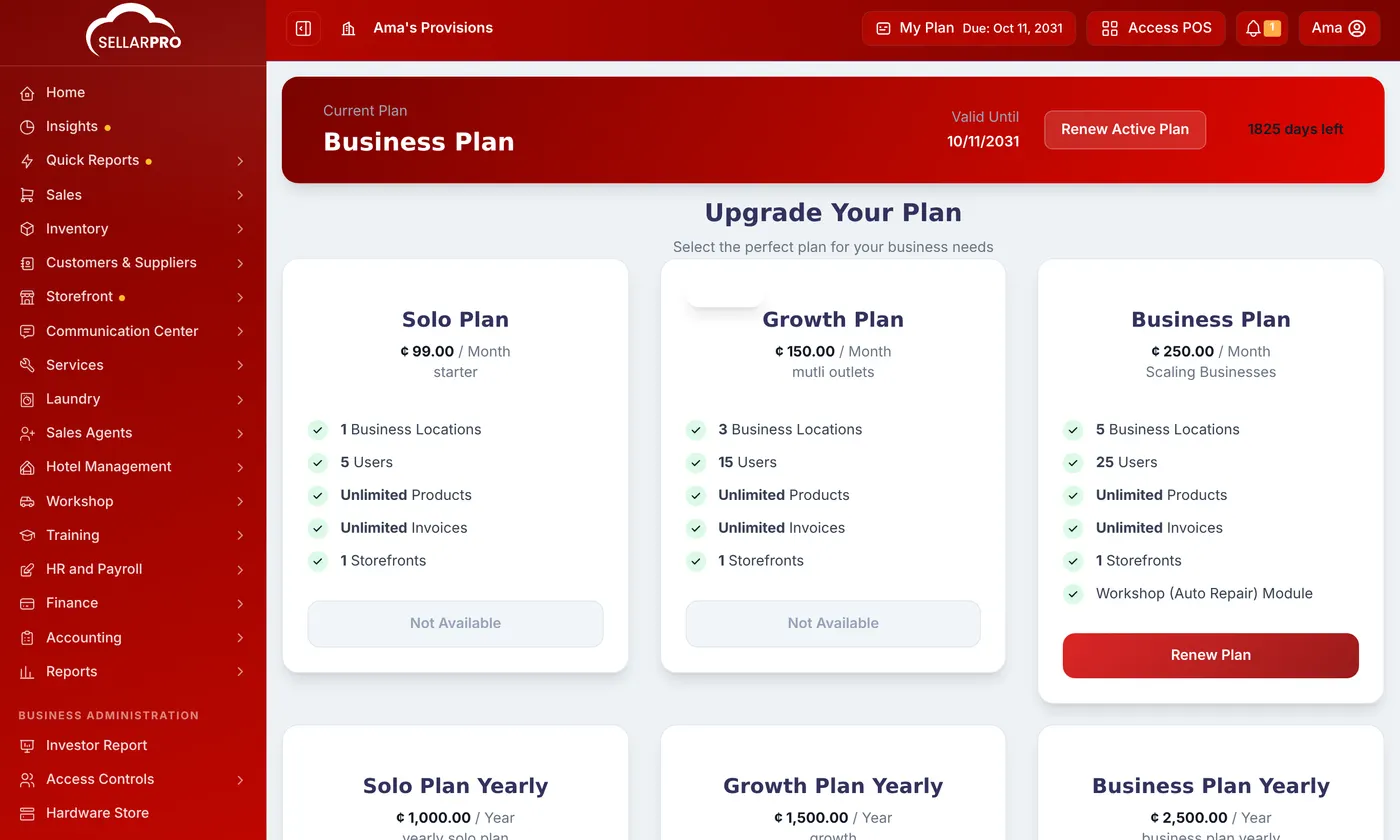
What happens to the days you have left
When you move to another plan, the value of the time left on your current plan is turned into days on the new one. Your remaining time carries forward on the payment page shows exactly how many.
A payment that needs checking by SellarPro, such as a bank transfer, appears under Pending Approval until it is confirmed. Past payments are under Subscription History.
Renew before Valid Until to keep trading without a break. The menu shows how many days you have left.
Common questions
What happens when my plan runs out?
I need a module my plan does not have.
Was this article helpful?
Thanks — your answer helps us improve this article.
Still need help?
Can’t find the answer you’re looking for? Our support team in Accra can help.