
All help topics
Help topics
- Getting Started
- Sales & POS
- Products & Inventory
- Purchases & Suppliers
- Customers
- Staff & Permissions
- Reports
- Branches
- Hardware
- Payments
- Settings
- Troubleshooting
- Billing & Subscription
- Workshop
- Training
- Sales Agents
- Laundry
- Accounting
- HR & Payroll
- Hotel
- Services
- Communication Center
- Online Store
- CRM
- Restaurant
- F&B Manager
- Production
- Projects
- Asset Management
- All topics
On this page
How to Set Up Reward Points for Customers
Short answer
Open Settings → Business Settings → Reward Point Settings and tick Enable Reward Point. Set how much a customer spends to earn one point, and what a point is worth when redeemed. At the POS, redeem points in the Discount window.
Reward points bring customers back: they earn points on every purchase and spend them as a discount later.
Step 1: switch it on
- Open Settings → Business Settings and go to Reward Point Settings.
- Tick Enable Reward Point and give them a Reward Point Display Name, such as "Loyalty points".
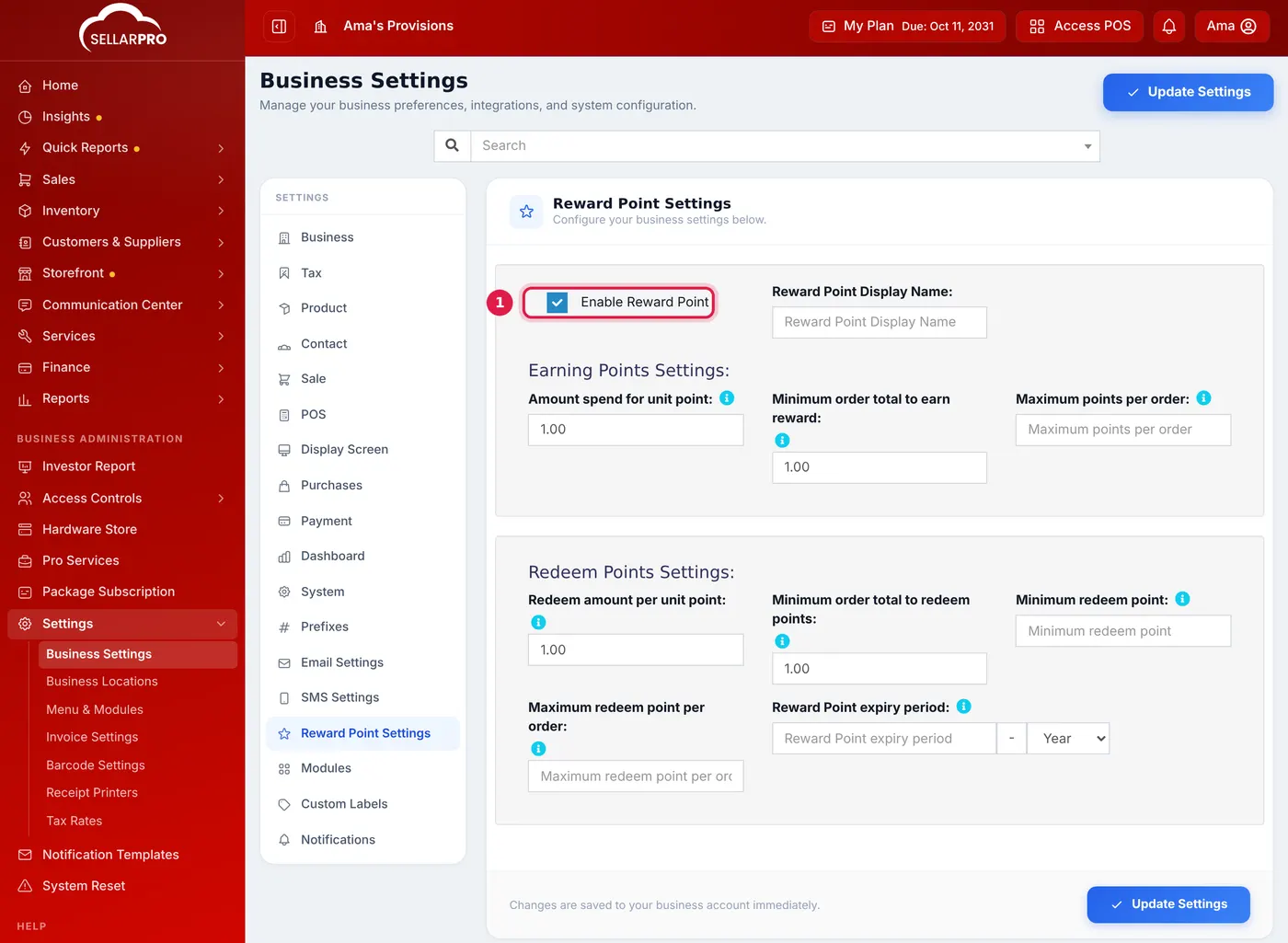
Earning settings at the top, redeeming settings below.
Step 2: how points are earned
- Amount spend for unit point: how much a customer spends to earn one point. At 10, a sale of 1,000 earns 100 points.
- Minimum order total to earn reward: smaller sales earn nothing.
- Maximum points per order: leave it empty for no cap.
Step 3: how points are spent
- Redeem amount per unit point: what one point is worth. Enter 1 if one point is worth 1, or 0.50 if two points are worth 1.
- Minimum order total to redeem points, Minimum redeem point and Maximum redeem point per order: optional limits.
- Reward Point expiry period: points older than this are removed automatically.
Save the settings.
Redeem points at the POS
- Select the customer and add the items.
- Open the Discount window. It shows the points Available.
- Enter the points in Redeemed. The Redeemed Amount comes off the sale. Click Update.
Each customer's Reward Points tab shows what they have Earned and Redeemed.
Common questions
Does a walk-in customer earn points?
No. Points are kept on a named customer's account.
Was this article helpful?
Thanks — your answer helps us improve this article.
Still need help?
Can’t find the answer you’re looking for? Our support team in Accra can help.