
All help topics
Help topics
- Getting Started
- Sales & POS
- Products & Inventory
- Purchases & Suppliers
- Customers
- Staff & Permissions
- Reports
- Branches
- Hardware
- Payments
- Settings
- Troubleshooting
- Billing & Subscription
- Workshop
- Training
- Sales Agents
- Laundry
- Accounting
- HR & Payroll
- Hotel
- Services
- Communication Center
- Online Store
- CRM
- Restaurant
- F&B Manager
- Production
- Projects
- Asset Management
- All topics
How to Set Up Recurring Sales (Subscriptions)
Switch on Enable Subscription under Settings → Business Settings → Modules. On a sale, tick Subscribe? and set the Subscription Interval and No. of Repetitions. SellarPro raises the invoice again automatically, and Sales → Subscriptions lists them all.
If a customer buys the same thing every week or month, such as a supply contract, rent or a membership, SellarPro can raise the invoice for you each time.
Step 1: switch it on
Open Settings → Business Settings → Modules, tick Enable Subscription and save.
Step 2: make the first sale a subscription
- Create the sale for the customer as usual.
- Tick Subscribe? and open the settings beside it.
- Choose the Subscription Interval in days, months or years.
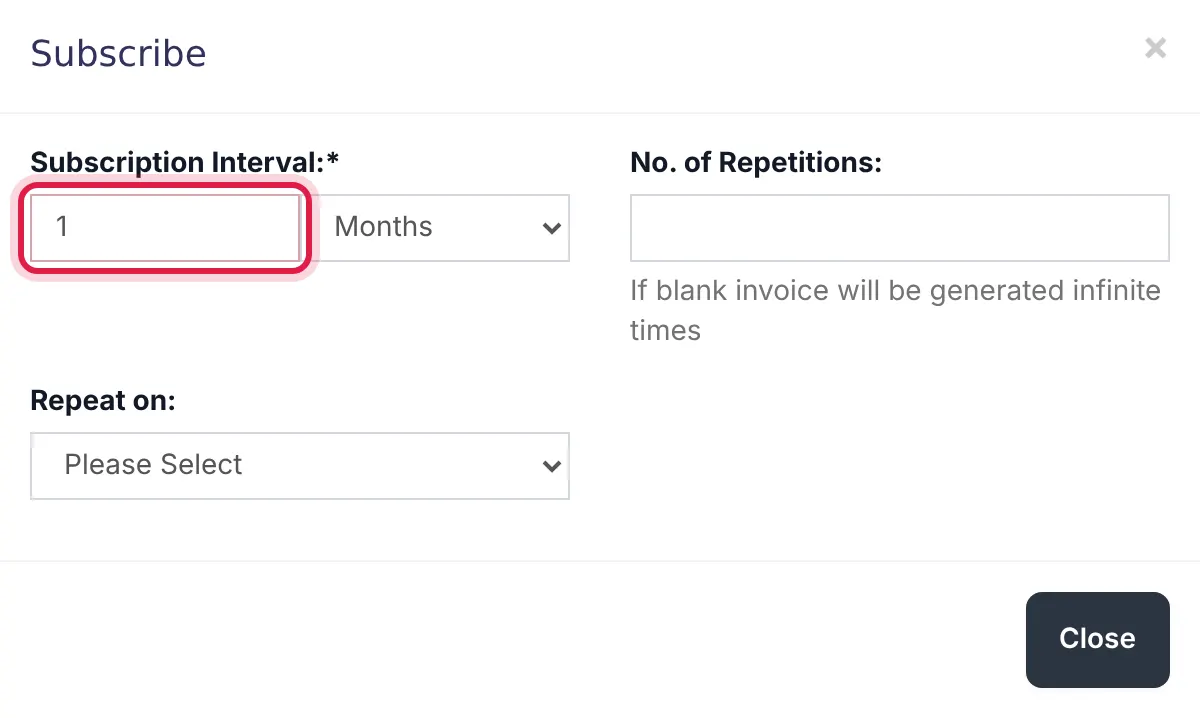
Every 1 month, with no limit on repetitions. - Set No. of Repetitions. Leave it blank to repeat until you stop it.
- For monthly invoices, choose the day in Repeat on.
- Save the sale.
Each new invoice is created automatically late in the evening on the day it is due.
Manage subscriptions
Open Sales → Subscriptions to see them all. Use Stop Subscription to pause one and Start Subscription to resume it.
Common questions
Are recurring invoices paid automatically?
Was this article helpful?
Thanks — your answer helps us improve this article.
Still need help?
Can’t find the answer you’re looking for? Our support team in Accra can help.