
All help topics
Help topics
- Getting Started
- Sales & POS
- Products & Inventory
- Purchases & Suppliers
- Customers
- Staff & Permissions
- Reports
- Branches
- Hardware
- Payments
- Settings
- Troubleshooting
- Billing & Subscription
- Workshop
- Training
- Sales Agents
- Laundry
- Accounting
- HR & Payroll
- Hotel
- Services
- Communication Center
- Online Store
- CRM
- Restaurant
- F&B Manager
- Production
- Projects
- Asset Management
- All topics
On this page
How to Set Up Payment Accounts
Open Finance → List Accounts and click Add for each place money sits: the cash drawer, each MoMo wallet, each bank account. Under Payment methods, choose which methods post to it, so every sale and payment lands in the right account and your balances stay true.
A payment account is a place your money sits: the cash drawer, a MoMo wallet, a bank account. With accounts set up, SellarPro shows the balance of each, and your dashboard shows what you have across all of them.
Add an account
- Open Finance → List Accounts and click Add.
- Enter the Name, such as "MTN MoMo 024…" or "GCB current account", and the Account Number.
- Choose the Account Type if you use them, and the Opening Balance: what is in it today.
- Under Payment methods, for each branch, choose the methods whose payments land here: Cash for the cash account, MOMO for the MoMo wallet, Bank Transfer for the bank. Leave a branch on Not mapped to any method if this account is not used there.
- Save.
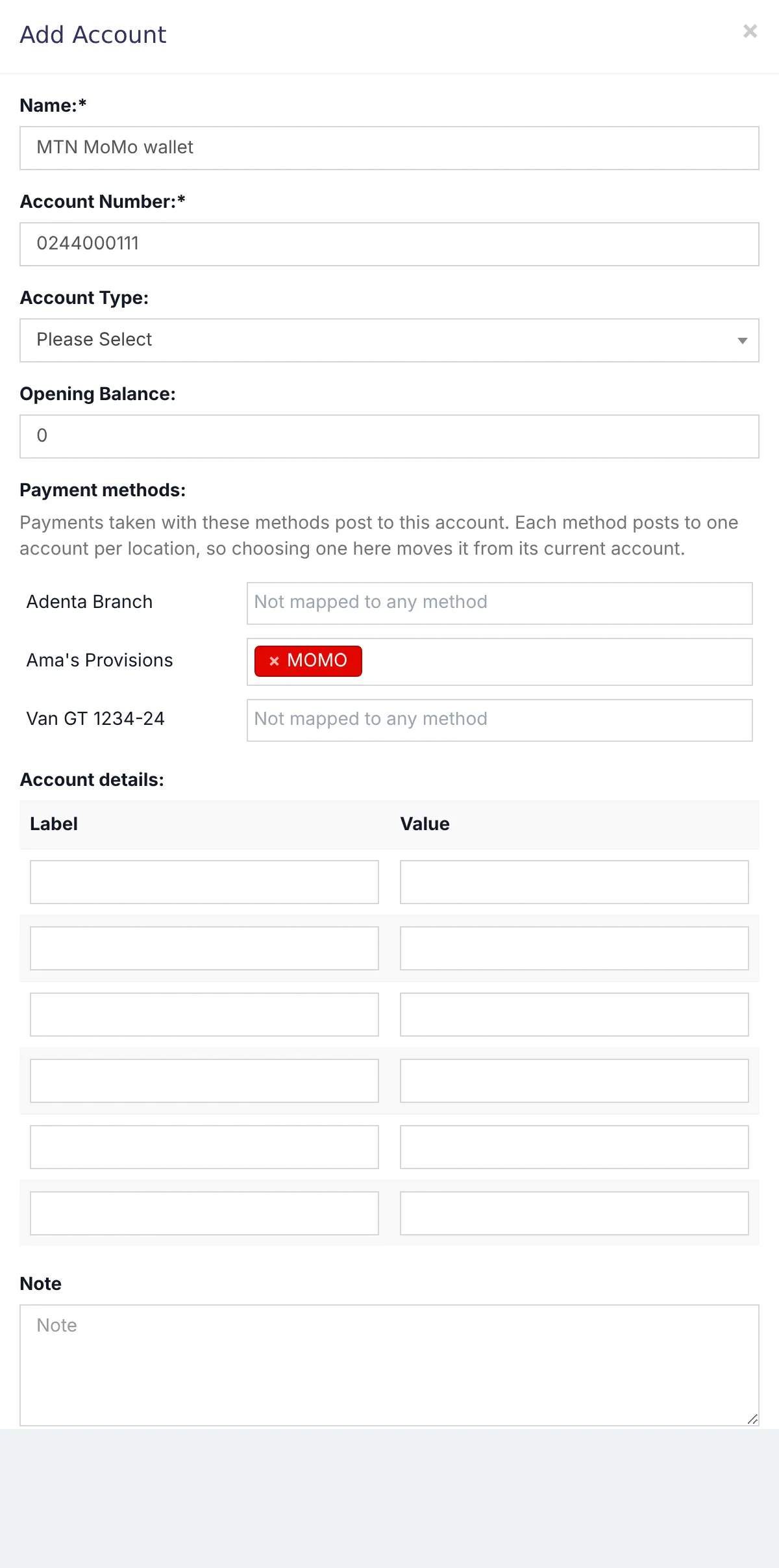
Each method posts to one account per branch. If payments with that method were already taken, SellarPro offers to post those earlier payments to the new account too. Choose a start date if you only want recent ones.
Day to day
- Fund Transfer moves money between accounts, for example banking the day's cash.
- Deposit records money paid in from outside sales, such as a loan.
- Account Book on an account lists every movement with a running balance.
- Finance → Payment Account Report lists every payment and the account it went to. A payment with no account has a Link Account button.
Common questions
The page says some payments are not linked with any account.
Can I close an account?
Was this article helpful?
Thanks — your answer helps us improve this article.
Still need help?
Can’t find the answer you’re looking for? Our support team in Accra can help.