
All help topics
Help topics
- Getting Started
- Sales & POS
- Products & Inventory
- Purchases & Suppliers
- Customers
- Staff & Permissions
- Reports
- Branches
- Hardware
- Payments
- Settings
- Troubleshooting
- Billing & Subscription
- Workshop
- Training
- Sales Agents
- Laundry
- Accounting
- HR & Payroll
- Hotel
- Services
- Communication Center
- Online Store
- CRM
- Restaurant
- F&B Manager
- Production
- Projects
- Asset Management
- All topics
On this page
How to Set Up F&B Manager
Switch on F&B Manager under Settings → Menu & Modules. Mark your ingredients, packaging and consumables Not for selling on the product form and give them stock. They then appear under F&B Manager → Inventory, where you set each one's type, reorder point and supplier. Check F&B Manager → Settings for your thresholds.
F&B Manager tracks what a kitchen or bar holds and uses: ingredients, packaging, consumables and things you prepare yourself. It shows what is running out, what was used and what was thrown away.
Switch on F&B Manager under Settings → Menu & Modules.
Step 1: mark your materials
- Add each ingredient, packaging item or consumable as a product, such as "Flour (50kg bag)" or "Takeaway box", with what it costs you.
- On the product form, open More Fields and tick Not for selling. It then never shows at the till.
- Give it stock: record the purchase, or use Bulk Opening Stock for what you already hold.
Step 2: set types and reorder points
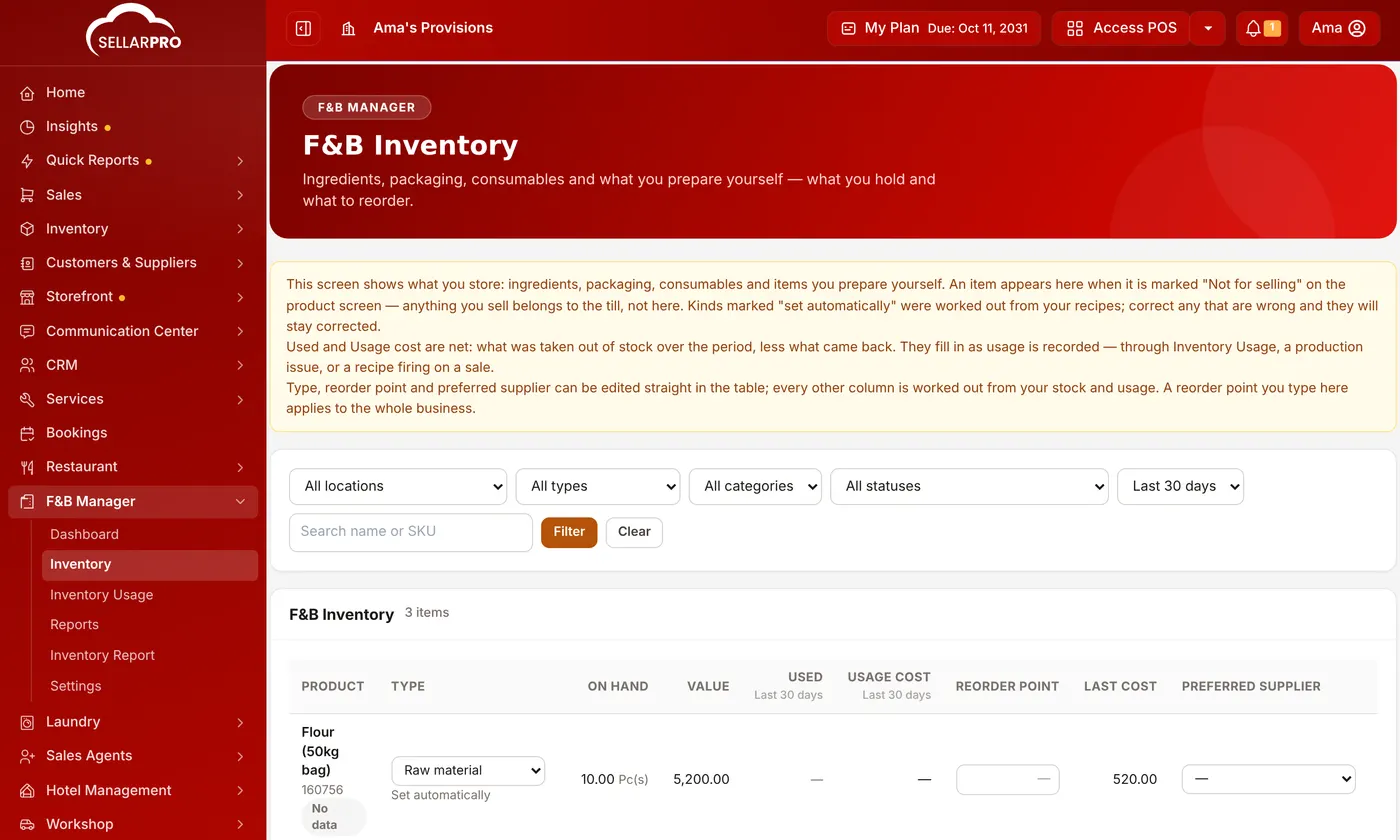
Open F&B Manager → Inventory. Every material is listed with what you hold. Straight in the table, set its Type (Raw material, Packaging, Consumable or Prepared in-house), its reorder point and its preferred supplier. Each item's status then shows: Out of stock, Below minimum, Reorder now or OK.
Step 3: check the settings
Open F&B Manager → Settings. The defaults suit most kitchens:
- Alerts & thresholds: how many days ahead to warn about expiry, and how much consumption or waste may drift before it is flagged.
- Reordering: supplier lead time, safety stock in days of cover, how often you order, and the period used to measure average daily use.
- Stock & costing policies: what happens when usage would take stock below zero. Allow it and record the shortfall is the default, because a kitchen that runs out mid-service still has to serve.
Common questions
Does selling a drink take ingredients out of stock?
Was this article helpful?
Thanks — your answer helps us improve this article.
Still need help?
Can’t find the answer you’re looking for? Our support team in Accra can help.