
All help topics
Help topics
- Getting Started
- Sales & POS
- Products & Inventory
- Purchases & Suppliers
- Customers
- Staff & Permissions
- Reports
- Branches
- Hardware
- Payments
- Settings
- Troubleshooting
- Billing & Subscription
- Workshop
- Training
- Sales Agents
- Laundry
- Accounting
- HR & Payroll
- Hotel
- Services
- Communication Center
- Online Store
- CRM
- Restaurant
- F&B Manager
- Production
- Projects
- Asset Management
- All topics
On this page
How to See Who Changed a Product's Price
Open Reports → Activity Log → Adjustment Log and choose the Price changes tab. Every change to a selling price, cost or price-group price is listed with the price before and after, where it was changed from, and who changed it.
A price that was dropped for an afternoon and put back is easy to miss and costly. SellarPro now keeps a permanent record of every price change.
Steps
- Open Reports → Activity Log → Adjustment Log.
- Choose the Price changes tab.
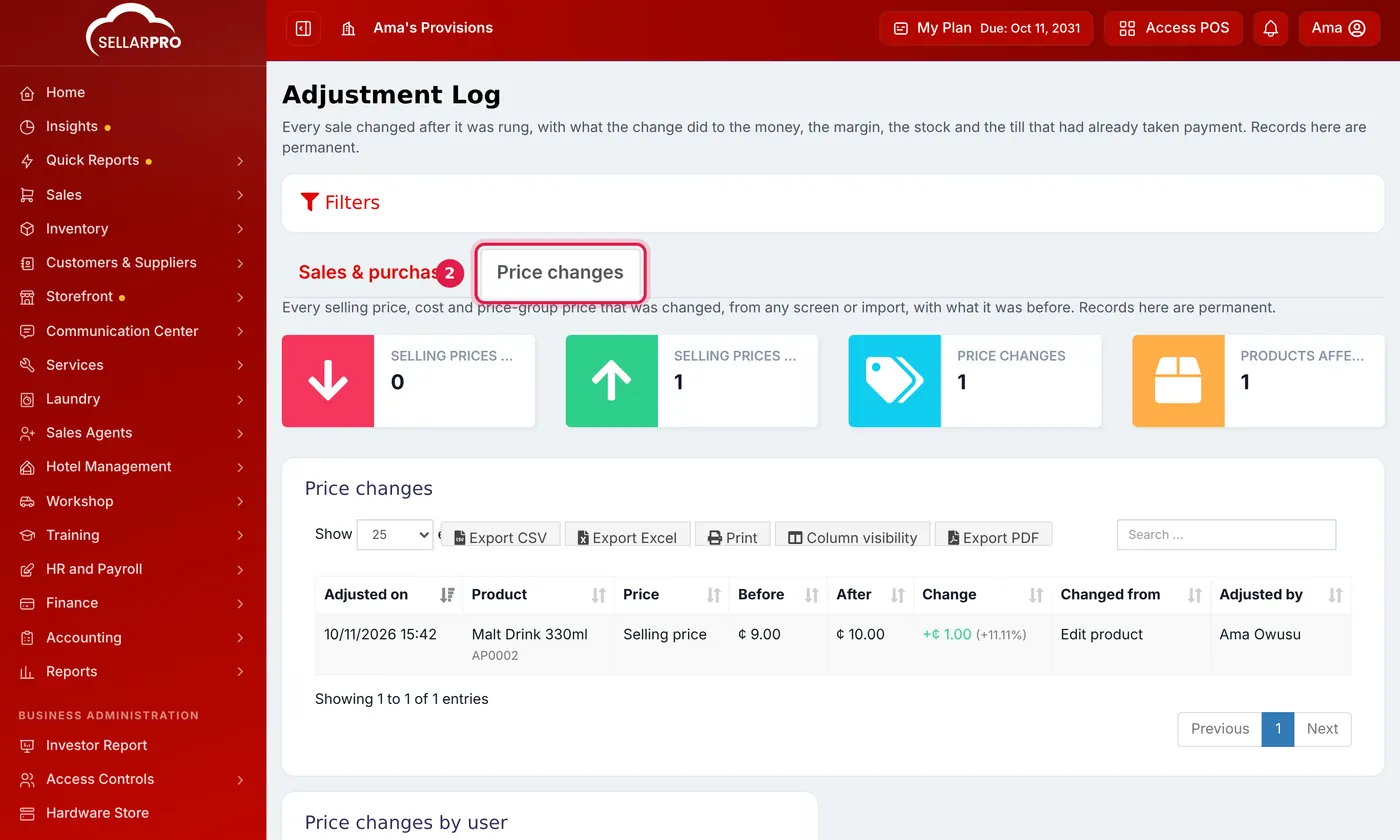
Every price change, with the price before and after, where it was changed and who changed it.
What you see
- The price before and after, the change and the percentage.
- Which price it was: selling price, cost, or a price-group price.
- Where it was changed: product edit, bulk edit, an import, the price-group screen or a purchase.
- Who made the change and when.
The summary lists cuts to selling prices first, because those are what cost you money. Price changes by user shows who changes prices most.
Records are permanent and cannot be edited or deleted. Like the rest of the Adjustment Log, this tab is for admins only.
What is not a price change
- Adding a new product.
- Saving a product without changing its price, even if the number was typed differently (50 and 50.00).
Common questions
Are price changes from before this feature listed?
Can a manager see the log?
Was this article helpful?
Thanks — your answer helps us improve this article.
Still need help?
Can’t find the answer you’re looking for? Our support team in Accra can help.