
All help topics
Help topics
- Getting Started
- Sales & POS
- Products & Inventory
- Purchases & Suppliers
- Customers
- Staff & Permissions
- Reports
- Branches
- Hardware
- Payments
- Settings
- Troubleshooting
- Billing & Subscription
- Workshop
- Training
- Sales Agents
- Laundry
- Accounting
- HR & Payroll
- Hotel
- Services
- Communication Center
- Online Store
- CRM
- Restaurant
- F&B Manager
- Production
- Projects
- Asset Management
- All topics
On this page
How to Create an Investor Report
Open Investor Report in the menu, choose the period, location and the areas to include, then click Generate report. Download it as a PDF or Excel workbook, email it to up to ten people, or share a private link that needs no login.
Investors, partners and banks want a clear picture of how the business is doing. The Investor Report puts your sales, profit, stock and more into one document, using exactly the same figures as your own Reports pages.
Before you start
Admins can use it straight away. For other staff, open Access Controls → Roles and grant Generate, view and download investor reports, and, if they will send it out, Email investor reports and manage their private links.
Steps
- Open Investor Report, under Business administration in the menu.
- Give it a Report title.
- Choose the Period: this or last month, quarter, year or financial year, or custom dates.
- Choose a location, or all locations you can access.
- Tick Compare with the previous period of the same length if you want growth figures.
- Under Areas to include, pick any of: Sales, Profit & Loss, Purchases & Sales, Expenses, Inventory, Product Trending, Tax and Staff Performance. Inventory Usage is also offered if you use F&B Manager.
- Optionally Save these choices as a preset, for example "Quarterly investor pack".
- Click Generate report.
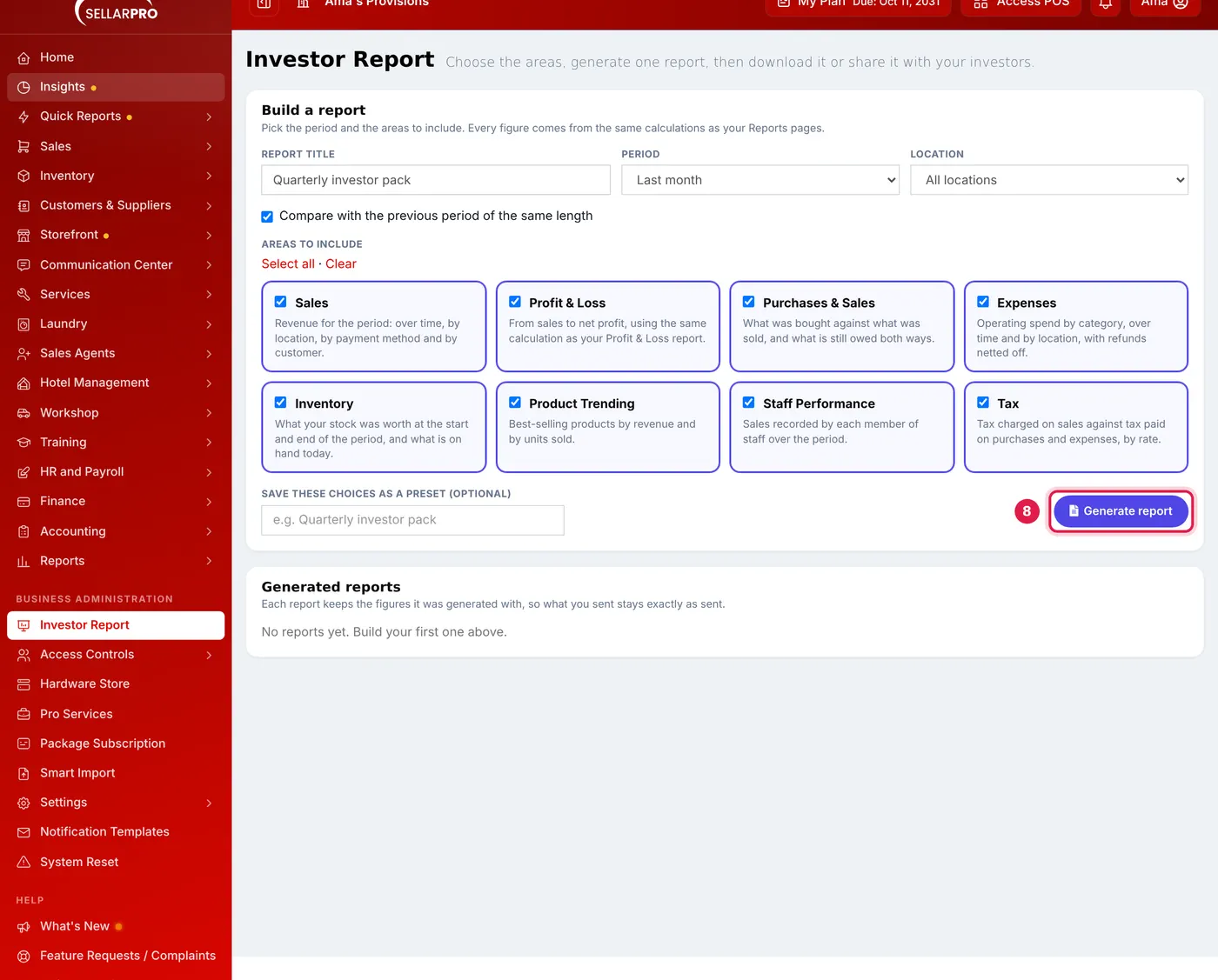
Pick the period and the areas, then Generate report.
Sharing it
- Download PDF: a formatted document with a cover, contents and page numbers.
- Download Excel: one sheet per area, with real numbers you can work with.
- Email to investors: send the PDF to up to ten addresses from your business email settings, with an optional private link.
- Private link: anyone with the link can view and download this report without signing in. Nothing else in your account is visible. Set how long it lasts, replace it, or revoke it at any time.
The report's Activity shows when it was downloaded, emailed and opened through the link.
What happens next
Each report keeps the figures it was generated with. If a sale from that period is edited later, the report you sent does not change. Generate a new one to see the latest figures. Past reports are listed under Generated reports.
Common problems
"Choose at least one area to include"
Tick at least one area before generating.
The email was not sent
The PDF is sent through your business's own email settings. Check those under Settings, or download the PDF and send it yourself.
Common questions
Do the figures match my Reports pages?
Can an investor see the rest of my account through the link?
Was this article helpful?
Thanks — your answer helps us improve this article.
Still need help?
Can’t find the answer you’re looking for? Our support team in Accra can help.