
All help topics
Help topics
- Getting Started
- Sales & POS
- Products & Inventory
- Purchases & Suppliers
- Customers
- Staff & Permissions
- Reports
- Branches
- Hardware
- Payments
- Settings
- Troubleshooting
- Billing & Subscription
- Workshop
- Training
- Sales Agents
- Laundry
- Accounting
- HR & Payroll
- Hotel
- Services
- Communication Center
- Online Store
- CRM
- Restaurant
- F&B Manager
- Production
- Projects
- Asset Management
- All topics
On this page
How to See Deleted and Changed Sales
Short answer
Open Reports → Activity Log. The Deletion Log lists every deleted sale, purchase, expense, adjustment, return and payment, what it was worth, who deleted it and why. The Adjustment Log lists every sale changed after it was rung up and every price change. Both are permanent.
A sale deleted or reduced after the money was taken is the commonest way cash goes missing. Two logs record every such change, and nobody can edit or clear them.
Deletion Log
- Open Reports → Activity Log and choose Deletion Log.
- Read the cards: Payments deleted, Payment gone, invoice kept, Deleted own takings (staff deleting payments they took themselves) and Documents deleted.
- The list shows each deletion: when, the type, the invoice, the customer, the amount and what was paid, who received the money, who deleted it and the Reason. Click View to see the deleted document.
- Deletions by user shows who deletes most.
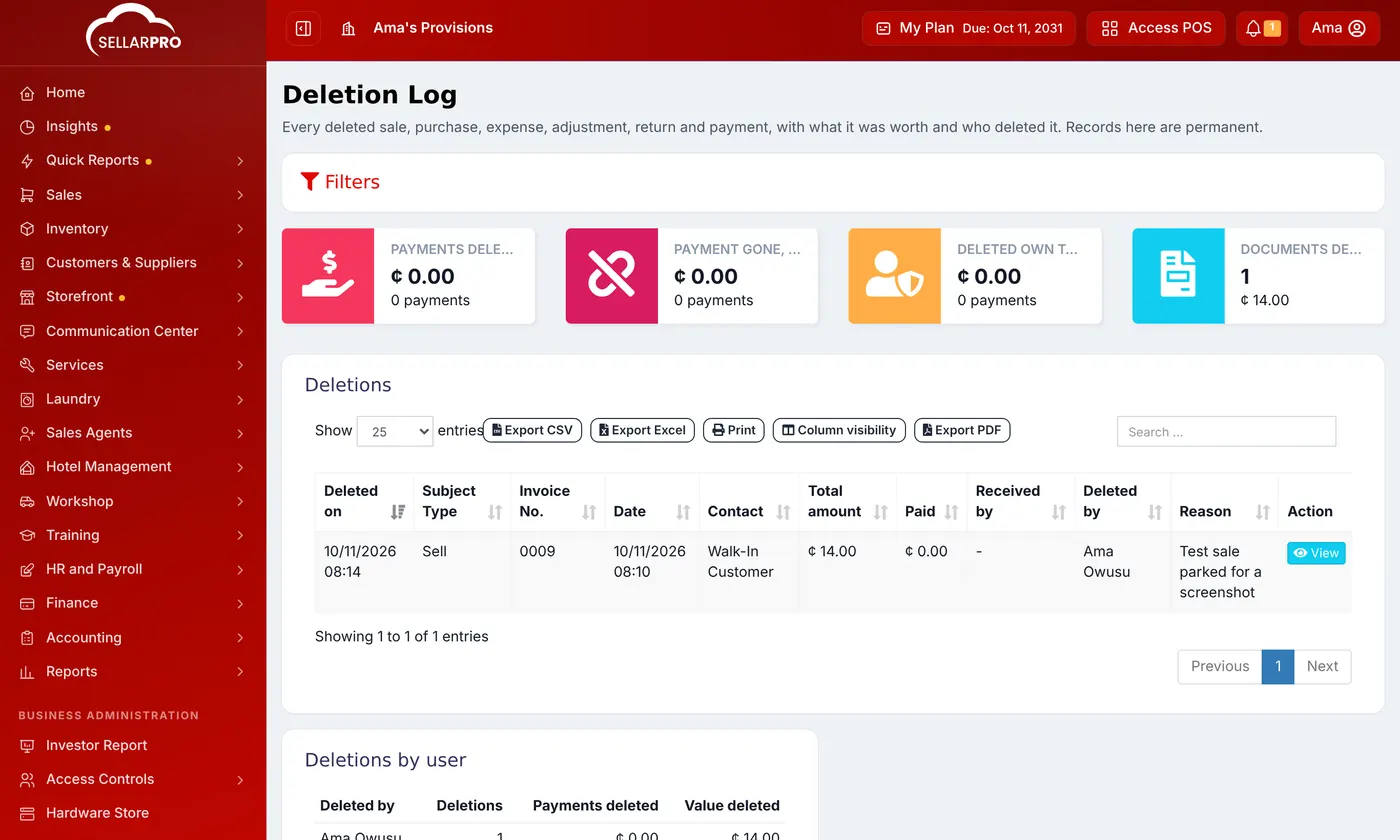
Anyone deleting a sale has to give a reason.
Adjustment Log
- Open Reports → Activity Log and choose Adjustment Log.
- On Sales & purchases, every sale changed after it was rung up: what the change did to the money, the margin and the stock, and whether money came back off a till. The cards show Taken off settled invoices, Money back off a till and Margin lost.
- On Price changes, every price change. See How to See Who Changed a Price.
Both logs are for admins. Check them weekly: a pattern of edits after payment is worth a conversation.
Was this article helpful?
Thanks — your answer helps us improve this article.
Still need help?
Can’t find the answer you’re looking for? Our support team in Accra can help.