
All help topics
Help topics
- Getting Started
- Sales & POS
- Products & Inventory
- Purchases & Suppliers
- Customers
- Staff & Permissions
- Reports
- Branches
- Hardware
- Payments
- Settings
- Troubleshooting
- Billing & Subscription
- Workshop
- Training
- Sales Agents
- Laundry
- Accounting
- HR & Payroll
- Hotel
- Services
- Communication Center
- Online Store
- CRM
- Restaurant
- F&B Manager
- Production
- Projects
- Asset Management
- All topics
On this page
How to Run Production and Issue Materials
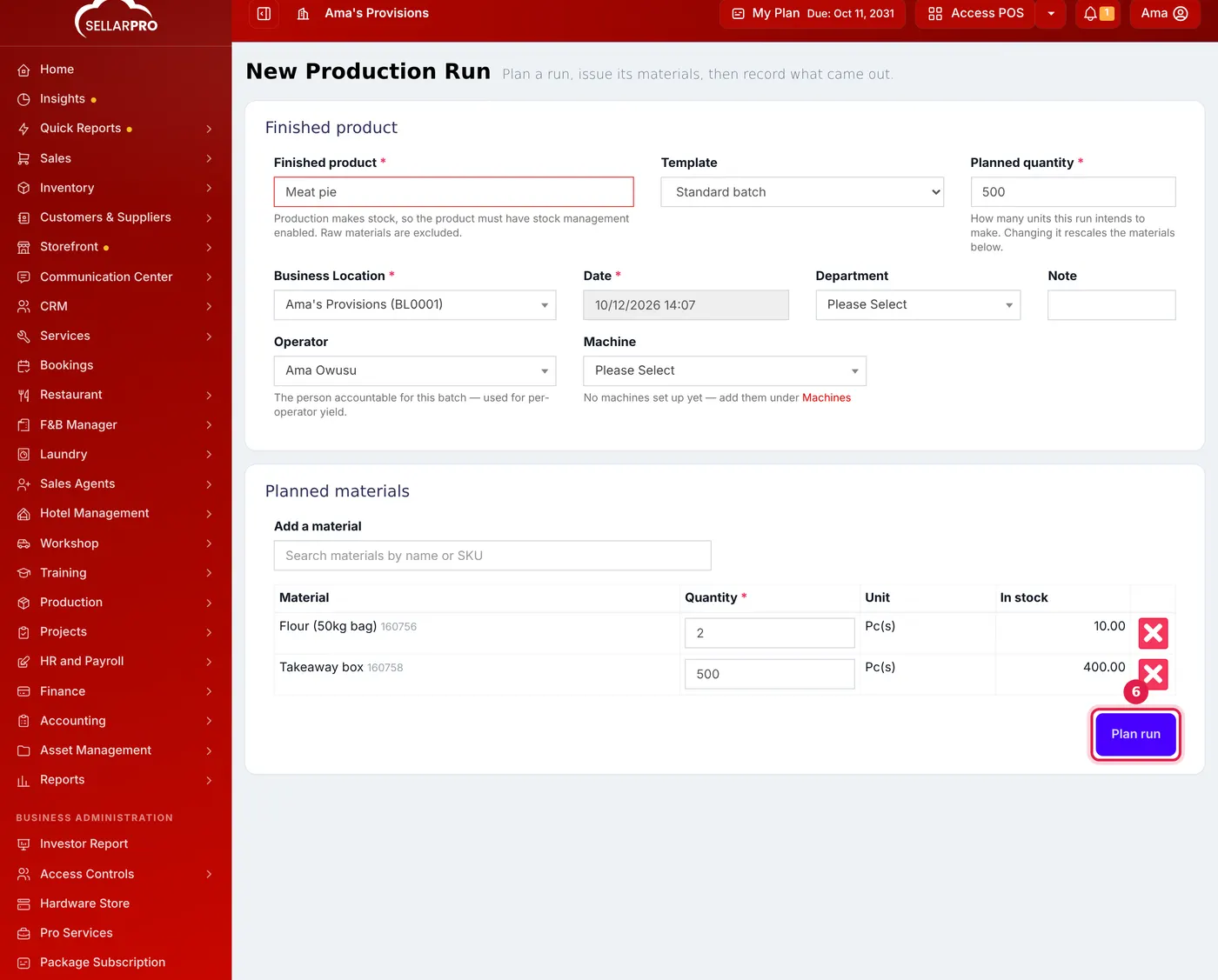
Open Production → Production Runs → New Production Run. Choose the finished product and template, the planned quantity, location, department, operator and machine, and click Plan run. Issue the materials, then record the good output and any scrap. For materials used outside a run, use Material Issues, which can need approval.
Run a batch
- Open Production → Production Runs and click New Production Run.
- Choose the Finished product and its Template, or One-off for a run with no template.
- Enter the Planned quantity. The materials below are scaled to it.
- Choose the Business Location, the Date, and the Department, Operator and Machine if you track them.
- Check the Planned materials against what is in stock, and click Plan run.
- When work starts, open the run and click Issue materials. Adjust any quantity to what you really draw; the materials come out of stock.
- When the batch is finished, click Record output and enter the Good output and any Scrap / rejects. The good units go into stock, valued at the run's material cost.
Each run is costed from the actual cost of the materials used, plus labour and overhead if you record them. Cancel run returns the materials to stock and removes any goods the run produced.
Issue materials outside a run
For materials a department takes for something else, such as cleaning or maintenance:
- Open Production → New Material Issue.
- Choose the location, date and Department, and the Reason.
- Add the materials and quantities. The available stock and estimated cost are shown.
- Click Submit for approval, or Save as draft. Stock moves once the issue is approved.
Set up your departments and machines under Production → Departments & Machines, so reports show who used what.
Was this article helpful?
Thanks — your answer helps us improve this article.
Still need help?
Can’t find the answer you’re looking for? Our support team in Accra can help.