
All help topics
Help topics
- Getting Started
- Sales & POS
- Products & Inventory
- Purchases & Suppliers
- Customers
- Staff & Permissions
- Reports
- Branches
- Hardware
- Payments
- Settings
- Troubleshooting
- Billing & Subscription
- Workshop
- Training
- Sales Agents
- Laundry
- Accounting
- HR & Payroll
- Hotel
- Services
- Communication Center
- Online Store
- CRM
- Restaurant
- F&B Manager
- Production
- Projects
- Asset Management
- All topics
On this page
How to Read the Sales Agents Dashboard and Reports
Short answer
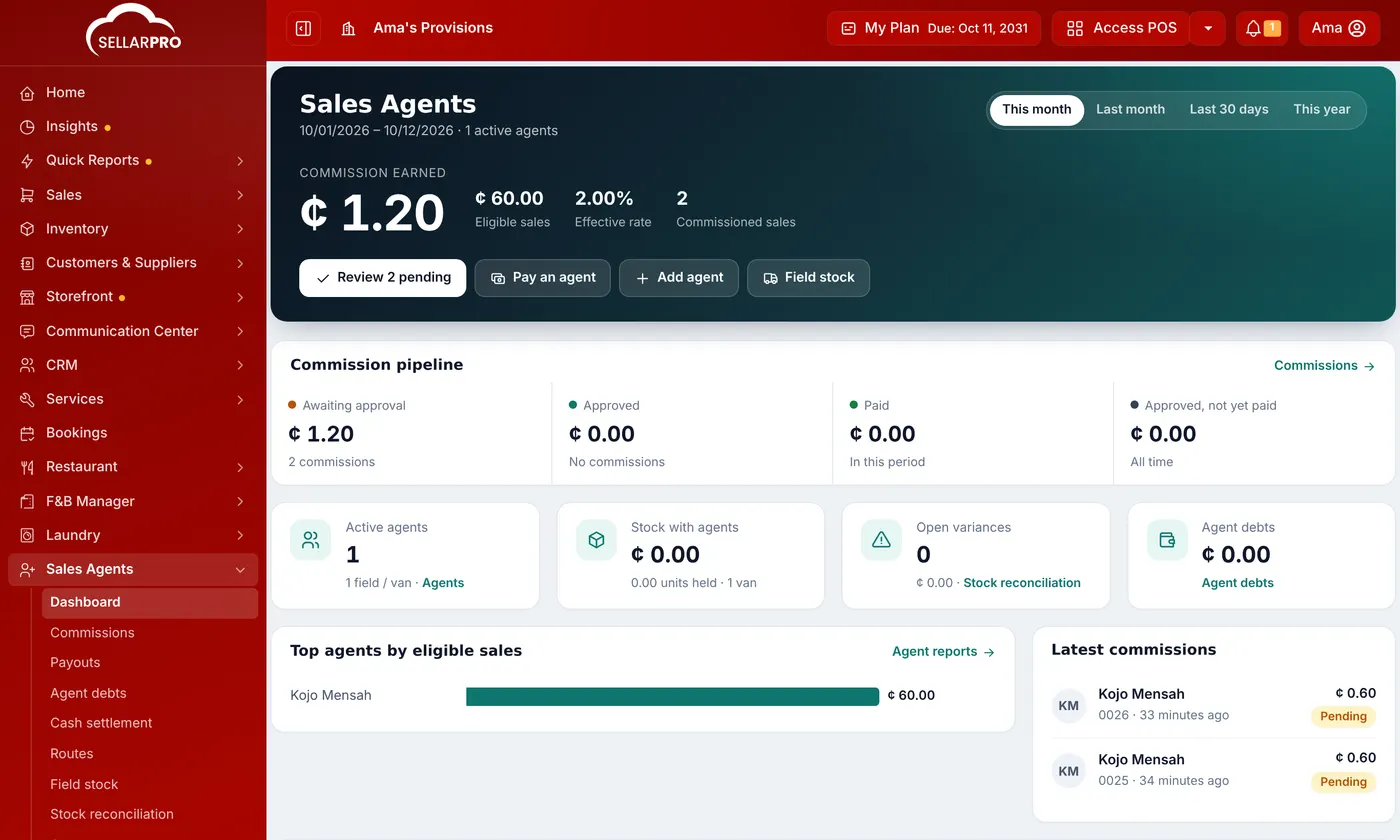
Sales Agents → Dashboard shows commission earned, eligible sales and the effective rate, commissions awaiting approval, approved and paid, active agents, stock with agents, open variances and agent debts. Agent reports gives 15 reports, from the commission summary to stock issued, reconciliation variance and cash settlements, by period, agent and branch.
The dashboard
Open Sales Agents → Dashboard and choose the period. It shows:
- Commission earned, the eligible sales it was earned on, and the effective rate.
- The Commission pipeline: awaiting approval, approved, paid, and approved but not yet paid. Review pending takes you to them.
- Active agents, Stock with agents, Open variances and Agent debts.
- The top agents, the latest commissions and the latest van stock movements.
Reports
Open Sales Agents → Agent reports, choose a report, the dates, the agent and the branch, and click Filter:
- Commission summary and Commission detail: each agent's sales, eligible sales, commission, and what is pending, paid and outstanding.
- Top agents, Pending approvals, Commission vs sales, Payout history and Reversed / refunded commission.
- Price overrides & margin: where agents sold below or above the base price.
- For field agents: Stock issued to agents, Outstanding agent stock, Reconciliation variance, Agent cash & value accountability, Collections by agent and Cash settlements.
Was this article helpful?
Thanks — your answer helps us improve this article.
Still need help?
Can’t find the answer you’re looking for? Our support team in Accra can help.