
All help topics
Help topics
- Getting Started
- Sales & POS
- Products & Inventory
- Purchases & Suppliers
- Customers
- Staff & Permissions
- Reports
- Branches
- Hardware
- Payments
- Settings
- Troubleshooting
- Billing & Subscription
- Workshop
- Training
- Sales Agents
- Laundry
- Accounting
- HR & Payroll
- Hotel
- Services
- Communication Center
- Online Store
- CRM
- Restaurant
- F&B Manager
- Production
- Projects
- Asset Management
- Device Repair
- Bookings & appointments
- Set up for your industry
- Hire Purchase
- Refer & earn
- All topics
On this page
How to Read Hire Purchase Reports
Open Hire Purchase → Reports and choose a period. You see what is owed and how late (arrears ageing and the share at risk over 30 days), expected installments against money collected, new agreements by salesperson, branch, plan and product, HP charge income, late fees, repossessions and the rating mix.
Open Hire Purchase → Reports and pick a Period.
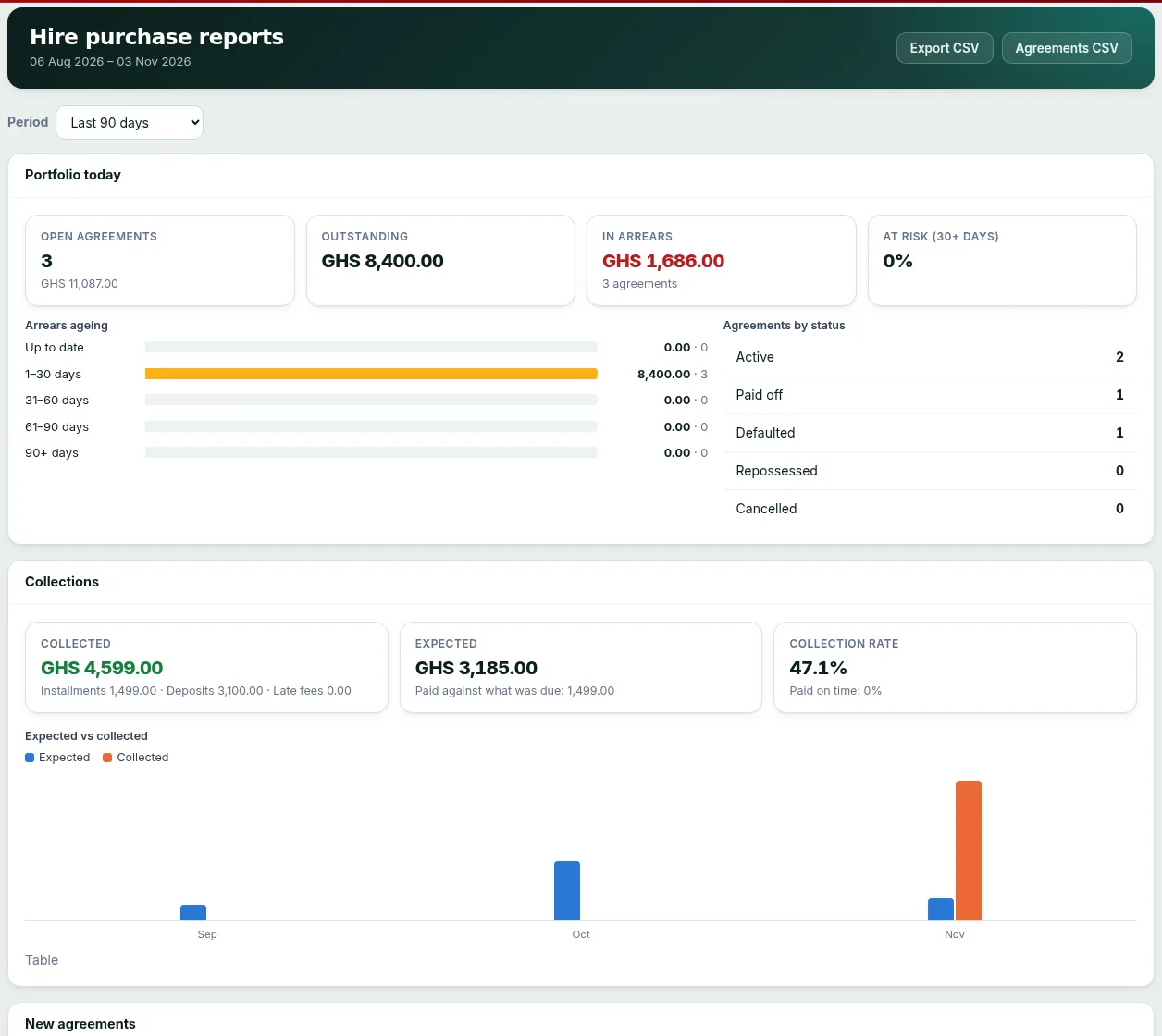
Portfolio today
- Outstanding: what is still owed on open agreements, including unpaid late fees.
- In arrears: the part that is already past due.
- Arrears ageing: each agreement's balance in the bucket of its oldest late installment (up to date, 1–30, 31–60, 61–90, 90+ days).
- At risk (30+ days): the share of what is owed sitting with customers more than 30 days late. Watch it: the lower, the better.
Collections
- Expected: installments falling due in the period.
- Collected: money received in the period, split into installments, deposits and late fees.
- Collection rate: how much of what fell due has been paid, and how much was paid on time.
New agreements
How many you wrote, the cash price, the amount financed and the HP charge income, broken down by the person who wrote them, the salesperson credited, branch, plan and top goods.
Export CSV downloads the collections by day; Agreements CSV downloads every agreement with its balance, arrears and rating.
The Dashboard shows the same figures for today and this month.
Was this article helpful?
Thanks — your answer helps us improve this article.
Still need help?
Can’t find the answer you’re looking for? Our support team in Accra can help.