
All help topics
Help topics
- Getting Started
- Sales & POS
- Products & Inventory
- Purchases & Suppliers
- Customers
- Staff & Permissions
- Reports
- Branches
- Hardware
- Payments
- Settings
- Troubleshooting
- Billing & Subscription
- Workshop
- Training
- Sales Agents
- Laundry
- Accounting
- HR & Payroll
- Hotel
- Services
- Communication Center
- Online Store
- CRM
- Restaurant
- F&B Manager
- Production
- Projects
- Asset Management
- All topics
On this page
How to Give and Recover Staff Loans
Open HR and Payroll → Staff Loans, choose the Employee, the Amount and how many months to Repay Over, and click Issue Loan. Each payroll run then deducts the instalment automatically until the loan is repaid.
A staff loan or salary advance is issued once and recovered from payroll automatically, so nobody has to remember to deduct it each month.
Issue a loan
- Open HR and Payroll → Staff Loans.
- Choose the Employee and enter a Reference and the Amount.
- Enter how many months to Repay Over, any Interest / Fee (a percentage or a fixed fee), and the month of the First Deduction From.
- Check the summary of Total repayable and Per payroll, then click Issue Loan.
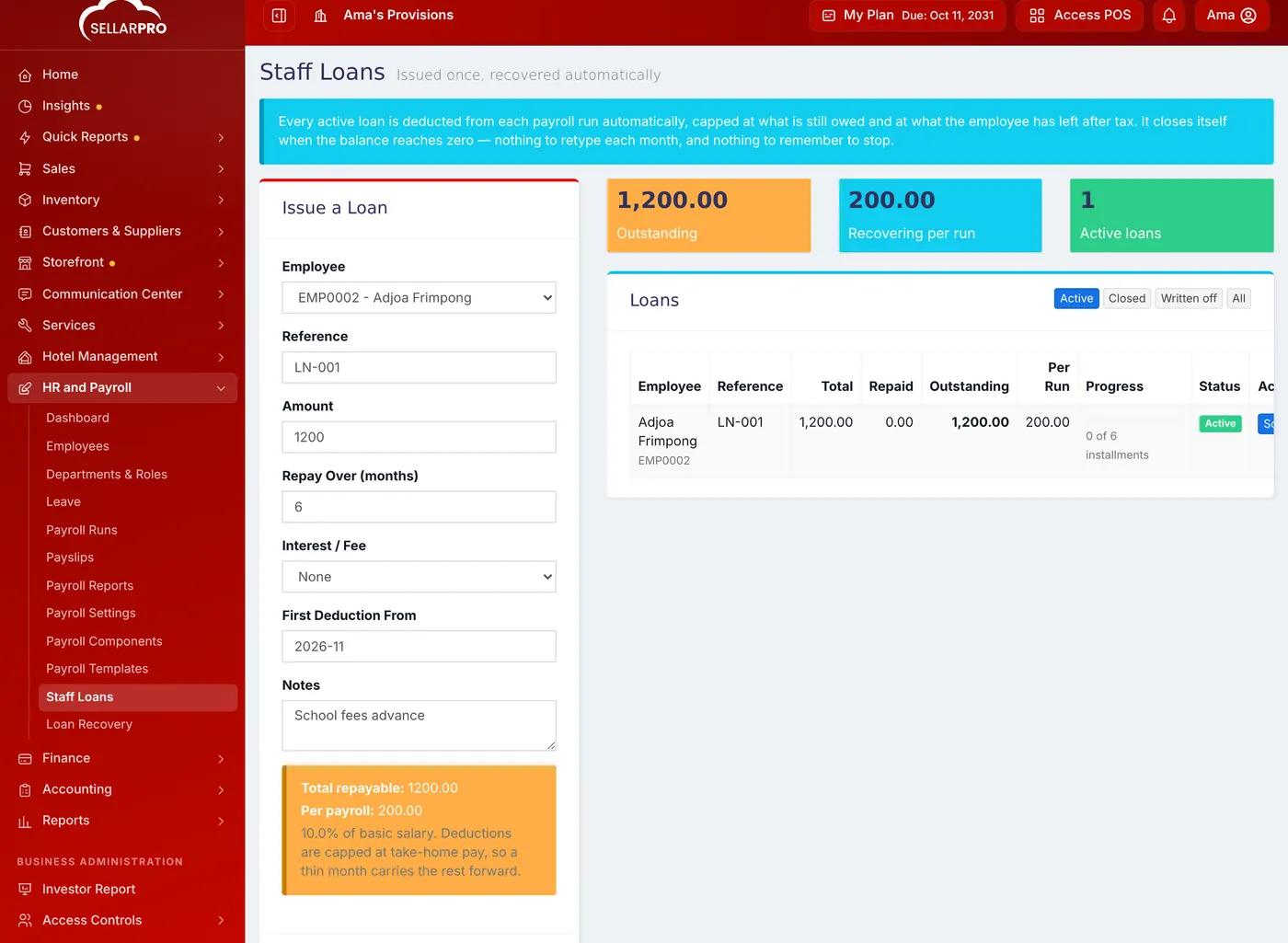
A 1,200 advance repaid at 200 per payroll over six months.
How it is recovered
Every active loan is deducted in each payroll run, capped at what is still owed and at what the employee has left after tax, so a thin month carries the rest forward. The loan closes itself when the balance reaches zero.
Click Schedule on a loan to see the planned deductions and what has been recovered so far. Loan Recovery in the menu reports on all of them. Write off ends a loan that will not be repaid.
Common questions
When does the first deduction happen?
Was this article helpful?
Thanks — your answer helps us improve this article.
Still need help?
Can’t find the answer you’re looking for? Our support team in Accra can help.