
All help topics
Help topics
- Getting Started
- Sales & POS
- Products & Inventory
- Purchases & Suppliers
- Customers
- Staff & Permissions
- Reports
- Branches
- Hardware
- Payments
- Settings
- Troubleshooting
- Billing & Subscription
- Workshop
- Training
- Sales Agents
- Laundry
- Accounting
- HR & Payroll
- Hotel
- Services
- Communication Center
- Online Store
- CRM
- Restaurant
- F&B Manager
- Production
- Projects
- Asset Management
- Device Repair
- Bookings & appointments
- Set up for your industry
- Hire Purchase
- Refer & earn
- All topics
On this page
How to Chase Overdue Hire Purchase Payments
Open Hire Purchase → Due & overdue. It lists who is late, most overdue first, and who is due soon, with their rating and phone number. Call, send a reminder text with SMS, or collect the payment from the same row.
Open Hire Purchase → Due & overdue every morning. It is your call list.
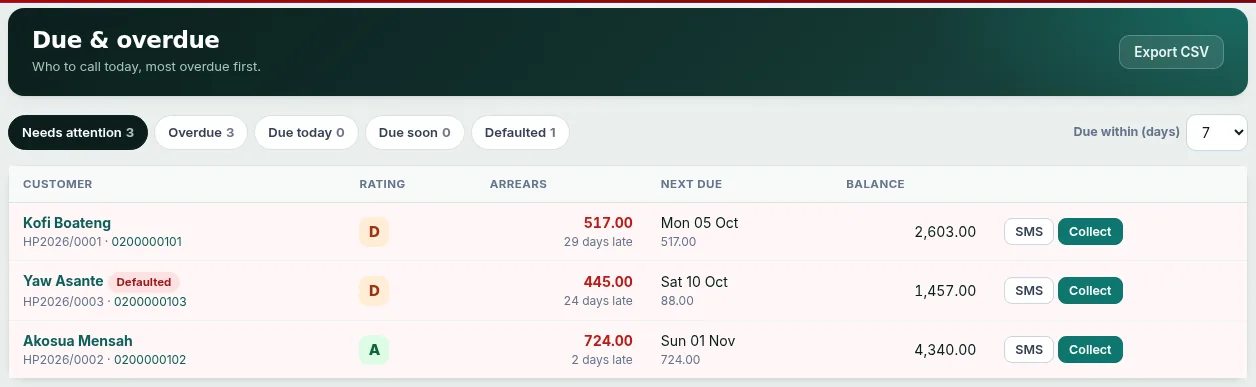
- Needs attention: everyone overdue, plus everyone due within the days you choose.
- Overdue, Due today, Due soon and Defaulted narrow the list.
On each row, tap the phone number to call, SMS to send a reminder now, or Collect to take the payment. Export CSV downloads the list for a collector.
Texts go out by themselves
You don't have to remember. Every morning SellarPro texts customers before a payment is due, on the due day and when they are late, as set in Settings. See How to Set Up Hire Purchase Reminder Texts.
When someone stops paying
An agreement that is far behind shows a banner suggesting you mark it defaulted. See How to Handle a Default and Repossess Goods, or reschedule if they can pay on new terms.
Common questions
What does "days late" count?
Was this article helpful?
Thanks — your answer helps us improve this article.
Still need help?
Can’t find the answer you’re looking for? Our support team in Accra can help.