
All help topics
Help topics
- Getting Started
- Sales & POS
- Products & Inventory
- Purchases & Suppliers
- Customers
- Staff & Permissions
- Reports
- Branches
- Hardware
- Payments
- Settings
- Troubleshooting
- Billing & Subscription
- Workshop
- Training
- Sales Agents
- Laundry
- Accounting
- HR & Payroll
- Hotel
- Services
- Communication Center
- Online Store
- CRM
- Restaurant
- F&B Manager
- Production
- Projects
- Asset Management
- Device Repair
- Bookings & appointments
- Set up for your industry
- Hire Purchase
- Refer & earn
- All topics
On this page
How to Share the Customer Page and Take Payment Online
Every agreement has its own customer page showing the balance, schedule and payments. Copy it from the agreement or let reminder texts carry it. When your online store accepts online payments, the page has Pay now buttons for MoMo or card, and the money reaches the agreement automatically.
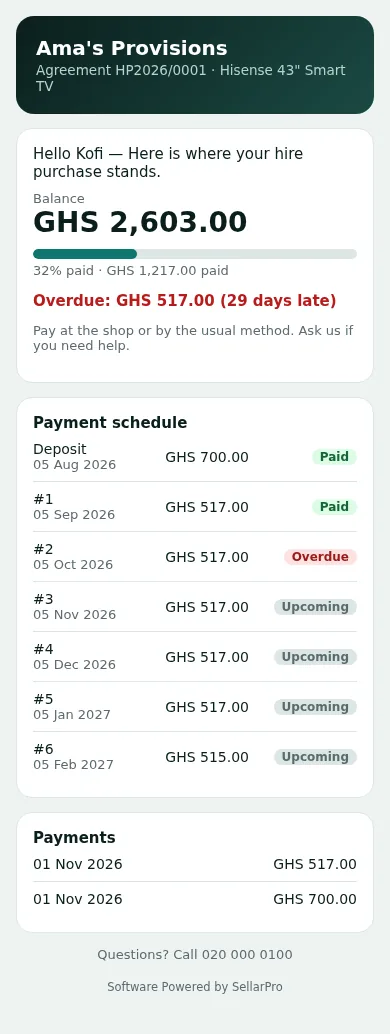
Every agreement has a private customer page. It shows the balance, what is due, the schedule and the payments made, so customers don't need to call to ask what they owe.
Share the page
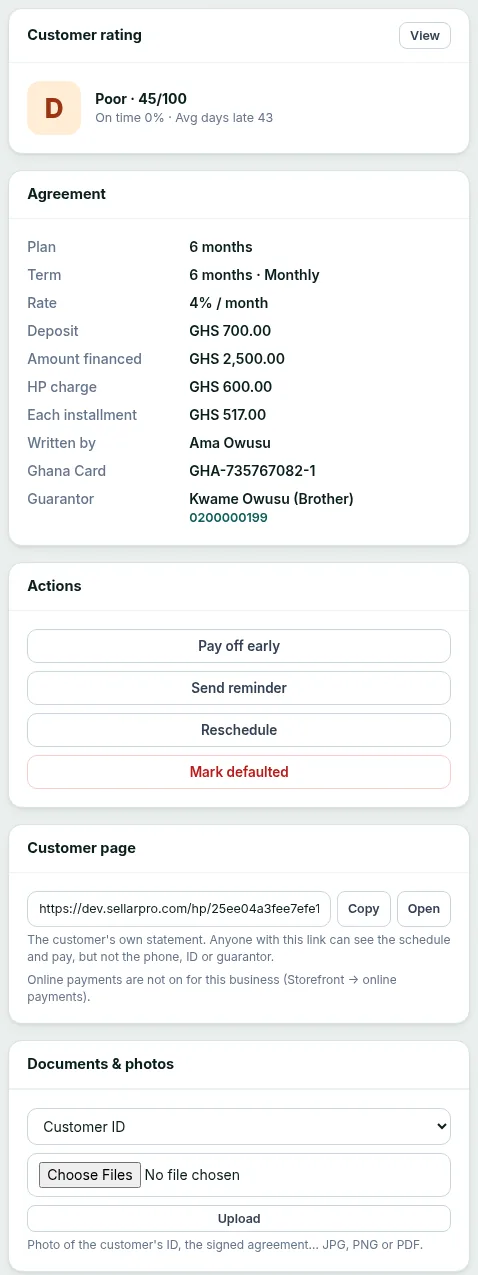
- Open the agreement. Under Customer page, click Copy and send the link on WhatsApp, or Open to see it yourself.
- Reminder texts carry the link automatically while Add the customer page link to texts that ask for payment is ticked in Settings.
The page shows the customer's first name only. It never shows their phone number, ID or guarantor.
Let customers pay online
When your business accepts online payments, the page shows Pay now for what is due and Pay off the balance. The customer pays by MoMo or card on SellarPro's secure payment page, and the payment lands on the agreement by itself: the schedule, the balance and the rating all update.
- Switch on online payments for your business under Storefront → Settings → Accept online payments, and add your payout account.
- In Hire Purchase → Settings → Customer page & online payments, keep Offer "Pay online" ticked.
Until online payments are on, the page shows the statement and asks the customer to pay at your shop.
Common questions
Can customers pay late fees online?
Is the link safe to send?
Was this article helpful?
Thanks — your answer helps us improve this article.
Still need help?
Can’t find the answer you’re looking for? Our support team in Accra can help.