
All help topics
Help topics
- Getting Started
- Sales & POS
- Products & Inventory
- Purchases & Suppliers
- Customers
- Staff & Permissions
- Reports
- Branches
- Hardware
- Payments
- Settings
- Troubleshooting
- Billing & Subscription
- Workshop
- Training
- Sales Agents
- Laundry
- Accounting
- HR & Payroll
- Hotel
- Services
- Communication Center
- Online Store
- CRM
- Restaurant
- F&B Manager
- Production
- Projects
- Asset Management
- All topics
On this page
How to Set Up Types of Service
Switch on Types of service under Settings → Menu & Modules, then open Settings → Types of service and click Add. Name each one, such as Dine-in or Home delivery, choose the price group each branch charges for it and any packing charge. Cashiers pick the type of service on every sale.
A type of service is how the customer is served: dine-in, takeaway (parcel), home delivery, a delivery app. Each can have its own prices and a packing charge.
Steps
- Switch on Types of service under Settings → Menu & Modules.
- Open Settings → Types of service and click Add.
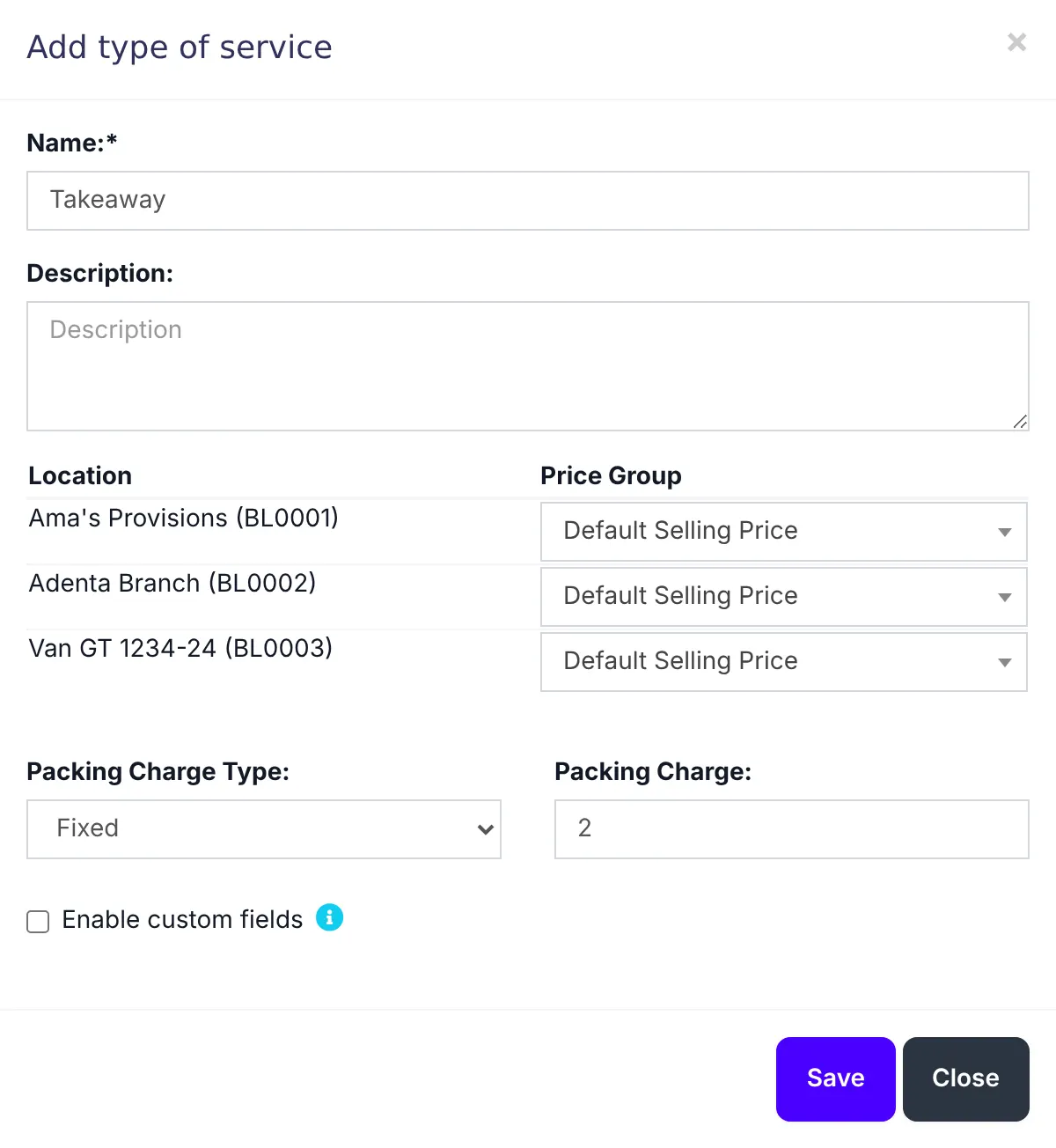
- Enter the Name, such as "Takeaway", and a Description if you like.
- For each branch, choose the price group it charges for this service. Leave it on the default to charge normal prices.
- Set the Packing Charge Type (fixed or percentage) and the Packing Charge, if you charge for packaging.
- Save. Repeat for each type.
On the POS, the cashier chooses the type of service for each sale. Its prices and packing charge are applied straight away.
Charge delivery-app prices on orders that come through a delivery app: make a price group with those prices, and a "Delivery app" type of service that uses it.
Was this article helpful?
Thanks — your answer helps us improve this article.
Still need help?
Can’t find the answer you’re looking for? Our support team in Accra can help.