
All help topics
Help topics
- Getting Started
- Sales & POS
- Products & Inventory
- Purchases & Suppliers
- Customers
- Staff & Permissions
- Reports
- Branches
- Hardware
- Payments
- Settings
- Troubleshooting
- Billing & Subscription
- Workshop
- Training
- Sales Agents
- Laundry
- Accounting
- HR & Payroll
- Hotel
- Services
- Communication Center
- Online Store
- CRM
- Restaurant
- F&B Manager
- Production
- Projects
- Asset Management
- All topics
On this page
How to Send a Feature Request or Complaint
Short answer
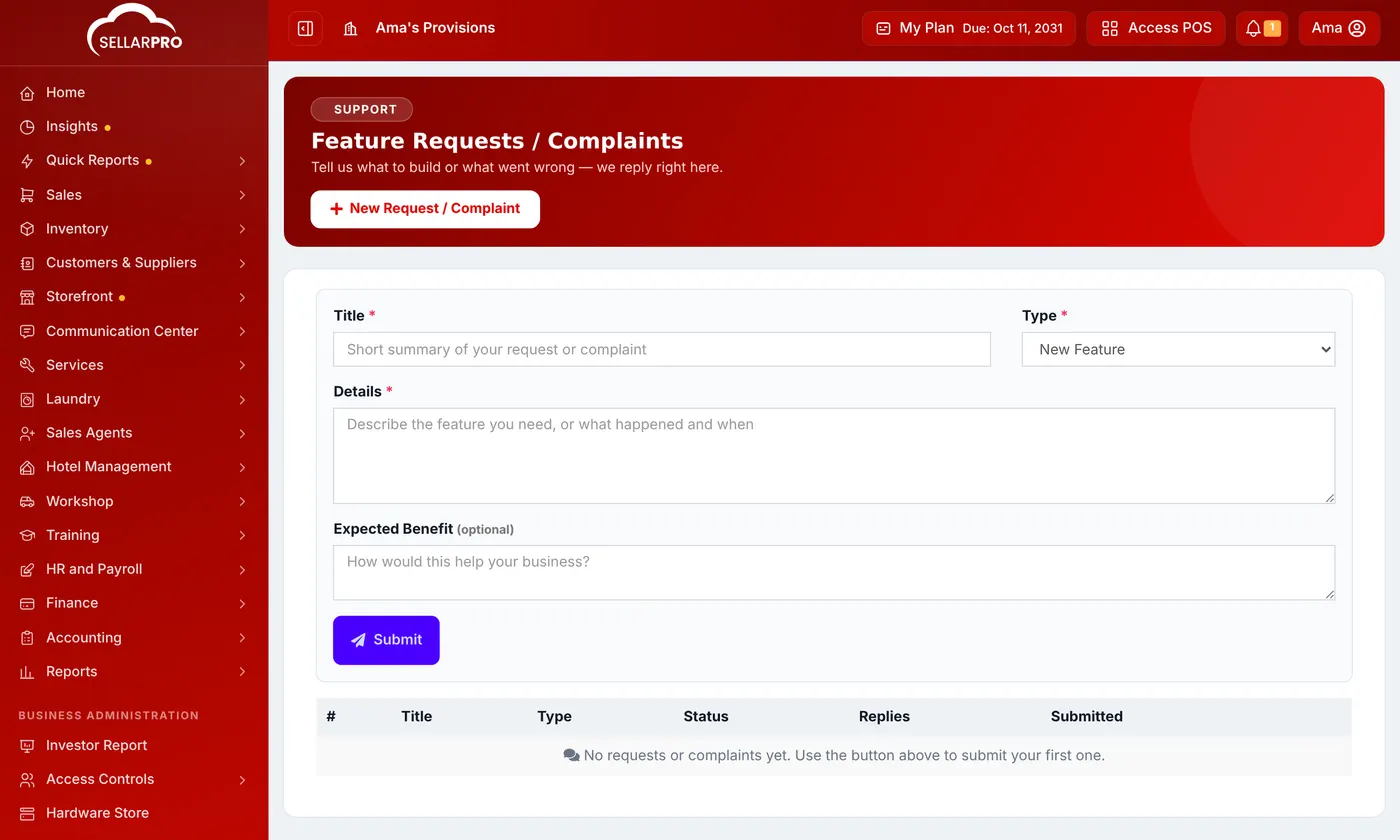
Open Feature Requests / Complaints, click New Request / Complaint, choose the Type, give it a title and describe it in Details. The SellarPro team replies on the same page and you are notified.
Tell us what to build, or what went wrong. Requests go straight to the SellarPro team, and the reply comes back to the same page.
Steps
- Open Feature Requests / Complaints from the menu.
- Click New Request / Complaint. The form opens on the same page.
- Choose the Type: New Feature, Bug Report, UI / UX Improvement, Performance, Integration, Complaint or Other.
- Give it a short Title, such as "Receipt prints twice".
- In Details, say what you did, what happened and what you expected. For a request, add the Expected Benefit if you like.
- Click Submit.
What happens next
Your request is listed with its Status and number of Replies. When the team replies or the status changes, you get a notification on the bell at the top of the screen.
Write down the invoice or product. "Sale 0042 shows the wrong total" is fixed much faster than "totals are wrong".
Common questions
How quickly will I get an answer?
Complaints that stop you selling are looked at first. For anything urgent, also call SellarPro support.
Was this article helpful?
Thanks — your answer helps us improve this article.
Still need help?
Can’t find the answer you’re looking for? Our support team in Accra can help.