
All help topics
Help topics
- Getting Started
- Sales & POS
- Products & Inventory
- Purchases & Suppliers
- Customers
- Staff & Permissions
- Reports
- Branches
- Hardware
- Payments
- Settings
- Troubleshooting
- Billing & Subscription
- Workshop
- Training
- Sales Agents
- Laundry
- Accounting
- HR & Payroll
- Hotel
- Services
- Communication Center
- Online Store
- CRM
- Restaurant
- F&B Manager
- Production
- Projects
- Asset Management
- Device Repair
- Bookings & appointments
- Set up for your industry
- Hire Purchase
- Refer & earn
- All topics
On this page
How to Sell on Hire Purchase (Write an Agreement)
Short answer
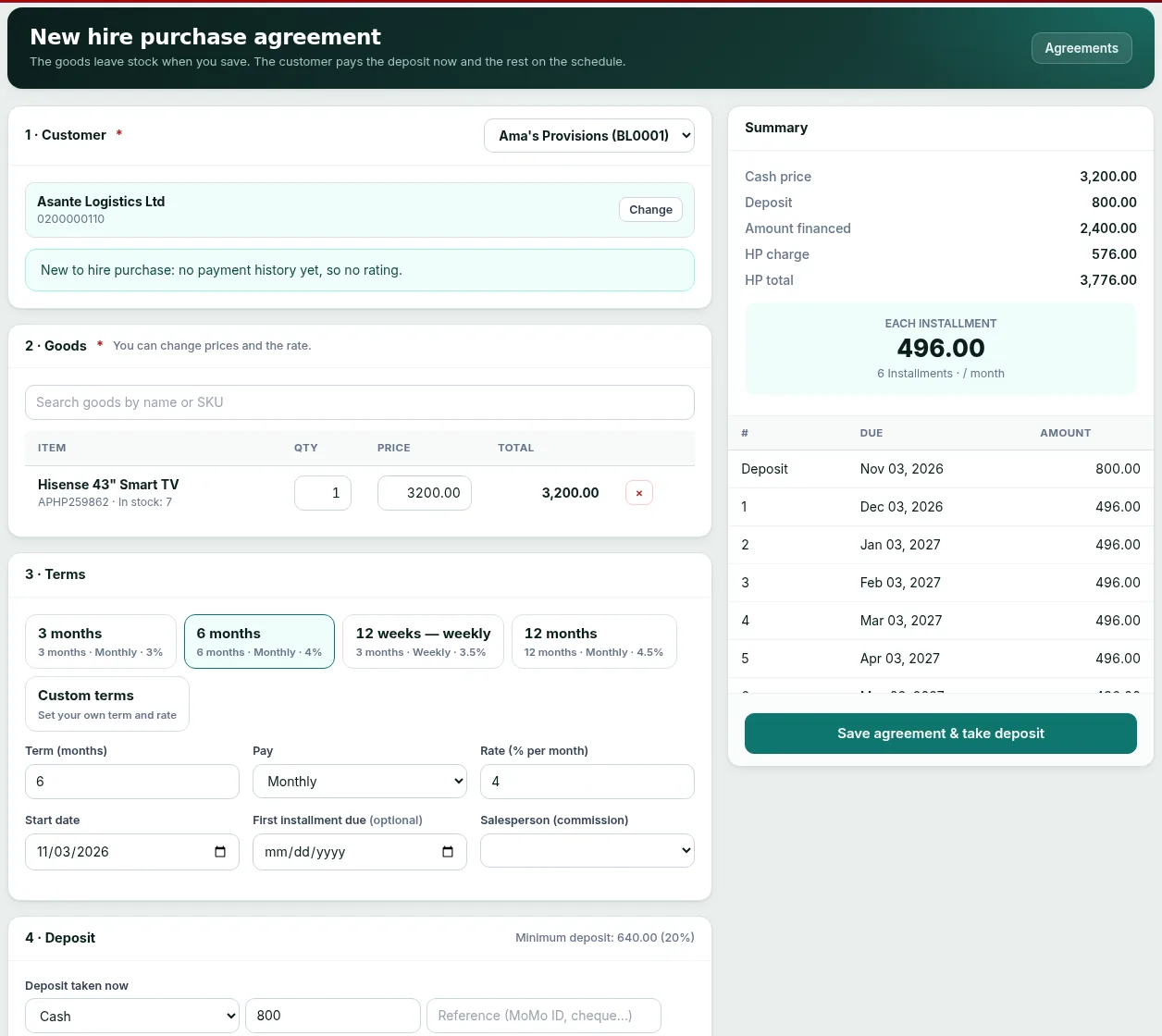
Open Hire Purchase → New agreement, choose the customer, add the goods, tap a plan, enter the deposit and the guarantor, then click Save agreement & take deposit. The schedule on the right is exactly what the customer will pay.
- Open Hire Purchase → New agreement.
- Customer: search by name or phone, or click New customer. Hire purchase needs a named customer with a phone number for reminders, not Walk-In. If the customer has bought on hire purchase before, their rating shows under their name.
- Goods: search and add each item. The price comes from your product list and the stock at this branch is shown.
- Terms: tap a plan, or Custom terms to set your own term and rate. The first installment falls due one period after the start date unless you choose a date. If your business pays commission, choose the Salesperson (commission).
- Deposit: enter what the customer pays now. Split it across methods (part cash, part MoMo) with Add method. The minimum deposit is shown in the top corner.
- Identity & guarantor: the customer's ID, the guarantor's name and phone, and any notes. You can attach a photo of the ID under Papers.
- Check the Summary and the schedule on the right, then click Save agreement & take deposit.
After you save
- The goods leave stock and the deposit is recorded. If you have a cash register open, the deposit goes on it.
- The customer gets a text with the agreement number, the first installment and a link to their own page.
- Click Print agreement for a copy to sign. It has the goods, the schedule, your terms and signature lines for the customer, the guarantor and your shop.
Common questions
Why was the agreement refused?
The message says why: the deposit is under the minimum, there is not enough stock at the branch, the customer is over their credit limit, or the customer's rating needs a manager. See Hire Purchase Troubleshooting.
Can I sell several items on one agreement?
Yes. Add as many items as the customer is taking; they share one deposit and one schedule.
Was this article helpful?
Thanks — your answer helps us improve this article.
Still need help?
Can’t find the answer you’re looking for? Our support team in Accra can help.