
All help topics
Help topics
- Getting Started
- Sales & POS
- Products & Inventory
- Purchases & Suppliers
- Customers
- Staff & Permissions
- Reports
- Branches
- Hardware
- Payments
- Settings
- Troubleshooting
- Billing & Subscription
- Workshop
- Training
- Sales Agents
- Laundry
- Accounting
- HR & Payroll
- Hotel
- Services
- Communication Center
- Online Store
- CRM
- Restaurant
- F&B Manager
- Production
- Projects
- Asset Management
- All topics
On this page
How to Manage Technicians, Settings and Workshop Reports
Add mechanics under Workshop → Technicians with their name, speciality and phone; they need no login. Workshop → Settings sets job numbering, check-in points, invoice wording and customer texts. Workshop → Reports shows revenue, parts and labour, what was collected and what is outstanding, with breakdowns by service, part, technician and vehicle make.
Technicians
Open Workshop → Technicians. Enter the Name, Speciality (such as Engine or Electrical) and Phone, and click Add technician. A mechanic does not need a SellarPro login to be assigned jobs and credited for the work.
The same page shows each technician's revenue for the period. Line revenue, the value of the lines booked to them, is the fair basis for commission.
Settings
Open Workshop → Settings:
- Job numbering: prefix, digits and whether the year is included, and how many days estimates are valid.
- Check-in condition points and the Customer belongings checklist used at check-in.
- Invoice: payment instructions, standing notes and a sign-off line.
- Customer messages: text the customer when their vehicle is booked in, when an estimate is sent and when the vehicle is ready. Nothing is sent until you switch it on.
- Release Vehicle: refuse to release a vehicle that still owes money.
- Terms printed on job cards and estimates.
Reports
Open Workshop → Reports and choose the dates, technician and branch. The figures across the top: Revenue, Parts Revenue, Labour Revenue, Collected, Outstanding, Jobs and the Average Job. Revenue is work invoiced in the period; collections are money received, reported separately.
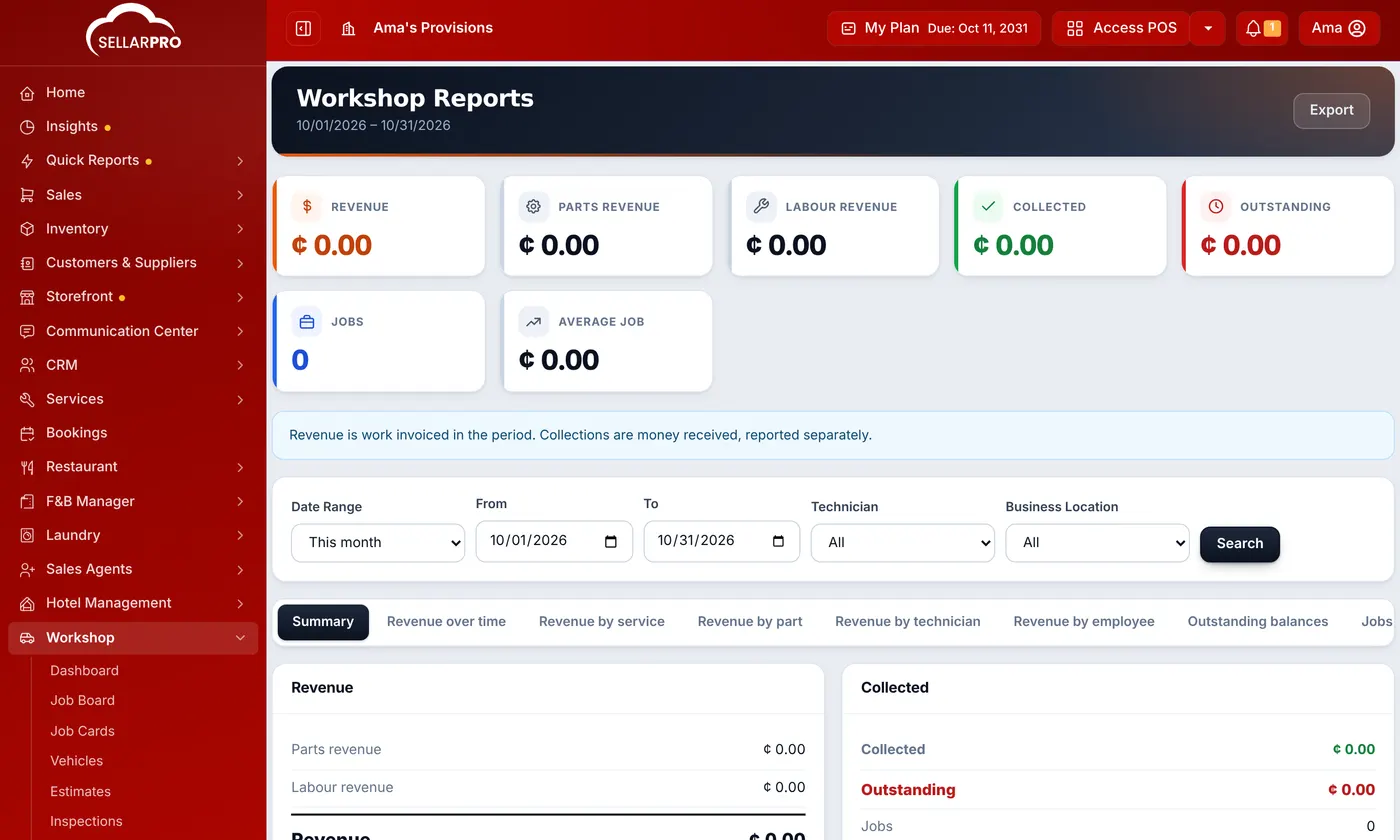
The tabs break it down: revenue over time, by service, by part, by technician and employee, outstanding balances, jobs by status, customers and return rate, and revenue by vehicle make.
Was this article helpful?
Thanks — your answer helps us improve this article.
Still need help?
Can’t find the answer you’re looking for? Our support team in Accra can help.