
All help topics
Help topics
- Getting Started
- Sales & POS
- Products & Inventory
- Purchases & Suppliers
- Customers
- Staff & Permissions
- Reports
- Branches
- Hardware
- Payments
- Settings
- Troubleshooting
- Billing & Subscription
- Workshop
- Training
- Sales Agents
- Laundry
- Accounting
- HR & Payroll
- Hotel
- Services
- Communication Center
- Online Store
- CRM
- Restaurant
- F&B Manager
- Production
- Projects
- Asset Management
- All topics
How to Manage Projects and Tasks
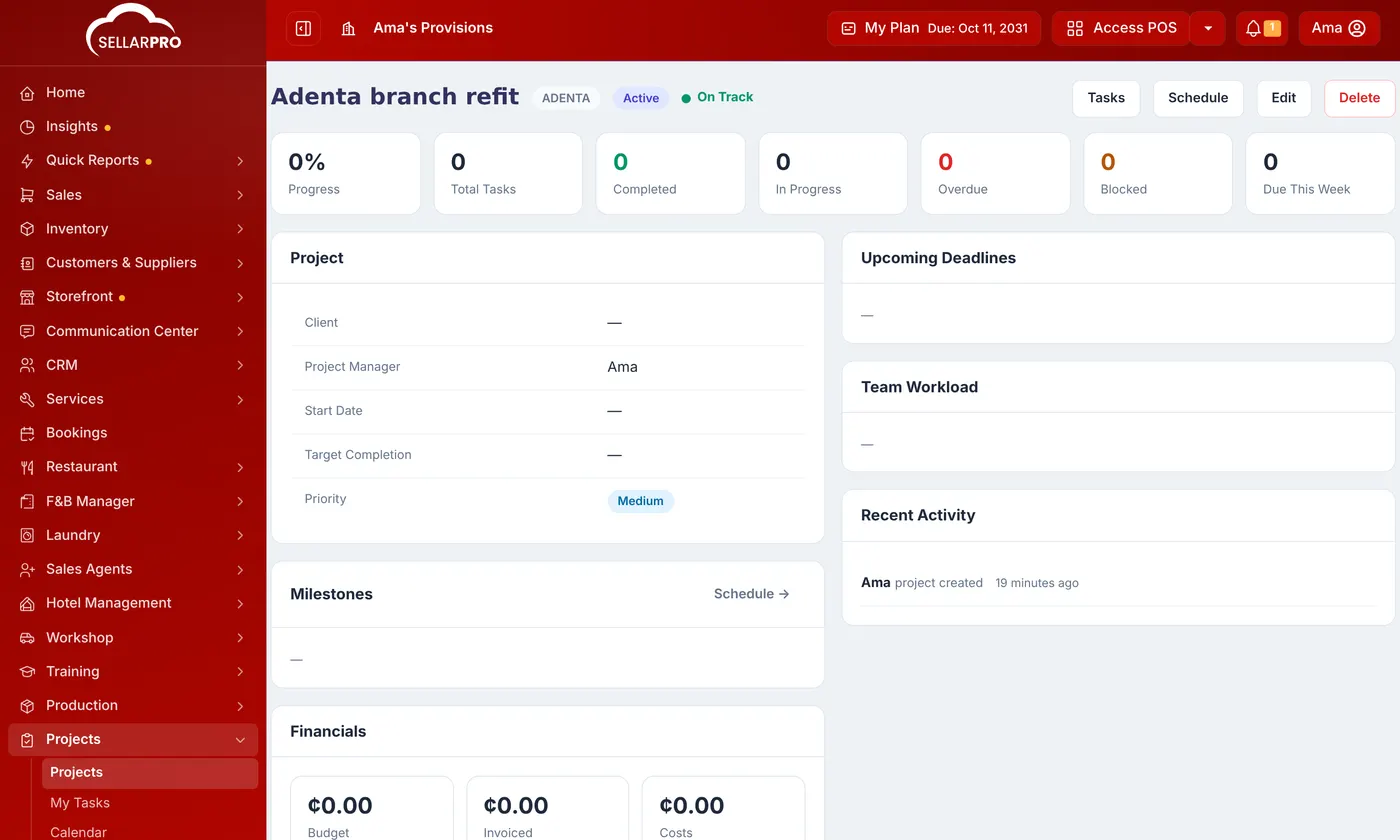
Switch on Project Management under Settings → Menu & Modules. Open Projects → New Project, give it a name, client, manager, status, dates, budget and team, and save. Add tasks under Tasks → New Task with an owner, due date and checklist, and milestones under Schedule. Link invoices and expenses to see what the project earned against what it cost.
Projects are for work that takes longer than one sale: a fit-out, a website, an event, a construction job.
Switch on Project Management under Settings → Menu & Modules.
Create a project
- Open Projects and click New Project.
- Enter the Project name and a short Code, the Client and the Project Manager.
- Set the Status (Draft, Planning, Active, On Hold, Completed or Cancelled) and Priority.
- Set the Start Date, Target Completion and Budget, and choose the Team Members.
- Save.
Add tasks and milestones
- On the project, open Tasks and click New Task.
- Enter the Task, its Status (To Do, In Progress, Blocked, Review, Completed) and Priority.
- Set the dates, estimated hours and who it is Assigned To. Link it to a Milestone, note what it is Blocked By, and add a Checklist if it has steps.
- Save.
Under Schedule, see every task on a timeline and add milestones with New Milestone.
Know whether it made money
Under Financials on the project, use Link Invoice / Expense to tag real invoices and expenses to it. The project then shows its Budget, Invoiced, Costs and Profit. Linking does not change the documents; they stay in your normal books.
Common questions
How is progress worked out?
Was this article helpful?
Thanks — your answer helps us improve this article.
Still need help?
Can’t find the answer you’re looking for? Our support team in Accra can help.