
All help topics
Help topics
- Getting Started
- Sales & POS
- Products & Inventory
- Purchases & Suppliers
- Customers
- Staff & Permissions
- Reports
- Branches
- Hardware
- Payments
- Settings
- Troubleshooting
- Billing & Subscription
- Workshop
- Training
- Sales Agents
- Laundry
- Accounting
- HR & Payroll
- Hotel
- Services
- Communication Center
- Online Store
- CRM
- Restaurant
- F&B Manager
- Production
- Projects
- Asset Management
- Device Repair
- Bookings & appointments
- Set up for your industry
- Hire Purchase
- Refer & earn
- All topics
On this page
How to Let a Customer Pay Off Early
Set an early-settlement rebate in Hire Purchase → Settings. Then open the agreement, click Pay off early, and SellarPro shows the charge not yet earned, the rebate and the amount to pay today. Take that payment and the agreement closes with the rebate recorded as a credit note.
A customer who pays off early can be given back part of the HP charge they haven't used yet.
Step 1: choose your rebate
In Hire Purchase → Settings → Early settlement, set Early settlement rebate. It is 0% (no rebate) until you set it.
The charge is earned evenly over the installments. If 4 of 6 installments are not yet due, 4/6 of the charge is not yet earned, and a 50% rebate gives back half of that.
Step 2: settle the agreement
- Open the agreement and click Pay off early, or tap Settle early on the payment screen.
- Check Charge not yet earned, the Rebate and Pay today to settle.
- Take exactly that amount (split methods if needed) and click Take payment & close agreement.
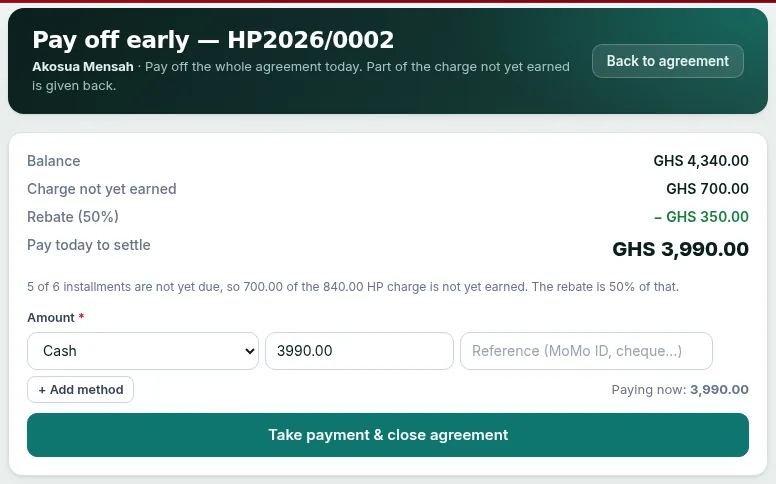
The agreement is marked Paid off. The rebate is recorded as a credit note on the sale, so your sales and the customer's account both show it.
Late fees are never rebated. If the customer owes any, they are part of the amount to pay today.
Common questions
Can I undo an early settlement?
Why is Pay off early not available?
Was this article helpful?
Thanks — your answer helps us improve this article.
Still need help?
Can’t find the answer you’re looking for? Our support team in Accra can help.